Set up GCP Cloud Run Jobs service credential
A GCP Cloud Run Jobs service credential lets a Glean agent start existing Cloud Run jobs and monitor job executions as a service account rather than on behalf of an individual user.
Glean handles authentication automatically. Depending on your deployment setup, Glean can use service account impersonation to mint short-lived tokens or use a service account JSON key.
- Authentication: GCP service account credentials
- Scope: The cloud Run jobs and related Cloud Run resources the target service account can access
- Access: Read Cloud Run resource metadata and start existing jobs with approval
Prerequisites
Complete the following prerequisites:
- Have an active GCP project with the cloud Run jobs the agent will run.
- Have a dedicated service account created specifically for the agent, for example:
job-runner@<your-gcp-project>.iam.gserviceaccount.com. - Have the following IAM roles granted to that service account on the intended resources:
- Cloud Run Viewer (
roles/run.viewer) so the agent can inspect jobs, executions, and tasks. - Cloud Run Invoker (
roles/run.invoker) so the agent can start existing jobs.
- Cloud Run Viewer (
- Identify the Glean query endpoint service account for your deployment if you use service account impersonation.
- Work with a Glean administrator who can create service credentials.
- Enable the GCP Cloud Run Jobs template for your deployment. If you do not see it in the list of templates, contact your Glean representative to turn it on.
If your agent needs to pass execution overrides, grant only the additional Cloud Run permissions required for those overrides, such as run.jobs.runWithOverrides, on the intended jobs.
Identify the Glean query endpoint service account
If you use service account impersonation, the Glean query endpoint runs as a specific GCP service account using the following format:
query-endpoint@<your-glean-gcp-project>.iam.gserviceaccount.com
Select your preferred method below to locate this service account:
- Using the CLI
- Using the GCP Console
Choose the command that matches your access level.
Via gcloud (requires IAM permissions on the Glean project):
gcloud iam service-accounts list \
  --project="<YOUR_GLEAN_GCP_PROJECT>" \
  --filter="email:query-endpoint@"
Via kubectl (requires cluster access to the Google Kubernetes Engine deployment):
kubectl get serviceaccount gke-qe \
  --namespace=default \
  -o jsonpath='{.metadata.annotations.iam\.gke\.io/gcp-service-account}'
- Open the Google Cloud Console and navigate to IAM & Admin → Service Accounts within your Glean GCP project.
- Search for the service account prefix:
query-endpoint@.
Grant impersonation access on the target service account
To mint short-lived tokens, the Glean query endpoint service account must be granted the Service Account Token Creator (roles/iam.serviceAccountTokenCreator) role on the target service account.
Select your preferred configuration method:
- Using the CLI
- Using the GCP Console
Execute the following gcloud command to add the required IAM policy binding. Replace the placeholder variables with your specific service account identifiers.
# Set your service account variables
TARGET_SA="job-runner@<your-gcp-project>.iam.gserviceaccount.com"
QE_SA="query-endpoint@<YOUR_GLEAN_GCP_PROJECT>.iam.gserviceaccount.com"

# Grant the Service Account Token Creator role
gcloud iam service-accounts add-iam-policy-binding "$TARGET_SA" \
  --member="serviceAccount:$QE_SA" \
  --role="roles/iam.serviceAccountTokenCreator"
- Open the Google Cloud Console and navigate to IAM & Admin → Service Accounts in the GCP project that owns the target service account.
- Select the checkbox next to your target service account (for example,
job-runner@...). - If the info panel on the right is not visible, click Show Info Panel in the top-right corner.
- In the permissions panel, click Grant Access.
- In the New principals field, enter the full email address of your Glean query endpoint service account.
- In the Select a role dropdown, select Service Account Token Creator.
- Click Save.
Confirm the target service account permissions
Make sure the target service account has only the cloud Run permissions it needs on the intended jobs:
- Cloud Run Viewer (
roles/run.viewer) to inspect jobs, executions, and tasks. - Cloud Run Invoker (
roles/run.invoker) to start existing jobs.
Do not grant permissions to create, update, delete, or cancel jobs unless another workflow requires them outside Glean.
Create the service credential in Glean
- In Glean, go to Admin console → Platform → Tools → Service credentials.
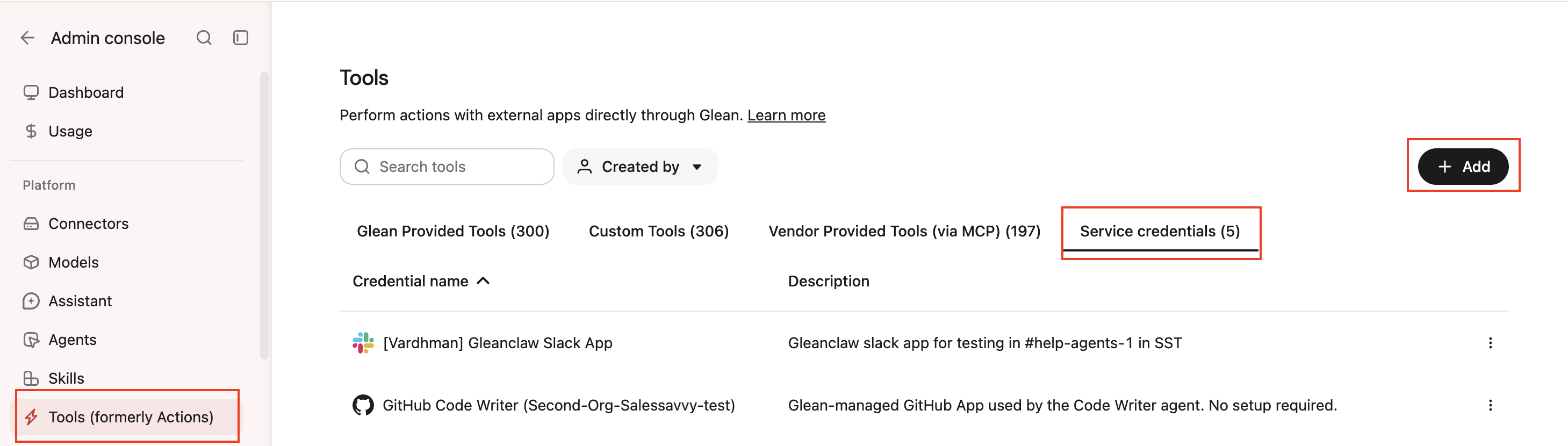
- Click Add.
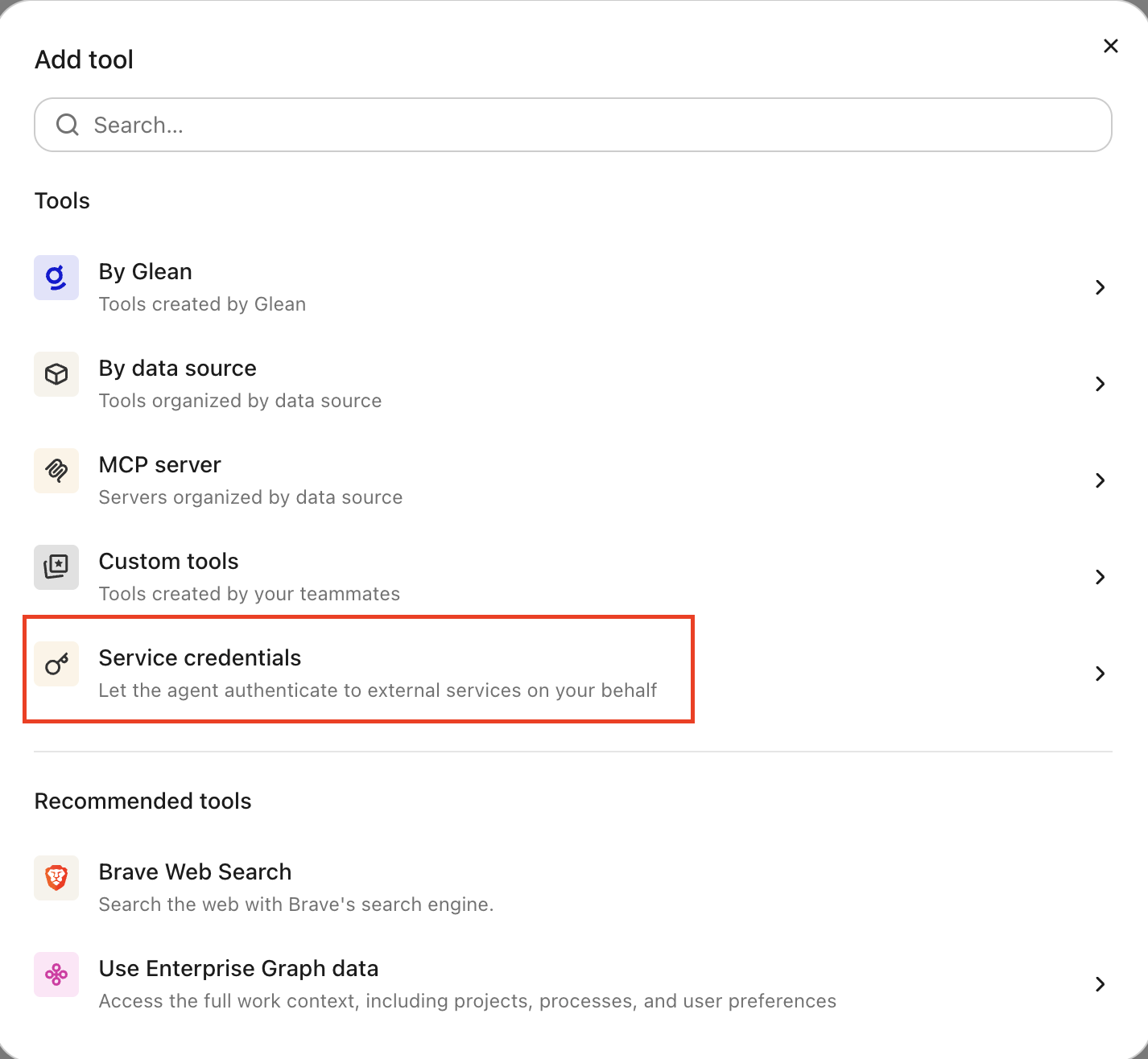
- Select GCP Cloud Run Jobs under Service credentials.
- Fill in these fields:
- Credential name: A human-readable name for the credential, for example, "Cloud Run Jobs Runner project".
- Description: A brief description of what this credential is used for.
- Service account email: The full email address of the target service account, for example,
job-runner@<your-gcp-project>.iam.gserviceaccount.com. - Service account JSON key: The JSON key file contents for the target service account, if you are not using workload identity impersonation.
- Audience: Which users or groups can attach this credential to agents.
- Select Save.
Attach the credential to an agent
Agent builders can attach the credential from the Service credentials tab in the agent builder. After you attach it, the agent can inspect Cloud Run jobs and request approval to start existing jobs.
-
Go to Agents in Glean.
-
Select the agent to which you want to add the service credentials.
-
In the Tools tab, select Service credentials and select the GCP Cloud Run Jobs service credential you created.
Verify it works
Ask the agent to inspect an existing job, for example, "describe the <job-name> Cloud Run job in <region> for <project-id>." If it returns the job metadata, the credential can read Cloud Run resources.
To verify execution, ask the agent to start a harmless existing job. Glean should require approval before the job starts.
What the agent can do
With a GCP Cloud Run Jobs credential attached, the agent can use the target service account to:
- List and describe Cloud Run jobs, executions, and tasks.
- Start an existing Cloud Run job after approval.
- Monitor execution and task status for a started job.
The credential does not let the agent create, update, delete, or cancel jobs, change IAM policies, or invoke Cloud Run services.
Security and operational notes
- Approval required: starting a job requires approval because it can change external data.
- Least privilege: grant the target service account only the cloud Run roles needed for the intended jobs.
- Injected server-side: the agent runtime never receives a static credential. Glean adds authentication only to approved Cloud Run API requests.
- Revocation: to cut off access, remove the Service Account Token Creator binding or revoke the service account JSON key, depending on your authentication method.