Adaptive reasoning
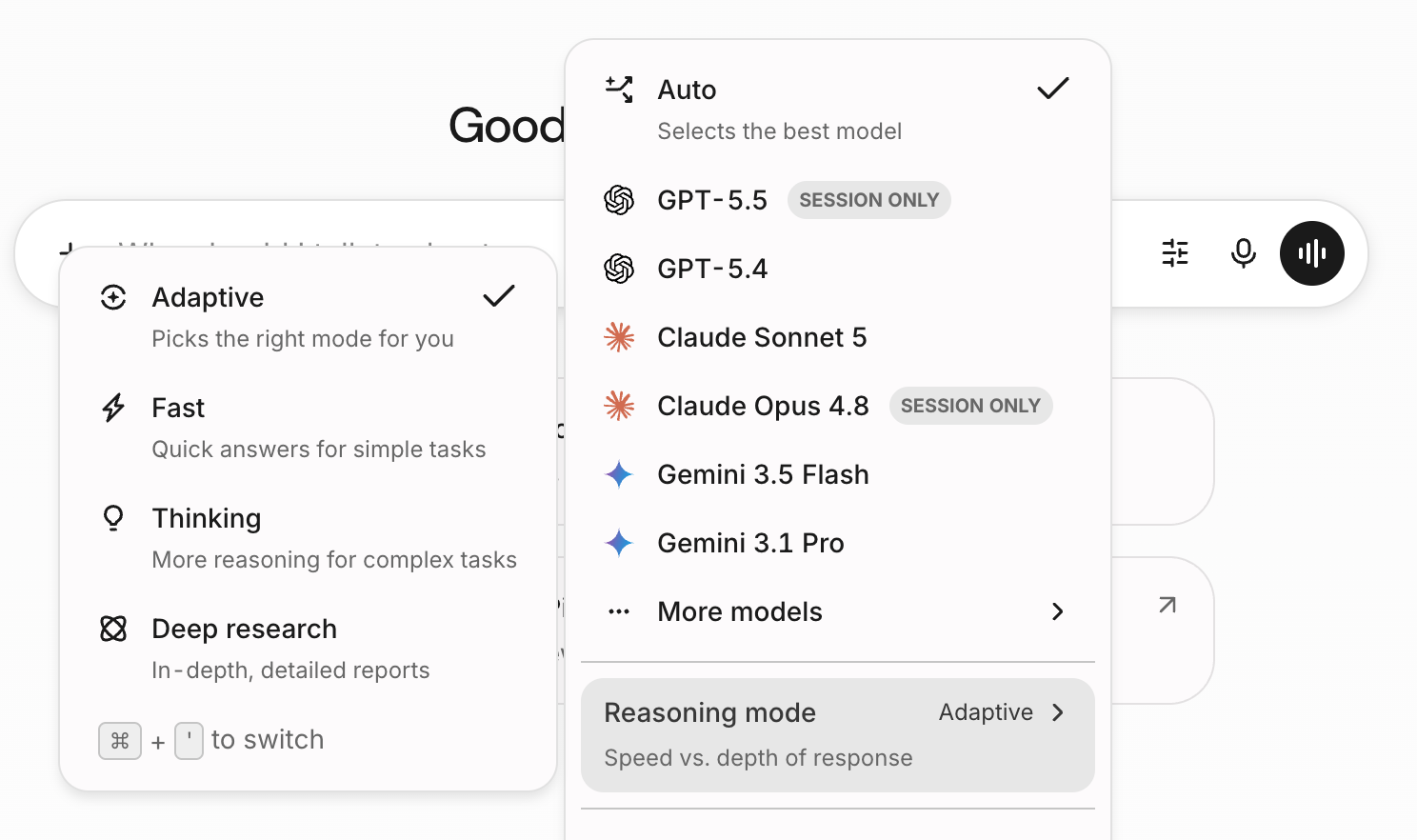
Adaptive is a reasoning mode for Glean Assistant on Customer Key. It starts with a fast response and switches to deeper reasoning when a question needs it or requires tools that Fast mode doesn't support. Users can switch reasoning modes at any time from the chat input.
On the Glean Universal Model Key, the Adaptive, Fast, and Thinking modes are no longer available. Auto chooses a model and reasoning effort for each request. See Model choice.
Waldo, Glean's agentic search model
Glean Assistant no longer uses Waldo on either key. Glean's updated Assistant harness gathers context efficiently with lower-cost models, so a separate retrieval model is no longer needed.
How adaptive reasoning works
- A user asks a question in Glean Assistant.
- Waldo determines whether the question would benefit from a retrieval plan. If so, it issues targeted searches in parallel across your organization's content using a controlled set of tools.
- The pre-collected evidence is passed to the frontier model, which reasons over the initial searches, does its own reasoning, and produces a grounded, cited answer.
Model usage in adaptive and auto modes
When Waldo has sufficient information to answer the question, it plans retrieval, breaks down the question, and figures out the right search tools to call. Waldo never generates user-visible text. The frontier model always runs afterward and is responsible for the final response.
Glean's Universal Model Key uses a premium model in Auto mode. Under FlexCredits pricing, FlexCredits are consumed when a premium model is automatically selected. If a user explicitly self-selects a premium model, it also consumes FlexCredits and shows up on your billing dashboard.
Benefits
- Faster answers: By front-loading retrieval, Glean spends less time searching and more time reasoning, delivering noticeably faster responses. We observed a 50% reduction in latency in our testing.
- Lower LLM costs at scale: The agentic search model reduces frontier model token consumption by handling retrieval planning more efficiently.
Performance
Waldo delivers measurable latency improvements with no regression in answer quality:
| Metric | Improvement |
|---|---|
| P25 Time to First Token | -51.0% |
| P50 Time to First Token | -51.9% |
| P75 Time to First Token | -45.8% |
| Answer quality and satisfaction | No change (neutral) |
Who is affected by adaptive reasoning
Adaptive reasoning and Waldo apply to Glean Assistant only. They don't apply to Glean Search or other surfaces.
Waldo runs automatically for eligible organizations on both the Glean Universal Model Key and Customer Key. For Customer Key, Waldo is available on the Enterprise Flex, Full Consumption, and Glean Core Suite pricing plans; Customer Key organizations on the Migration pricing plan aren't eligible.
Waldo is available to organizations in both US and EU regions. Waldo inference runs in the same region as your Glean deployment.
Waldo runs only with supported frontier models. For Waldo's model support, availability by tier, and key type, see Supported LLMs.
For how Waldo usage is billed, see Glean Enterprise Flex pricing.
Configuration
No configuration is required from admins or end users. Waldo runs automatically on eligible queries behind the scenes.
If a query falls outside the model's scope, it immediately hands off to the frontier model with no degradation in quality.
Data flow
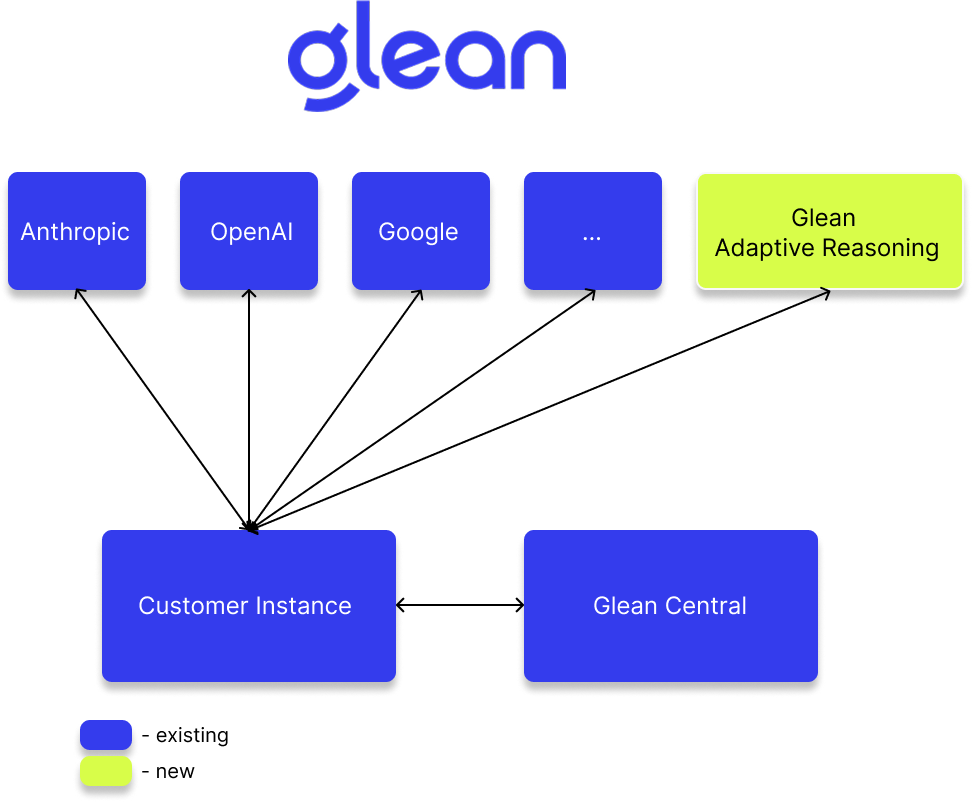
The following describes the query processing flow for Waldo:
- User query is sent to your Glean deployment.
- Your Glean deployment calls Waldo (hosted on Glean-managed infrastructure), executes retrieval tool calls, and collects relevant context.
- Waldo's response goes back to your Glean deployment with the retrieved tool calls and context.
- Your Glean deployment calls the frontier model. The frontier model does the rest of the reasoning for the query using the pre-collected context and generates the final response.
Model information
In the Admin console, billing dashboard, and anywhere else models are listed, Waldo usage appears under the Glean provider.
Waldo is built on NVIDIA's Nemotron-3 Nano (30B-A3B) model and fine-tuned by Glean using reinforcement learning. It's hosted entirely on Glean-managed infrastructure (Google Cloud Vertex AI or AWS SageMaker, depending on your deployment) and isn't served through a third-party model provider endpoint. Inference runs in the same region as your Glean deployment, including US and EU regions.
Customer data isn't used to train this model. The model was trained on Glean's own internal dataset of enterprise information-seeking queries.
Security and data handling
| Property | Detail |
|---|---|
| No data persistence | Query and response content is not logged in the Waldo serving path. |
| No model training on customer data | The model was trained exclusively on Glean's internal data. Your organization's data is never used to train or fine-tune the model. |
| Stateless information flows | Each call to Waldo runs independently of any other calls, reducing complexity and increasing data isolation assurance. |
| Glean-hosted and controlled | The model runs on Glean's cloud infrastructure, not a third-party endpoint. |
| Regional infrastructure | Model inference runs on Glean-managed infrastructure in the same region as your deployment, including US and EU regions. |
| Permission enforcement | The model only retrieves content the requesting user is already authorized to access. |
| Admin controls unchanged | All existing Glean policies, including document restrictions, folder exclusions, and connector restrictions, continue to apply. |
Updated terms
Glean's AI Terms Addendum has been updated to reflect that the Service supports Glean-hosted model deployments in addition to direct third-party LLM providers. You can review the updated terms at glean.com/legal.