Okta (OIDC)
This guide provides instructions for configuring Okta as the SSO provider for Glean using OIDC. You can set up the connection in one of two ways:
- API token (automated): Provide a temporary Super admin API token and Glean creates and assigns the OIDC app for you. Choose this for the quickest setup when you can generate a super admin API token.
- Glean OIN integration: Install the preconfigured Glean app from the Okta Integration Network (OIN) and provide its Client ID and Client Secret to Glean. Choose this when you'd rather not share an API token or you standardize on OIN-managed integrations. This method isn't self-serve yet — contact Glean support to enable it.
Both methods result in the same OIDC SSO connection.
Single Sign-On (SSO) is a user authentication service that permits a user to use one set of login credentials to access multiple applications. Glean supports SSO with Okta using OIDC (preferred) or SAML 2.0, both of which enhance security and simplify the login process for end users. To learn more about using SAML with Okta, see Okta (SAML).
If you'd rather build the OIDC app manually instead of using the Glean OIN integration, see Okta OIDC SSO tokenless setup.
Complete SSO setup in both Okta and the Glean Admin console.
Customized instructions for your Glean environment are available in the Admin console:
Admin Console → Users & permissions → Single sign-on (SSO)Supported features
The Okta OIDC integration supports the following:
- SP-initiated SSO: Users start at Glean and are redirected to Okta to authenticate. See Test the configuration.
- Centralized access and MFA: Manage who can access Glean, and enforce multi-factor authentication, through your Okta access policies.
Requirements and prerequisites
Meet the following requirements:
- An active Okta administrator account with Super admin privileges
- Admin or Setup Admin role access to Glean
Glean restricts SSO authentication to pre-approved domains. Notify Glean of all domains that will be used for user authentication, or SSO will fail.
For example: company.com, company.co.jp, and subsidiary.co
Set up SSO before workspace initialization
If you're configuring SSO through Central Workspace Settings (CWS), a service that allows admins to configure SSO before a dedicated workspace is provisioned, you'll receive a magic link from Glean to access CWS at app.glean.com/admin.
Set up with an API token (automated)
With this method, Glean uses a temporary Super admin API token to create the OIDC app in your Okta instance and assign it to all users automatically. The token is only used during setup and you should delete it afterward. This method requires permission to create API tokens in Okta.
Create a temporary API token in Okta
- Sign in to Okta as a Super admin. Note your Okta domain URL from the address bar — you'll paste it into Glean later. For example,
https://yourcompany-admin.okta.com. - In the left navigation panel, navigate to Security → API → Tokens.
- Click Create token.
- Add the following details:
- What do you want your token to be named:
Glean - API calls made with this token must originate from:
Any IP
- What do you want your token to be named:
- Click Create token.
- Copy the Token Value. You will paste this into the Glean Admin console later.
The token value shows only once. If you don't copy it, you can't access it again and you'll need to create a new token.
For more information on how to create an API token in Okta, see Create Okta API tokens.
Configure Okta SSO in Glean
- In the Glean UI, navigate to Admin Console → Users & permissions → Single sign-on (SSO).
- Select Okta SSO.
- Add the following details:
- Okta domain URL: Your Okta admin URL (for example,
https://yourcompany-admin.okta.com) - API token: The temporary API token you copied from Okta
- Okta domain URL: Your Okta admin URL (for example,
- (Optional) Choose to assign a bookmark app for all users.
- Click Save. Glean uses the temporary API token to create the required Okta apps for setup.
Activate SSO
You must activate SSO in the Admin console before your users can sign in to Glean using SSO.
- Navigate to Admin Console → Users & permissions → Single sign-on (SSO).
- Click Switch to Okta SSO. Glean prompts you to confirm the switch.
After SSO activates, Okta SSO displays in the Glean Single sign-on (SSO) page with a Connected status.
If you don't see the Switch to Okta SSO button, it means that your Glean tenant is still provisioning and you must wait to switch to using SSO.
You can skip ahead to the Add connectors section and return to this step later.
Revoke the temporary API token
After Glean creates the SSO app and you have activated SSO, return to Okta and revoke or delete the temporary API token. The token is no longer needed.
Set up with the Glean OIN integration
With this method, you install the Glean app from the Okta Integration Network (OIN) in your Okta org. The app provides a Client ID and Client Secret that you enter in Glean, and Glean uses those credentials to connect to Okta for OIDC sign-in. No API token is required. This method requires permission to add integrations from the Okta App Catalog.
This method uses Glean's tokenless Okta setup, which isn't self-serve yet. Contact Glean support to enable it for your workspace, and wait for confirmation before you start these steps.
Add the Glean OIN integration
- Sign in to Okta as a Super admin. Navigate to Applications → Applications, then click Browse App Catalog.
- Search for Glean and select the Glean app.
- Click Add Integration.
- On the General Settings step, enter your Glean tenant name in the Tenant field. For example,
acmefor anacme-be.glean.combackend. The Glean OIN integration uses this to configure the sign-in redirect URIs and endpoints for you, so you don't need to set them manually. Click Next. - On the Sign-On Options step, select OIDC, then click Done.
- Go to the Assignments tab and assign the application to the users and groups who need access to Glean. Only assigned users can authenticate through Okta.
Find your tenant name at app.glean.com/admin/about-glean. Contact Glean support if you're unsure.
Enter your Okta details in the Glean Admin console
- In the Glean UI, navigate to Admin Console → Users & permissions → Single sign-on (SSO).
- Select Okta SSO.
- (Optional) Give the connector a Name and icon. This is how Glean labels the connection.
- On the Glean app's General page in Okta, copy the Client ID and paste it into the Client ID field in Glean.
- On the same General page, copy the Client Secret and paste it into the Client Secret field in Glean.
- In the Issuer field, enter your Okta subdomain so the issuer reads
https://<subdomain>.okta.com. For example,companyforhttps://company.okta.com. Don't include-admin. - Click Save.
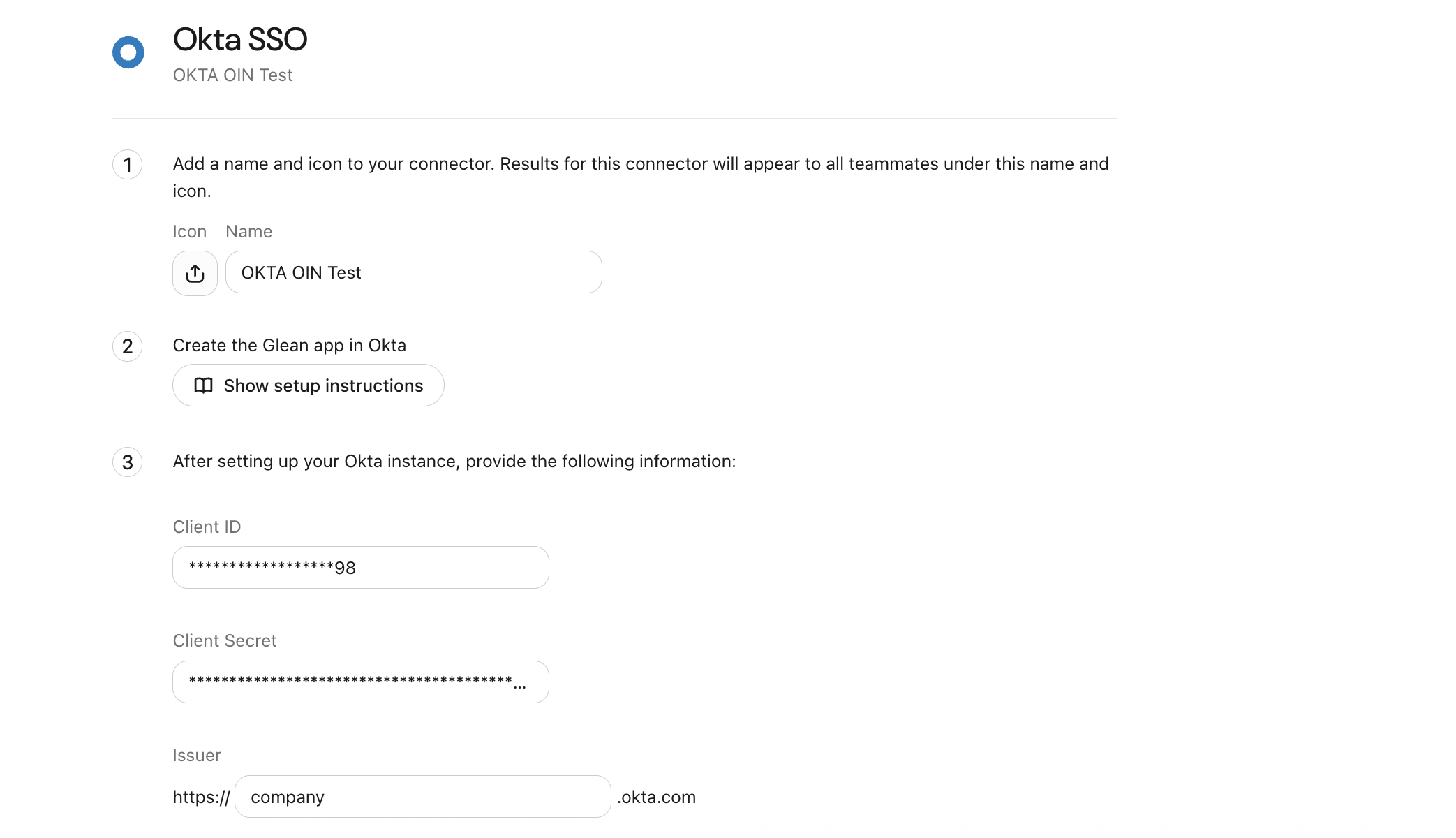
The Okta SSO page in the Glean Admin console: name the connector, then provide the Client ID, Client Secret, and Issuer from your Okta app.
A bookmark app adds a Glean link to the Okta home screen. Follow Okta's guide to create a bookmark app, use https://app.glean.com as the URL, and assign it to the same users as the SSO app.
Test the configuration
Test your SSO configuration to ensure proper authentication flow between Glean and Okta. These steps apply to both setup methods.
Test Glean to Okta redirect
- Open a new Incognito or Private Browsing window and navigate to app.glean.com.
- Enter your work email and click Log in.
Glean redirects you to Okta to complete the authentication flow.
Test the configuration in an incognito or private browsing window to prevent existing cache, storage, sessions, and cookies from affecting the result.
Test Okta to Glean redirect
When redirected to Okta, sign in. Okta redirects you back to Glean as an authenticated user.
Troubleshooting
If any of the SSO flows fail, consult the following table. If you have issues that persist or issues not mentioned below, contact Glean support.
| Issue | Description | Fix |
|---|---|---|
| Glean cannot create the OIDC app | The API token is invalid, lacks Super admin privileges, or has been revoked before Glean finished creating the app. | Sign in to Okta as a Super admin, create a new temporary API token, and re-enter it in the Glean Admin console. Don't revoke the token until after Glean has created the SSO app. |
| Sign-in fails with the Glean OIN integration | The Client ID, Client Secret, or Issuer entered in Glean is incorrect. | Recopy the Client ID and Client Secret from the Glean app's General page in Okta, and confirm the Issuer reads https://<subdomain>.okta.com without -admin. |
| User can't sign in or is denied access | The user isn't assigned to the Glean app in Okta. | Assign the user, or a group they belong to, to the Glean app on its Assignments tab in Okta. |
| Domain not approved | One or more authentication domains haven't been pre-approved by Glean. | Notify Glean support of all email domains that your users will be authenticating from. |
See also
- Okta OIDC SSO tokenless setup — build a custom OIDC app manually instead of using the Glean OIN integration.
- Okta (SAML) — configure Okta SSO with SAML 2.0 instead of OIDC.