Glean A2A server
The Glean A2A server lets external AI platforms invoke Glean Assistant as a remote agent using the open Agent2Agent (A2A) protocol. Once an administrator turns it on, A2A-capable platforms such as Google Gemini Enterprise and Microsoft Copilot Studio can discover Glean Assistant and send it questions on behalf of your users — so people can ask Glean from whichever AI surface their organization standardizes on.
Every request runs as the individual user, under the same permissions and content controls that apply in Glean. A user asking Glean a question through Gemini gets a similar answer to the one they'd get in Glean itself.
To turn on the A2A server and connect an external platform, see Configure the Glean A2A server.
How it works
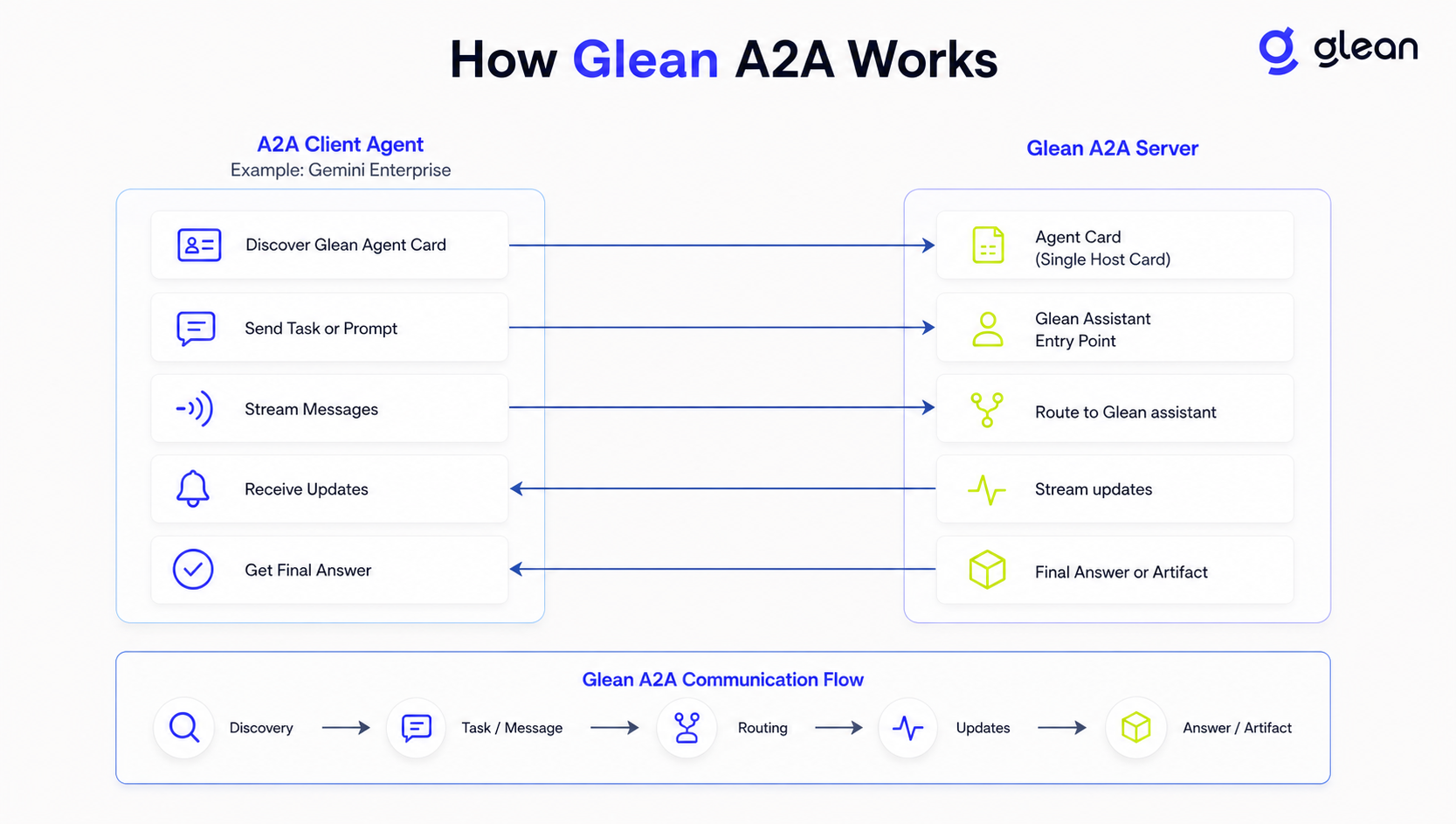
How an external A2A client agent discovers and communicates with the Glean A2A server
The A2A server exposes Glean Assistant as a single remote agent:
- Agent discovery: Glean publishes a per-deployment agent card at
/.well-known/agent-card.jsonon your Glean instance. External A2A clients use this card to discover the agent's endpoint, capabilities, and authentication requirements. The exact agent card URL for your deployment is shown on the A2A Server admin page. - Messaging: The agent card advertises a JSON-RPC endpoint that supports the standard A2A methods, including
message/sendandmessage/stream(which delivers task status updates and the final answer over Server-Sent Events), plustasks/getandtasks/cancelfor task management. - Assistant routing: Glean Assistant handles each incoming request and routes it to enterprise search, document retrieval, or any agents your organization has enabled in Glean Chat. Multi-turn conversations are supported: a client can continue a session across messages, and the conversation is saved to the user's Glean Chat history.
You can also expose an individual Glean agent directly over A2A, with its own agent card and endpoint. See Expose Glean agents over A2A.
To let a Glean Auto mode agent call a third-party A2A agent, use the Glean A2A host.
Authentication and permissions
The A2A server uses the same Glean OAuth authorization server as the Glean MCP server:
- The agent card advertises an OAuth 2.0 authorization code flow pointing at your Glean deployment's authorization and token endpoints.
- External A2A clients authenticate using dynamic client registration with PKCE.
- Every request runs on behalf of an authenticated Glean user. Responses respect that user's document permissions, and tasks are only visible to the user who created them.
- Users must have access to Glean Assistant to use Glean through A2A. Users without Assistant access receive an authorization error.
You don't need to provision any additional credentials or service accounts in Glean.
Limitations
- The A2A server exposes Glean Assistant as a single agent. To expose an individual Glean agent directly over A2A — with its own agent card and endpoint — see Expose Glean agents over A2A.
- The A2A server endpoint is inbound only. To make outbound calls from a Glean Auto mode agent to an external agent, configure the Glean A2A host.
- Only the text parts of an A2A message are used as the prompt. File and data attachments are currently ignored; support for them is planned for a future release.