Glean MCP Gateway
The Glean MCP Gateway brings tools from outside Glean's own platform into your Glean MCP servers. The gateway supports three types of external tools:
- Custom tools: Read and write tools your team builds and packages in Glean.
- External MCP servers: Third-party MCP servers you proxy securely through Glean.
- Connector tools: Read and write tools from your connectors.
Through one secure, Glean-governed endpoint, the gateway exposes these tools to every assistant your teams use like Claude, ChatGPT, Cursor, Gemini, Microsoft Copilot, Claude Code, and more while enforcing permissions, policy, and audit on every call. It exposes 2,000+ governed tools this way, and as new tools are added they become available through the Glean MCP tools automatically.
To set up external tools, see Set up external tools with MCP Gateway. To proxy a third-party MCP server, see Connect remote MCP servers. For general MCP server concepts — architecture, supported hosts, the MCP configurator, authentication, and pricing — see About Glean MCP server.
Ship MCP tools at enterprise scale with the Glean MCP Gateway
Glean plug-ins for Cursor, Claude Code, and Codex route requests through the governed gateway while adding dynamic Skill and tool discovery. See Glean plug-in for coding hosts.
Why a gateway
MCP servers are appearing inside organizations faster than IT can track them. Without a central gateway, four risks compound:
- Unvetted sources: Many MCP servers come from public repositories rather than official vendors.
- Credential exposure: A poorly built server can leak credentials from the machine it runs on.
- Governance gaps: There is no central catalog, approval flow, or policy engine.
- Observability gaps: Anyone can install any server, leaving IT with no inventory and no audit trail.
Routing every MCP call through Glean closes these gaps.
What you get
Vetted sources
Reach read and write tools connected to Glean, all through one approved endpoint.
Security and governance
Glean Protect+ policies apply to external MCP tool calls. Prompt injection, malicious code, and misaligned behavior can be blocked.
Observability
An Insights dashboard shows who uses which MCP server, which tools are called, and how often.
Management and access control
Manage every MCP server from one console — roll out, update, and revoke access — and limit tool calls to specific departments, roles, or data-sensitivity tiers.
How it works
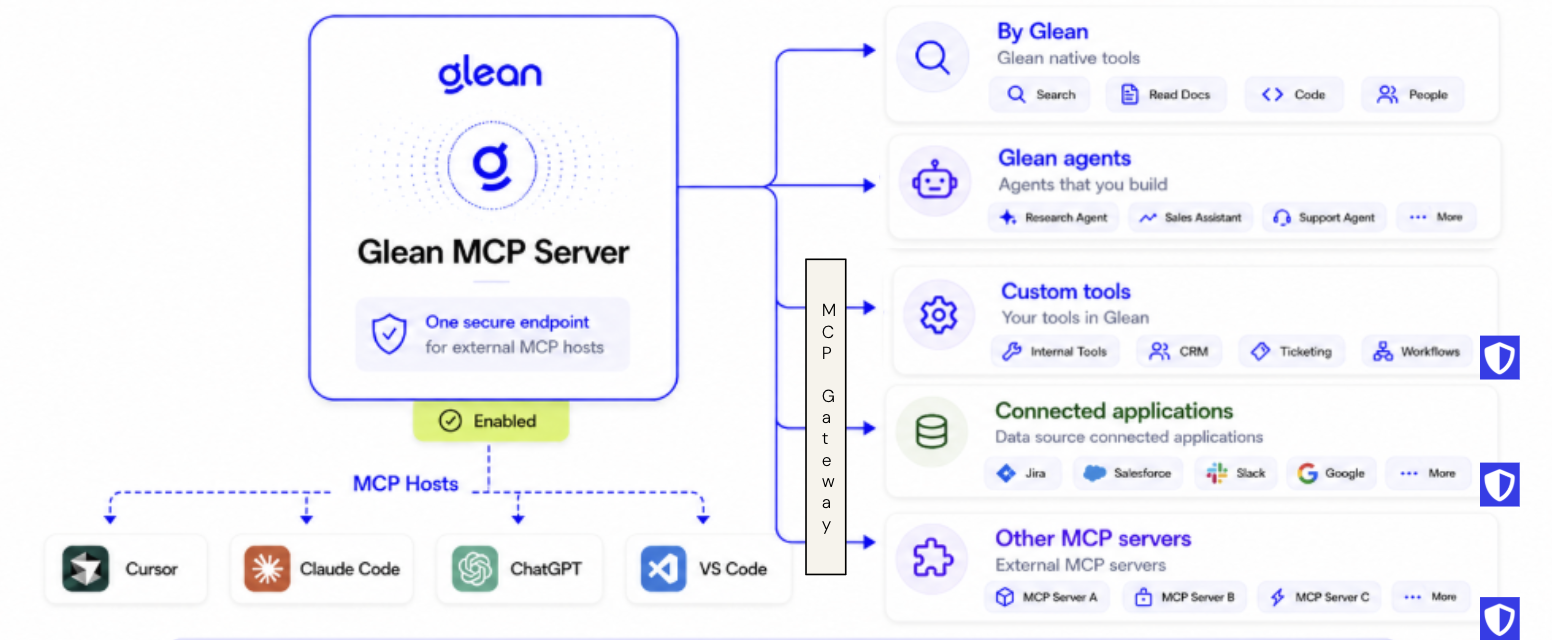
One MCP endpoint exposes thousands of tools across native, connector, and custom tools to external AI hosts.
Each MCP server you create has its own URL (https://{your-backend-domain}/mcp/{path}) that any supported host connects to. A single endpoint can serve Glean's own platform tools alongside everything the gateway brings in externally:
- Glean platform tools: Search, chat, read document, code search, people, and more. Native to Glean, not part of the gateway.
- Agents: Glean agents surfaced as tools that hosts can invoke. Native to Glean, not part of the gateway.
- Custom tools (gateway): Read and write tools that admins build and package in Glean, such as internal APIs, CRM, ticketing, and workflows. See Set up external tools with MCP Gateway.
- Connector tools (gateway): Read and write tools from your connectors, such as Jira, Salesforce, Slack, and Google, that respect source permissions.
- External MCP servers (gateway): Third-party MCP servers such as Atlassian, GitHub, and Slack, proxied securely through Glean. See Connect remote MCP servers.
New servers typically start with core tools such as search, chat, read document, and more. For the full set of built-in tools, see Built-in Glean tools. To select them per server, see Create MCP servers.
Rather than capping each server at a fixed number of tools, add the Dynamic skills and tools managed toolset so hosts discover and load tools on demand. See Dynamic skills and tools.
All endpoints point to Glean, and Glean enforces what is allowed downstream. Because tools resolve against Glean's permission-aware Knowledge Graph, results stay unified and access-controlled across every connected source — unlike siloed native MCP servers.
Centralized management
Because every endpoint routes through Glean, you manage MCP access from one place instead of configuring each host separately:
- One console for every app: Register an MCP server once and distribute it to every supported host — Claude, ChatGPT, Cursor, Gemini, Microsoft Copilot, and Claude Code — from a single catalog of approved tools and servers.
- Roll out, update, or revoke centrally: Enable or disable any server or tool for your organization from one place, without touching individual user configurations.
- Fast rollout at scale: Glean provides a script to deploy MCP servers across managed devices in minutes. See Deploy MCP servers with MDM.
- Control tool access per user: Decide who can use which tools from the Admin console, or set access for each tool directly from the MCP server using tool advanced settings. By default, all tools are on for all users.
- Permissions inherited from the source: Tools inherit source-system permissions, so Glean never exposes more than a user already has access to.
Tool visibility is governed by MCP access control, so each user sees only the tools they have access to — even when they connect to the same MCP server. For example, if a server is created with 5 tools, a user granted access to all 5 sees 5 tools, while a user granted access to only 2 sees just 2.
Common use cases
One server for every tool
Create one server that includes Glean built-in tools, custom read and write tools, and external MCP servers — all in one place.
Developer workflows
Use Glean context in IDEs (for example, Cursor and VS Code) for debugging, PR reviews, and code navigation, and then close out your Jira tickets — all using one Glean MCP server.
Get work done
View your recent activity and use write tools to get work done through a single server.
Authentication
The gateway uses the same authentication methods as any Glean MCP server: the Glean OAuth authorization server (recommended) or Glean API tokens. See Authentication for the full setup.
If a user invokes a downstream tool that needs its own credentials, the gateway prompts for that authorization and retries the call once complete.
Security
Glean Protect+ guardrails can run on MCP calls and external tool calls — the same guardrails that protect Glean Assistant sit in front of the tool calls your users and agents make. Glean Protect+ can provide:
- Prompt injection detection: Blocks adversarial inputs that try to hijack the agent.
- Malicious code detection: Inspects tool inputs and outputs for known attack patterns.
- Agent alignment checks: Verifies the tool call matches what the user asked for.
- Restricted-topic policies: Per-group rules across users, connectors, and tools.
For session management, privacy, and data protection details, see About Glean MCP server. For a detailed security overview covering deployment, authentication, authorization, and monitoring, see MCP security.
Observability
MCP Insights shows every call across every app:
- Adoption: MAU, WAU, DAU, active-user trends, and usage among Glean users.
- Usage breakdowns: active users by top host applications, users, applications, MCP tools, and MCP servers.
See MCP Insights for more information.
See also
- General overview, setup, authentication, and pricing: About Glean MCP server
- Set up external tools: Set up external tools with MCP Gateway
- Select tools per server: Create MCP servers
- Proxy a third-party server: Connect remote MCP servers
- Roll out at scale: Deploy MCP servers with MDM
- Usage analytics: MCP Insights