About agent access policies
Agent access policies allow security administrators to control what data agents can read and what actions they can execute at runtime. These policies provide an additional governance layer on top of existing source permissions, reducing the risk of sensitive data exposure, unintended writes, and unsafe tool usage while maintaining productivity.
Use agent access policies to enforce governance rules such as:
- Preventing data egress: Block posts to public or external Slack channels, for example,
#all,#general,ext-*. - Role-based restrictions: Restrict interns or contractors from executing high-risk write actions.
- Auditing: Flag risky external communications or data egress for administrator review.
Agent access policies do not replace existing source permissions or Role-Based Access Control (RBAC). Instead, they establish a secondary control plane that evaluates live runtime behavior including the active tool, the invoking user, the agent in scope, input arguments, and returned payloads.
Where to find agent access policies
Open Protect from the Glean navigation, next to Admin console. Under AI security, click Policies. Agent access policies are listed there.
How agent access policies work
Each policy consists of a scope (who and where the policy applies) and one or more rules (the evaluation criteria). The Glean runtime evaluates applicable policies at two distinct phases of a tool invocation:
| Evaluation point | Monitored data | Primary use case |
|---|---|---|
| Before a tool runs (Tool call) | Tool identity and input arguments | Prevent unsafe writes or data egress before execution occurs. |
| After a tool returns (Tool output) | Structured response payload | Filter sensitive items out of a result set, or drop the entire response. |
This architectural split enables both proactive action control and reactive data containment:
- Pre-execution checks answer: Should this tool invocation be allowed to run?
- Post-execution checks answer: Is this generated result safe to return to the agent?
Enforcement is centralized within the Glean runtime. The same evaluation logic applies uniformly to native tools and tools backed by remote Model Context Protocol (MCP) servers.
Enforcement actions
When a rule condition is met, the policy executes one of the following actions:
| Action | Behavior |
|---|---|
| Block | Pre-execution: Stops the tool call and returns an error to the agent.Post-execution: Drops the entire response payload.Result: The agent treats the step as a failed tool run and continues its cycle. |
| Filter (Post-execution only) | Removes only the items in the payload that trigger the rule. The agent receives a partial, sanitized result set and continues normally. Ideal for search-style tools. |
| Flag for review (Monitor) | Allows the tool call to proceed without interruption. The event is logged as a finding in AI security issues for administrator auditing and policy tuning. |
When multiple policies apply to a single agent run, the most restrictive outcome wins. For example, if one policy flags an action for review and another blocks it, the tool call is blocked.
Scope a policy
Policies are scoped across three dimensions:
- Users and groups: Apply the policy globally, or restrict it to specific Identity Provider (IdP) groups such as
Interns,Contractors, orFinance. - Agents and folders: Apply the policy to all agents, or restrict it to specific agents or designated agent folders.
- Tools: Define the specific tool or tools such as
slack_post_messageorglean_searchthat the rule evaluates.
Together, the Scope + Tools + Condition determine exactly when a rule fires.
Rule conditions
Rule conditions are written in Common Expression Language (CEL), a Google-developed expression language for evaluating boolean expressions. A condition is a CEL expression evaluated against either the input arguments of the tool (tool_call) or its structured payload (tool_output). Conditions support the following operators: =, !=, in, and like.
Tool-call conditions
These inspect the tool name and input arguments.
- Block posts to specific Slack channels:
params.channel in ['all', 'general']
- Monitor outbound email to non-corporate domains:
params.to not like '%@yourcompany.com'
Tool-output conditions
These inspect the structured response after a tool runs. For glean_search and other document-returning tools, you can match against attributes like datasource, owner, container, custom labels, and matching filters.
- Filter Finance-owned documents out of search results:
output.structured.documents.exists(d, d.owner == 'finance-group@yourcompany.com')
- Filter documents from a specific folder path:
output.structured.documents.exists(d, d.container like '/Finance/%')
- Filter documents containing a "Confidential" sensitivity label:
output.structured.documents.exists(d, d.matchingFilters.label.exists(l, l == 'Confidential'))
Available attributes depend entirely on the response schema of the tool. For glean_search, you have full access to all document fields surfaced in the search response. To discover the input and output attributes a tool exposes, see Find a tool's schema.
Configure an agent access policy
- Open Protect from the Glean navigation, next to Admin console. Under AI security, click Policies.
- Click Edit next to an existing policy, or choose to duplicate a provided template.
- Define the Scope:
- Apply to users / groups: Keep as All users or select targeted IdP groups.
- Apply to agents: Keep as All agents or select specific agents/folders.
- Under Apply this policy to, select your environment targets (Glean Assistant, Interactive agents, or Automatically triggered agents).
- Add your Rules. For each rule:
- Select the Rule type: Tool call (pre-execution) or Tool output (post-execution).
- Select the Tools the rule should monitor.
- Enter the Condition expression.
- Select the Action: Block, Filter, or Flag for review.
- Toggle the rule status to Enabled.
- Click Save.
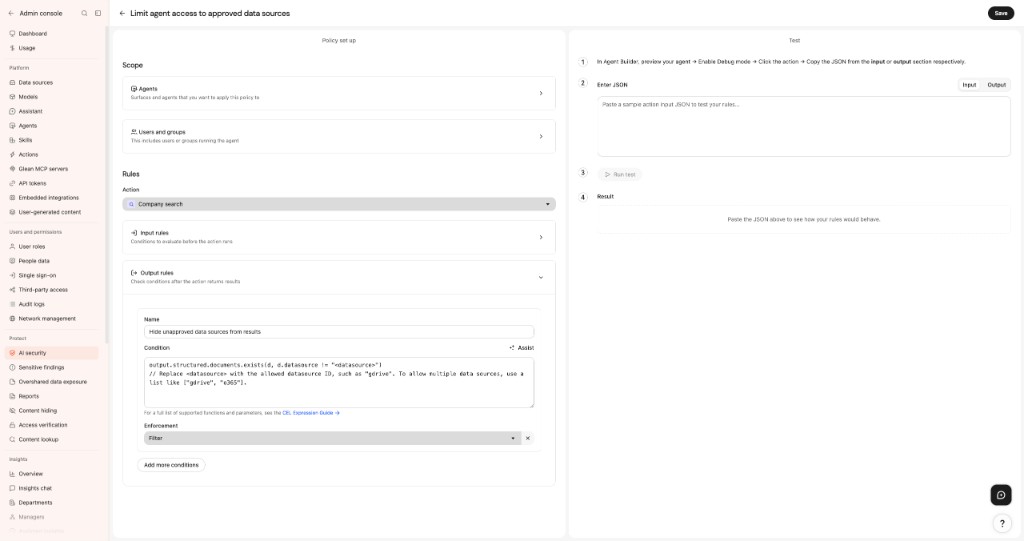
Updated policies apply immediately to all new tool calls.
You can add up to 20 rules per policy. Each rule can be enabled, disabled, edited, or duplicated independently.
Before enforcing a rule, validate that its condition fires only on the calls you intend. See Test a policy for how to evaluate a rule against a sample tool call.
Common use cases
Block posts to public Slack channels
Prevents agents from broadcasting into global channels, even if the invoking user has posting permissions.
- Rule type: Tool call
- Tool:
slack_post_message - Condition:
params.channel in ['all', 'general'] - Action: Block
Exclude Finance data from agent context
Stops financial documents from entering an LLM's context window, regardless of user permissions.
- Rule type: Tool output
- Tool:
glean_search - Condition:
output.structured.documents.exists(d, d.container like '/Finance/%') - Action: Filter
Restrict high-risk write actions for interns
Applies strict write limits to a targeted user group.
- Scope: Apply to users in the
Internsgroup. - Rule type: Tool call
- Tools: Select high-risk write tools (for example, Jira item creation, Slack posting, email sending).
- Condition: (Leave blank to match all calls made to these tools)
- Action: Block
Hide confidential content from automated agents
Respects O365 or Google Drive sensitivity labels within automated workflows while allowing access within standard chat interfaces.
- Scope: Apply to interactive and automatically triggered agents (uncheck Glean Assistant).
- Rule type: Tool output
- Tool:
glean_search - Condition:
output.structured.documents.exists(d, d.matchingFilters.label.exists(l, l == 'Confidential')) - Action: Filter
Investigate violations
When a rule triggers a Block, Filter, or Flag for review action, an entry is logged in AI security issues (Protect → AI security → AI security issues).
Each finding includes:
- The associated agent and tool.
- The triggered rule and condition expression.
- The user who initiated the session.
- The input arguments or the offending items from the response payload.
- The exact mitigation action taken.
For detailed information on handling alerts, see Findings Dashboard and Investigating Violations.
Error handling and rollout strategy
- Fail-open evaluation: Policy configuration errors are non-blocking. If a rule contains a typo or references an unknown field, it evaluates as a
no-op. The tool call proceeds normally to ensure critical business workflows do not break. - Latency bounds: Policy evaluation introduces minimal overhead targeting 10–50 ms per call. If an expression times out, it defaults to a
no-opand allows the call to pass. - Recommended deployment: Start all new rules with a Flag for review action. Monitor the results in AI security issues for 7–14 days to audit accuracy, then upgrade the action to Filter or Block.