How connectors power the Glean experience
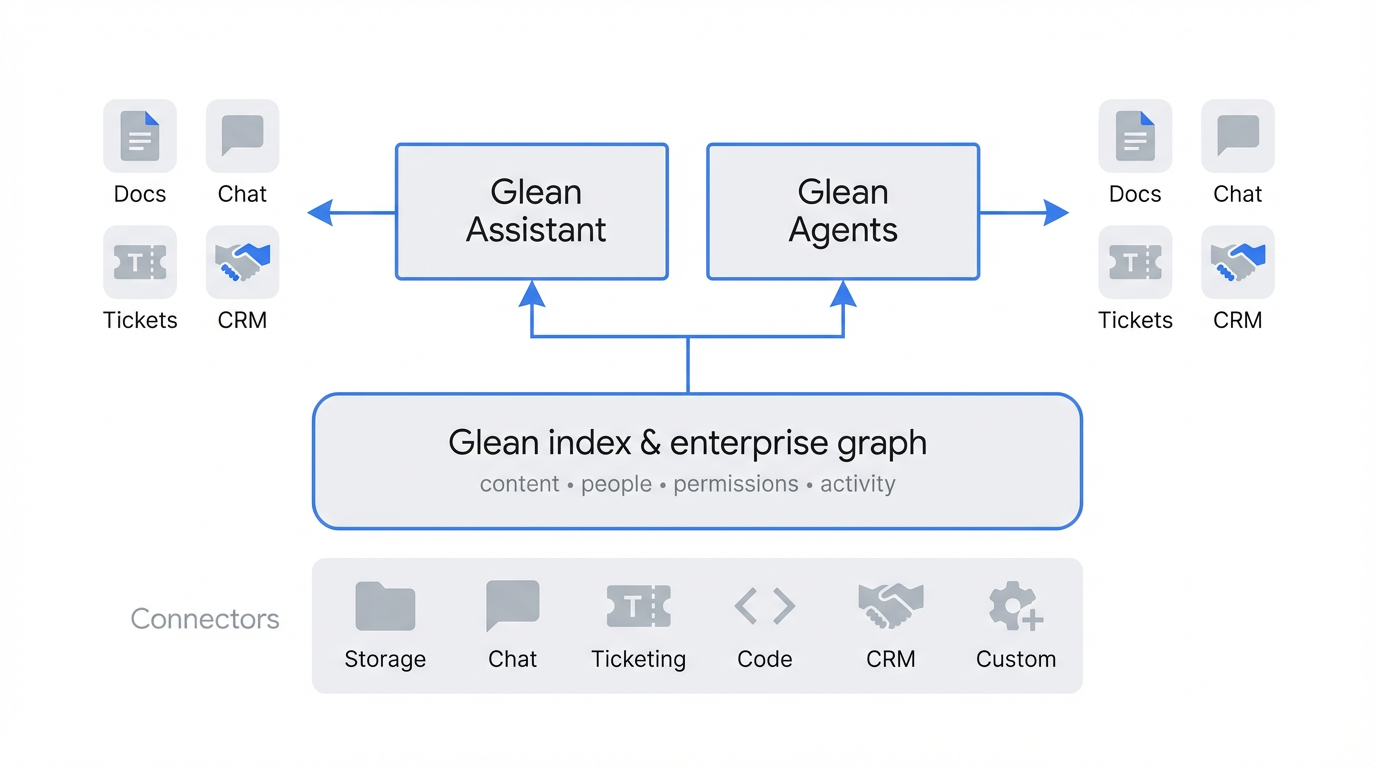
Connectors serve as the foundation of your Glean deployment. Beyond simply linking applications, they ingest, map, and normalize content, activity signals, and permission sets into a unified data layer.
This high-fidelity data feeds the Glean Knowledge Graph, powering Search, Chat (RAG), and Assistant through indexed, live-retrieval, and hybrid access patterns. By standardizing data from disparate systems, connectors ensure that all Glean experiences share the same secure, permission-aware view of your organization's knowledge.
This page explains what Glean connectors are, how they relate to the search index and Enterprise Graph, and how they enable Search, Chat, Assistant, and Agents.
- New to Glean? Read Key terms, then Building the search index and Enterprise Graph.
- Admin or security reviewer? Prioritize Data handling in your Glean tenant, Connector data access modes.
- Technical reader? Use Technical deep dive: the runtime flow, and About connectors for connector types and parsing behavior.
Connectors power Glean in the following ways:
| Interaction | How connectors power it | Key benefit |
|---|---|---|
| Contextual Search | Mirror permissions and use signals (for example, edits and views) where the connector provides them. | Find relevant content in one place without seeing results you could not open in the source. |
| Glean Chat | Supply RAG context from the index and, when needed, live fetches. | Answers grounded in your organization’s data and policies, not generic web training data alone. |
| Agents and Tools | Enable read context and, where configured, write-back through tools. | Complete work such as updating a ticket without leaving Glean. |
Building the search index and Enterprise Graph
Connectors synchronize content and metadata from your applications into your tenant’s search index. That index powers fast retrieval, faceting, and ranking.
The Enterprise Graph is built from that foundation: it reflects relationships (for example, between people, documents, and work items) and organizational context, not only isolated documents. In other words, connectors populate the index and associated identity and permission structures; the graph interpretation layers on structure and signals derived from that data. The result is a permission-aware model of how work and knowledge connect across apps.
This unified model depends on several synchronization functions:
- Metadata ingestion: Connectors extract fields beyond plain text where the source exposes them, such as last modified time, owners, version or status fields, and app-specific attributes. That supports ranking, filters, and graph-like relationships.
- Identity resolution: Glean aligns identities across systems (for example, recognizing that identifiers or display names in different apps refer to the same person when connector and directory data support that mapping).
- Permission mirroring: Connectors sync access control information from sources (for example, ACLs or equivalent models) so retrieval respects source visibility. If a user cannot access an item in the source, they should not see it in Glean—assuming the connector and configuration are correct.
Contextual search: from retrieval to answers
Glean uses connector-supplied metadata and signals to improve relevance.
- Activity and engagement signals: Where a connector ingests or derives engagement data (views, edits, shares, and similar), Glean can use those signals in ranking. The exact signals depend on the connector and your setup; not every app exposes the same metrics.
- Faceted filters: Because connectors map source-specific types and fields, users can often filter by attributes such as Jira status, Slack channel, or GitHub repository when those connectors expose them.
- Security-aware retrieval: Results are filtered to what the current user is allowed to see in the source, according to synced permissions.
How connectors power Search
For each connected connector, connectors typically:
- Fetch document and message content, including titles, bodies, comments, attachments, and common file types.
- Fetch the permissions map (or equivalent) from the source so results align with source access rules.
- Fetch people and group information so users, groups, and access can be aligned across apps.
- Capture activity signals such as edits, views, or shares when the connector and source APIs support them, to improve relevance over time.
User experience in Search
When connectors are healthy and synced:
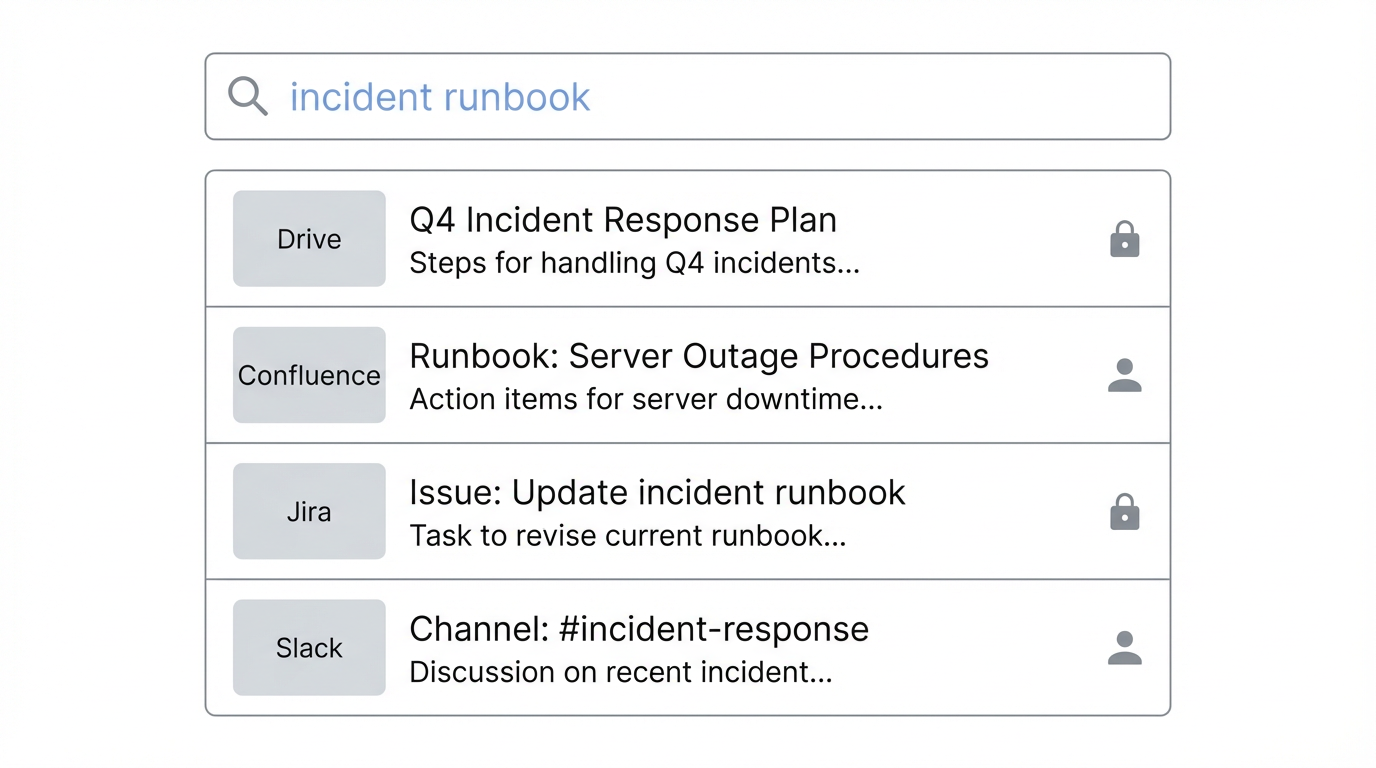
- Users can search across connected apps from a single search box (subject to which sources are enabled for your tenant).
- Results can mix content types such as docs, messages, tickets, boards, issues, and emails, filtered and ranked using permissions and relevance.
- Opening a result usually sends the user to the source system, which may enforce access again at click time.
Search is often the first place admins validate connector behavior (coverage and permissions) before relying on Chat, Assistant, or Agents.
The following figure illustrates how one query can return results across multiple connectors, with app badges and permission indicators.
Data handling in your Glean tenant
Connector-fetched data for indexing is routed into your isolated Glean tenant. As described in About connectors:
- Data is encrypted in transit on the way to your tenant and is written to your tenant environment.
- At rest, indexed data in the tenant is encrypted and remains within your tenant boundaries relative to other customers’ data.
That applies to indexed connector content and related metadata used for search and retrieval.
Chat, Assistant, and Agents use retrieved context from your tenant plus language models. Depending on your deployment and settings, prompts or subsets of content may be processed by model providers under your agreed architecture (for example, Glean-managed or customer-controlled keys). For authoritative detail on security, data flow, and subprocessors, see Security & Architecture and your contractual documentation—not only this overview.
Grounding AI with Glean Chat
Glean Chat uses retrieval from your connector-backed index (and live fetches when applicable) so answers are anchored in your organization’s data and permission rules, rather than only the model’s pretrained knowledge.
The RAG workflow
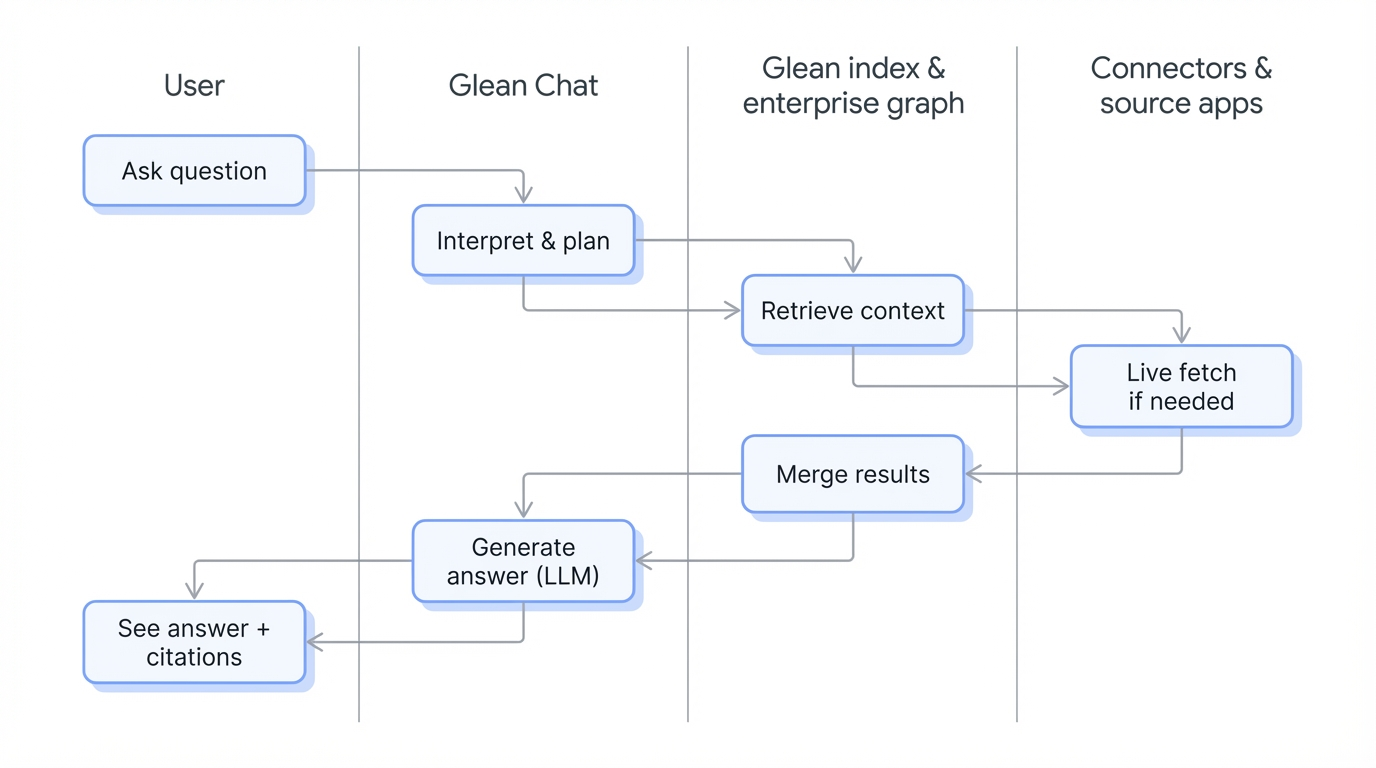
When a user asks a question, Glean uses connectors and retrieval to perform retrieval-augmented generation (RAG):
- Retrieval
- Identifies relevant connectors and pulls candidate snippets from the index where indexed access applies.
- Retrieves documents, messages, tickets, and other items subject to the user’s permissions.
- When needed, performs live fetches for fresher or selectively indexed content.
- Augmentation: Retrieved snippets are passed to the language model to condition the answer on your data.
- Verification: For grounded answers, Glean typically surfaces citations (for example, deep links) so users can open sources and verify. Citation coverage can vary by surface, workflow, and whether the model returns a grounded response; not every short or non-retrieval reply includes the same citation pattern.
For example, for “What is our current policy on travel expenses?”, connectors for systems where your policies live (for example, HR or wiki tools) may supply the relevant documents; the model then summarizes conditioned on those retrievals.
Because Chat respects connector-backed permissions, example questions include:
- “Summarize the latest design decisions for the mobile app launch, including docs, tickets, and relevant chat threads.”
- “What did we agree with this customer about SLA timelines?”
- “Show me the latest runbooks for production incidents.”
What this means for admins
For Chat to behave well:
- The right content is indexed (or reachable via live-retrieval or hybrid paths) from the right systems.
- Permissions are correct so retrieval does not over-collect relative to user access in sources.
- Crawls, incremental updates, and webhooks (where used) are healthy so high-churn systems (mail, storage, ticketing, chat) are not stale beyond what you expect.
Agents, Assistant, and Tools
Connectors extend Glean from read-heavy search and chat into action when you enable tools: configured operations that read or write in external systems.
- Context from connectors: Assistant and Agents use the same connector-backed index and live fetch paths to gather current context (tickets, docs, messages, and so on).
- Write-back through tools: Many connectors offer native tools (for example, create or update records). Exact tools vary by connector and your admin configuration.
- State-aware workflows: Automations can use retrieved and fetched state (for example, a ticket’s status) as inputs to a plan. Behavior depends on how you configure Assistant, Agents, and tools; it is not implied that Glean passively watches every field change without those workflows.
Assistant
Assistant uses connectors to:
- Determine which systems are relevant to a request.
- Retrieve documents, messages, and tickets to ground steps and answers.
- Invoke connector-backed tools for reads or writes when configured and allowed.
Examples:
- “Draft an incident summary using the latest incident ticket, Slack channel, and runbook.”
- “Prepare a QBR brief using the latest account notes, emails, and forecast data.”
- “Create a project checklist based on our existing onboarding docs and tickets.”
Agents
Agents are multi-step workflows that plan and execute over enterprise context. Connectors matter in two ways:
- As connectors: Agents read from the index and from live fetch to reflect current tickets, code changes, documents, or messages, within permissions.
- As tools (Tools): Agents call connector-backed tools to create, update, or transition items in external systems (for example, tickets, messages, or fields).
You can configure tools from connector setup in the Admin console to:
- Enable or disable native tools per connector where supported.
- Restrict which tools run automatically versus human-in-the-loop approval.
- Expose tools to Assistant and Agents according to policy.
Technical deep dive: the runtime flow
When someone uses Chat or an Agent runs a workflow, Glean generally:
- Understand the request: Parse intent and which systems or object types matter.
- Choose data paths: Prefer index, live retrieval, or hybrid, per connector capabilities and query needs.
- Retrieve context: Call connectors (index reads and/or live APIs) in parallel where appropriate, enforcing source permissions on all retrieved items.
- Plan and act: The agentic layer sequences steps and may call tools that mutate external systems when enabled.
- Generate output: Send curated, permission-filtered context to the model; return natural-language output, citations when grounded, and record any side effects from tools (for example, an updated ticket).
Connector data access modes
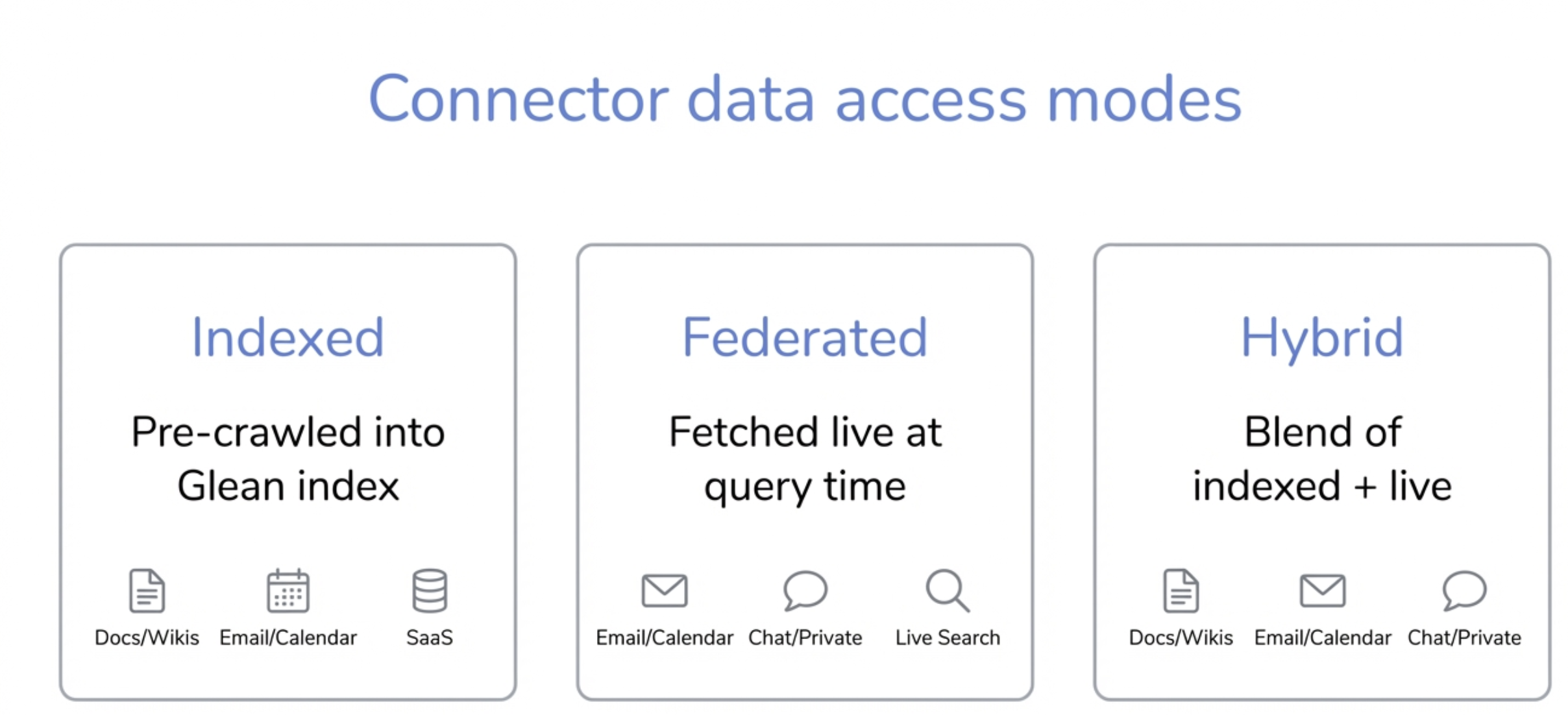
Glean balances coverage, freshness, latency, and cost using per-connector and per-use-case patterns. The table below is a product-level model; individual connectors implement it differently.
| Mode | How Glean uses it in Chat, Assistant, and Agents | When it is best suited |
|---|---|---|
| Indexed | Content, permissions, and often activity are crawled or pushed into the tenant index. Retrieval starts here for high recall and low latency across large corpora. | Docs, wikis, tickets, knowledge articles, code, and other bulk corpora; historical or cross-document questions. |
| Live retrieval (query-time fetching) | The connector queries the source at request time for fresh results for the current user. | Email, calendar, chat, or other data where minutes-to-hours freshness dominates, or where continuous full indexing is impractical or undesired. |
| Hybrid | Combines index results with targeted live fetches (for example, very recent changes or segments that are not broadly indexed). The system merges these into one permission-filtered context pool. | Mixed policies: team content indexed, personal or sensitive slices fetched only when needed; or freshness top-ups on top of indexed breadth. |
Freshness mechanisms: Indexed connectors often use incremental crawls and sometimes webhooks or push APIs so the index approaches real time without requiring every query to hit the source. Those mechanisms implement how the index stays current; they are not a separate column in the table above.
In practice, one answer can combine modes—for example:
- Indexed docs and tickets for policies and runbooks.
- Live retrieval for calendar for today’s sessions.
- Hybrid behavior where team channels are indexed but some personal mailboxes are fetched only when the user asks.
Example workflow: Slack and Microsoft Teams
When Glean is installed in Slack or Microsoft Teams and your connectors are connected:
- Users can invoke Glean from those clients to search across enabled connectors.
- Chat and Assistant in those clients rely on the same tenant index and permission model as the web experience, for the same user.
- Agents may read context from channels or threads according to indexing and federation rules for those products, and may run tools such as posting messages or creating tickets when configured.
The goal is one conversational surface that stays aligned with connector-backed permissions.
Example scenarios
Illustrative patterns (exact connectors and tools depend on your tenant).
Example 1: Resolve a customer issue faster
Goal: Help support engineers resolve a high-priority issue.
Connectors involved: Ticketing, document store, code host, chat.
Experience:
- In Search, find the incident ticket, runbooks, and related docs in one result set.
- In Chat, ask for a summary of incident INC-1234 with logs, code changes, and similar past incidents.
- An Agent may create a war-room channel, attach docs, or post summaries if those tools exist and are allowed.
Example 2: Onboard a new teammate
Goal: Ramp a new hire on team context.
Connectors involved: Document storage, project management, chat, HR or wiki.
Experience:
- Chat suggests docs, tickets, and channels based on indexed (and permitted) content.
- An onboarding Agent may build a checklist, post to a channel, or track tasks if configured.
Example 3: Prepare for a customer meeting
Goal: Unified view before a customer call.
Connectors involved: CRM, mail and calendar, call notes, document storage.
Experience:
- Chat summarizes permitted emails, calls, tickets, opportunities, and links to contracts when those sources are connected and the user may access them.
- An Agent may draft an agenda or tasks in CRM or project tools if tools are enabled.