Google Calendar
The Google Calendar connector brings your organization’s meetings into Glean so users can:
- Find upcoming and past meetings quickly using natural-language search.
- See rich meeting cards with participants, transcripts, and attached documents in search results.
- Use the Meeting Summary agent on the Glean home page to summarize past meetings.
- Power Calendar Search actions in agents and custom workflows.
The connector supports:
- Data crawling and indexing (native connector): Recommended for deep, fast search, and AI features.
- Data fetching (federated connector): For lightweight, on-demand retrieval of meetings without storing full calendar content in Glean.
Key capabilities and features
| Feature | Details | Access and scope |
|---|---|---|
| Data crawling and indexing (Recommended) | Indexes Google Calendar Event objects so meetings appear as first-class items in Glean Search and power agents and calendar actions. | Requires a configured Google Drive data sources. Uses the same service account and domain-wide delegation configuration as Google Drive. |
| Data fetching (federated) | Retrieves live meeting data directly from Google Calendar at query time, without storing full event content long-term. Historically used for showing a calendar widget and simple meeting lookup only. | Can be enabled alone or alongside indexing. Results typically appear when users filter by app:googlecalendar or use actions that call Google Calendar. |
| Meeting card in Search | When a query matches a relevant meeting (title, transcript, or attached docs), Glean surfaces a hero meeting card at the top of results. The card shows participants, attached docs, transcripts, and highlighted matching snippets. | Available only when data crawling and indexing is enabled. Respects Google Calendar permissions; private events are shown as free/busy only where applicable. |
| Calendar operator search | Users can filter Google Calendar events in search using operators such as app:googlecalendar, updated:, type:, organizer:, participants:, and before: / after:. For example: app:googlecalendar after:now finds upcoming meetings. | Requires data crawling and indexing. Events are returned only if the querying user has permission in Calendar to see them (details or free/busy only). |
| Meeting Summary agent on Home | On the Glean home page, users can click the sparkle icon on a past meeting to invoke the Meeting Summary agent, which summarizes key decisions, action items, decision-makers, experts, and related documents. | Requires indexed Google Calendar events and either a Google Meet transcript, Gemini meeting notes, or Zoom transcript for that event. |
| Calendar Search action for Agents | The Calendar search action lets agents and custom workflows retrieve events from Google Calendar and drive downstream tasks (e.g., summarize, plan follow-ups). | Requires data crawling and indexing for Google Calendar, then enabling calendar search in each agent configuration. |
| Security and permission enforcement | Glean enforces Google Calendar permissions at query time. If a user can only see free/busy in Google Calendar, Glean reflects that; private events remain opaque and appear only as “busy” blocks where appropriate. | Uses a domain-wide delegated service account based on the Google Drive connector setup, applying Calendar API and Google Workspace Audit permissions with the principle of least privilege. |
Update frequency
Glean uses a combination of incremental crawl and periodic full crawls to keep calendar data fresh:
-
Incremental crawl
- The connector leverages Google Calendar’s sync tokens to fetch only events that have changed since the last crawl.
- This incremental crawl runs frequently in the background to keep meeting details, cancellations, and permission changes reflected in Glean search and agents.
- By default, Glean runs incremental calendar crawls approximately every 1 hour.
-
Periodic full crawl
- When a sync token becomes invalid or configuration changes significantly (e.g., scopes or service account changes), Glean falls back to a full crawl of in-scope calendars to rehydrate the index.
- Glean may also run periodic full reconciliations as a safety net, similar to other connectors (e.g., Gmail), to ensure the indexed corpus stays consistent.
- By default, Glean runs a full recrawl of in-scope calendars approximately every 28 days.
Exact schedules can vary by deployment and can be tuned by Glean for specific customers. For more details on default crawling frequencies and customization, see Crawling Strategy.
Indexing scope
What gets indexed
| Aspect | Behavior |
|---|---|
| Calendars | Events from each user’s primary Google Calendar are indexed. This design focuses on most common enterprise use cases (personal and team meetings). |
| Events | Indexed objects are events, including single events and recurring event instances. Recurring events are expanded into instances so that each occurrence can be found individually; the recurrence pattern is captured via event metadata. |
| Fields | Indexed properties include event title (summary), description, location, start and end time, organizer, participants, and key metadata used for search operators such as updated, type, organizer, participants, before, and after. |
| Attachments | Structured attachments (e.g., Google Docs, Slides, Sheets) referenced in events are indexed via the Google Drive connector. Calendar records hold links so Glean can surface and relate documents to meetings. |
| Transcripts and notes | Where available, Glean identifies candidate transcript documents and uses them in the Meeting Summary agent. |
Permission and visibility model
The connector is designed to mirror Google Calendar’s permission semantics:
-
Calendars have roles such as reader, writer, and owner, and events can have visibilities like default, public, or private.
-
Glean determines who can see full event details vs free/busy only by combining:
- The viewer’s permissions on the underlying calendar or event.
- The event’s visibility (e.g., private events may show only “busy” even to users who can see the calendar).
-
If the user only has free/busy access in Google Calendar, opening an event link from Glean shows a UI like the examples below:
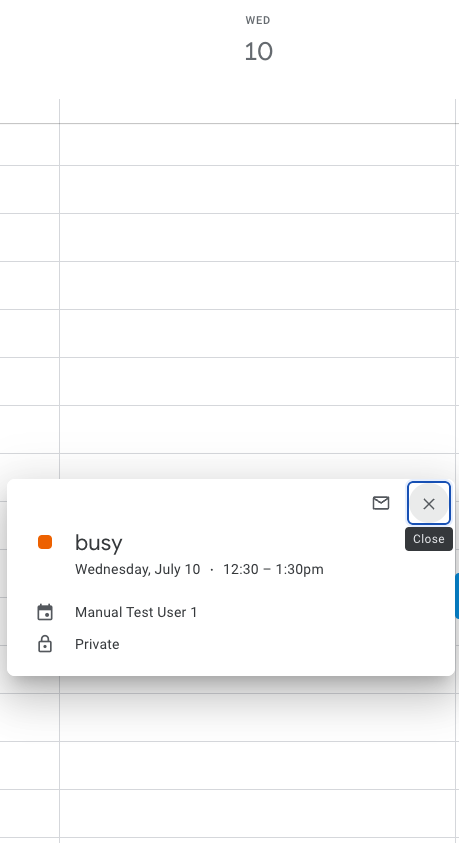
Figure 1: Example of a private event opened from Glean where the viewer only sees “busy” with no details in Google Calendar.
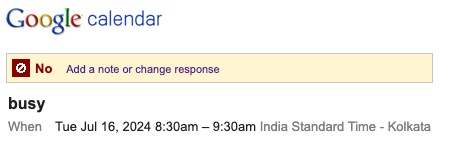
Figure 2: Example RSVP dialog for a busy event where users cannot see full event details.
Glean never grants broader event visibility than Google Calendar itself.
Limitations
The current Google Calendar connector behavior includes the following key limitations:
- Time window for indexing
- Future events are indexed only for up to 3 months ahead.
- Past events are indexed only for up to 6 months back.
- Events outside this window will not appear in Glean search or agents.
- Meeting summary availability
- Meeting summaries on the home page are only available when there is either a Google Meet transcript, Gemini meeting notes, or Zoom transcript attached or associated with the calendar event.
- Primary calendars only (current native behavior)
- The native index focuses on events from each user’s primary/personal calendar.
- Shared calendars, resource calendars, or additional personal calendars may not be indexed in the current release.
- Glean Chat support
- Direct interaction with meetings in Glean Chat via calendar actions is currently not supported; usage is through search, the home page Meeting Summary agent, and agent builder flows.
- Indexing of attachments
- Structured attachments (e.g., Google Docs) are crawled by the Google Drive connector, not directly by the Calendar connector. Calendar results link out to those docs using outlinks and rely on Drive for document content indexing.
Security and data access
The Google Calendar connector is designed to maintain privacy and follow the principle of least privilege:
- Authentication model
- Uses a service account with domain-wide delegation created during the Google Drive connector setup.
- Scopes are limited to those required for read-only access to users, groups, Drive, Reports (Audit), and Calendar.
- Permission enforcement
- Glean does not invent its own access model; it mirrors Google Calendar’s.
- For each event, Glean determines visibility from the underlying Calendar ACLs + event visibility (default / public / private).
- Users see only what they are allowed to see in Calendar — full details, free/busy only, or not at all.
- Deletion and revocation
- Glean uses Calendar’s incremental crawl plus Google Workspace Audit / Reports APIs to detect deletions and permission changes and remove or update events accordingly.
- When events are deleted or a user loses access, the corresponding records in Glean are updated or removed on the next incremental or full reconciliation.
- Data residency and retention
- Calendar documents and attached transcripts are stored and processed according to your existing Glean deployment’s data handling, the same as for Google Drive and Gmail.
- No additional write scopes to Calendar are used in the current connector; access is strictly read-only from the API perspective.