Choose your GitLab Cloud setup
Unified setup connects GitLab tools and configures search indexing in one flow. Indexing setup configures search and user identity mapping in a single form, with tools connected separately.
Compare the setup paths
Both paths require a GitLab group access token or personal access token to index content. OAuth does not replace this token.
| Capability | Unified setup | Indexing setup |
|---|---|---|
| Setup flow | Connect tools, configure indexing, then review setup. | Configure indexing credentials and user OAuth in one form. |
| Tools connection | Connect GitLab tools through OAuth in Connect. | Add a separate GitLab MCP connection. |
| Indexing token | Enter the token in a dedicated Set up indexing step, separate from OAuth in Connect. | Enter the token and user OAuth settings in the same Setup form. |
| Identity mapping | Configure user OAuth in Connect, with an optional CSV fallback. | Configure user OAuth in the connector form, with an optional CSV fallback. |
Each user authorizes GitLab with their own account to use tools. Configuring the connector does not authorize tools for every user. For a separate tools connection, see Set up tools and MCP integrations from Connectors.
Find your setup
When you set up GitLab Cloud in the Glean Admin console, you'll see one of the following setup flows.
- Unified setup
- Indexing setup
If you see Workspace → Connect → Set up indexing → Review setup, your connector uses unified setup.
Continue with unified setup
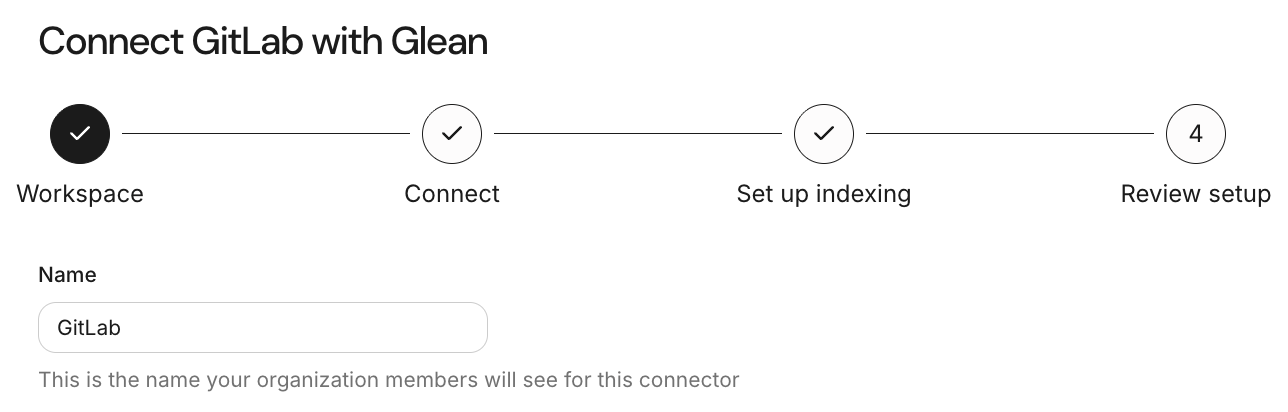
Workspace is the first step in unified setup.
If you see Setup → Manage data (Optional) → Schedule first crawl, your connector uses indexing setup. The Setup form contains Access Token and Use Glean's GitLab OAuth app.
Continue with indexing setup
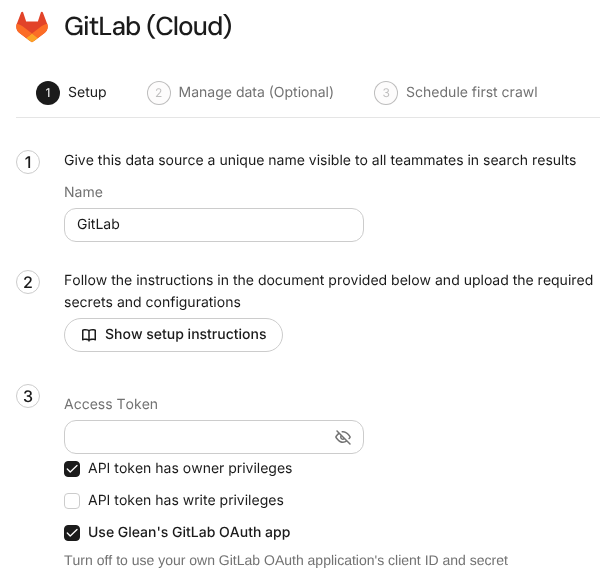
Indexing setup combines the access token and user OAuth settings in one form.
Existing connectors keep their setup flow. You don't need to recreate your connector.
See also
- GitLab Cloud overview: Check indexed content and permissions.