Choose your Greenhouse setup
Unified setup configures Greenhouse indexing and optionally connects tools in one flow. Indexing setup configures search indexing in a single form, without a built-in tools connection step.
Compare the setup paths
Both paths require Harvest v3 client credentials and webhooks for indexing. Authorizing Greenhouse tools does not replace these credentials.
| Capability | Unified setup | Indexing setup |
|---|---|---|
| Setup flow | Configure indexing, optionally connect tools, then review setup. | Configure indexing credentials in the Setup form. |
| Indexing credentials | Enter the base URL, webhook secret, and Harvest v3 client credentials in Set up indexing. | Enter the same values in the Setup form. |
| Tools connection | Authorize Greenhouse MCP in Connect tools (optional), or skip that step. | The form does not include a tools connection step. |
| Access review | Review indexed-content access before starting the crawl. Manage tool access separately. | Complete the indexing and crawl controls available in your setup. |
Each user authorizes Greenhouse with their own account to use tools. Configuring indexing does not authorize tools for every user. For separate tool connections, see Set up tools and MCP integrations from Connectors.
Find your setup
When you set up Greenhouse in the Glean Admin console, you'll see one of the following setup flows.
- Unified setup
- Indexing setup
If you see Set up indexing → Connect tools (optional) → Review setup, your connector uses unified setup.
- Set up indexing collects the Greenhouse base URL, webhook secret, and Harvest v3 client credentials.
- Connect tools (optional) provides a separate Greenhouse MCP authorization step.
- Review setup lets you review access and begin indexing.
Continue with unified setup
If you see a Setup tab containing the Greenhouse base URL, webhook secret, and Harvest v3 client credentials, without a separate Connect tools (optional) step, your connector uses indexing setup.
Continue with indexing setup
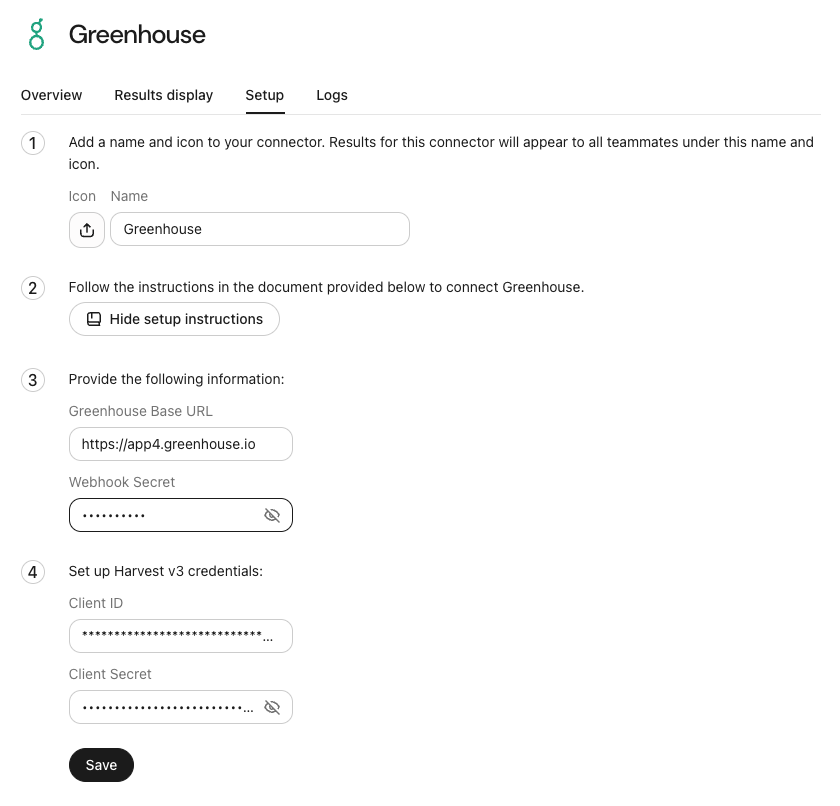
Indexing setup collects the Greenhouse connection details in the Setup tab.
Existing connectors keep their setup flow. You don't need to delete or recreate a working connector. Use Edit setup for an existing unified connection, or Continue setup if that control appears for an unfinished connection. For indexing setup, use the Setup tab.
See also
- Greenhouse overview: Check indexed content, permissions, and limitations.
- Glean Support: Get help if your setup does not match either path.