Slack hybrid search architecture overview
If your organization has a rate-limiting exception that allows you to continue using Slack Native for indexing, this documentation does not apply to your deployment.
Available Slack connectors
Glean provides a hybrid experience using the following Slack connectors in the Admin Console.
| Connector | Description | Slack app type | Typical use |
|---|---|---|---|
| Slack Real Time Search (RTS) | Fetches Slack messages live at query time. | Slack Marketplace app managed by Glean | Primary Slack connector for all customers. Required for Search and Assistant, and for Glean in Slack alongside the Slack connector. |
| Slack | The connector runs in one of two modes based on your Slack app’s rate limits: enterprise graph mode, which collects only relevancy signals like interactions, or indexing mode, available to customers with a written Slack rate-limit exception, which collects full Slack data for content indexing. | Per‑customer custom Slack app | Recommended for Glean in Slack, actions, or richer ranking signals. Required for proactive experiences like Glean in Slack. |
Indexing mode is supported in limited configurations where a customer-created custom Slack app and separately required written authorization from Slack is provided. This is separate from Slack RTS, which is used for real-time, permission-aware retrieval at query time rather than persistent storage of RTS results.
Older Slack connectors that use the Discovery API must be updated before March 3, 2026.
Which connectors should you use?
Use the table below to choose the right configuration.
| Scenario | Action |
|---|---|
| Connecting Slack to Glean for the first time | Set up Slack Real Time Search (RTS) as your primary connector. Also set up Slack for Glean in Slack or richer ranking signals. |
| Existing connector indexes messages (custom app) | Keep your existing connector for now, but setup Slack Real Time Search (RTS) as soon as possible. Work with your Glean representative to decide whether the Slack connector should continue indexing messages after March 3, 2026, based on any Slack rate limit exceptions you have in place. |
| Using Slack Enterprise Grid Connector or Slack connector with a central slack app | Setup Slack Real Time Search (RTS) and migrate their existing Slack connectors. |
| Possess a Slack‑approved rate‑limit exception for indexing | Set up Slack Real Time Search (RTS) and migrate their old Slack instance. Share exception details with Glean Support to maintain indexing alongside RTS. |
| Unsure which connector is active | Contact Glean Support or your representative before making changes. |
Slack hybrid search data flow
This section describes how data flows between Slack and Glean.
- A user issues a query in Glean or via Glean in Slack.
- The Glean query engine detects Slack‑related intent. It passes the query and filters to the Slack Real-Time Search Connector and Slack native to enrich with enterprise graph signals or indexing.
- The connector retrieves the user’s Slack OAuth token from a secure token store.
- The connector uses that token to call the Slack RTS endpoint (assistant.search.context) over HTTPS.
- Slack returns matching messages and optional thread context. Results include only what the user is allowed to see in Slack.
- Glean renders the results in Search, Assistant, or Glean in Slack.
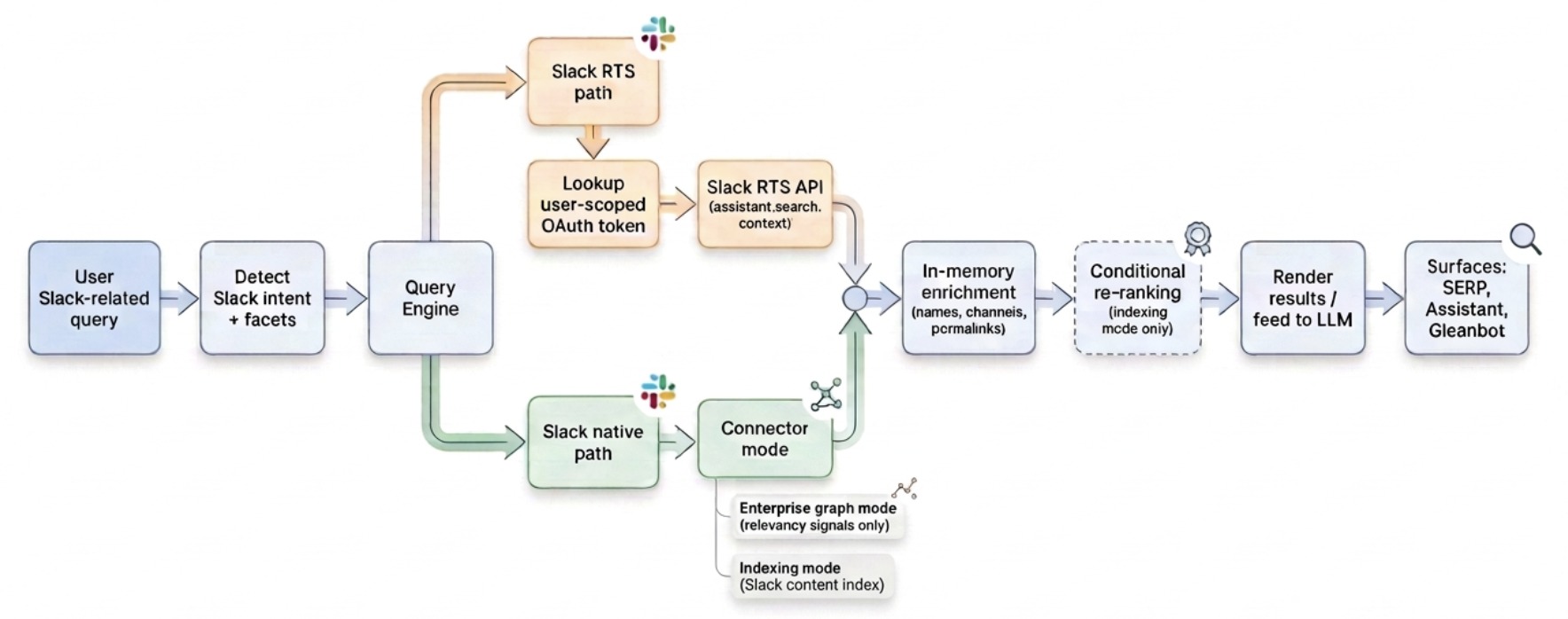
Figure 1: High‑level architecture for Glean’s hybrid search using the Slack native path and Slack Real-Time Search connectors.