Trello connector (Beta)
The Trello connector (Beta) enables you to index and search and access all your Trello workspaces, boards, and cards in Glean. The connector respects Trello permissions for each object, so users see only content they can access in Trello.
Supported Features and Limitations
Following are the supported features and limitations of the Trello connector.
Supported Objects/Entities
| Entity Type | Supported |
|---|---|
| Workspaces | Yes |
| Boards | Yes |
| Lists | No |
| Cards | Yes |
Lists are crawled to provide context for cards but are not indexed or are searchable as standalone entities.
Supported API Endpoints/Features
- REST API endpoints for workspaces, boards, lists, and cards.
- Webhooks for near real-time updates on card/board create, update, delete actions.
- Identity API for workspace and board membership resolution.
Limitations
- Only cloud (SaaS) Trello is supported. There is no on-prem variant.
- Private boards in free workspaces are inaccessible and you must use a paid standard, premium, or enterprise plan for private board indexing.
- SCIM APIs are not supported and all identity resolution is through REST APIs.
Crawling Strategy
| Crawl Type | Full Crawl | Incremental Crawl | People Data | Activity | Update Rate | Webhook | Notes |
|---|---|---|---|---|---|---|---|
| Trello | 1d | N/A | 30m | N/A | N/A | Yes | Requires Jira or Confluence setup |
- Full crawl: The entire workspace corpus is indexed every 24 hours.
- People data: Membership or identity crawls are every 30 minutes.
- Webhooks supplement crawling is done for real-time freshness of indexed cards and boards.
- No incremental content crawl is done apart from webhook-driven updates.
Requirements
There are specific technical and credential requirements to configure the Trello connector:
Technical Requirements
- Cloud version of Trello.
- Glean requires network access to Trello’s API and webhook callback endpoints.
Credential Requirements
- You need a Trello API key and an API token, both generated through the Trello UI. Optionally, an app secret if OAuth is used.
- An admin user in the desired Trello workspace(s) must be used to ensure visibility into all boards and content.
- You can configure the access token to never expire, minimizing credential maintenance.
- During setup, you must also provide the webhook callback URL for Glean so that Trello events are pushed in real time.
Permission Requirements
- The connector enforces all Trello permission rules, including board or workspace visibility (private, public, organization).
- Only admin users can generate the required tokens and are subject to workspace-level or enterprise-level visibility rules.
- For workspace membership enumeration (identity crawl), certain privileged endpoints require enterprise-level admin tokens.
Preliminary Source/System Setup
- Before setup, create a dedicated Trello admin user for authorization to improve control and minimize visibility issues.
- Generate your Trello API key and token through Trello’s user settings and application directory.
- If using OAuth 1.0, manually grant access and authorize route with your new key.
Configuration and Setup Instructions
This section guides you through connecting Trello to Glean and configuring crawl and security options.
Prerequisites
- Active subscription to Trello standard, premium, or enterprise.
- Admin access to the relevant Trello workspaces.
- Glean admin rights for connector configuration.
Step-by-Step Setup
Perform the steps in the following sections to configure the Trello connector.
Getting Trello configuration details
-
Log into Trello with the admin user credentials.
-
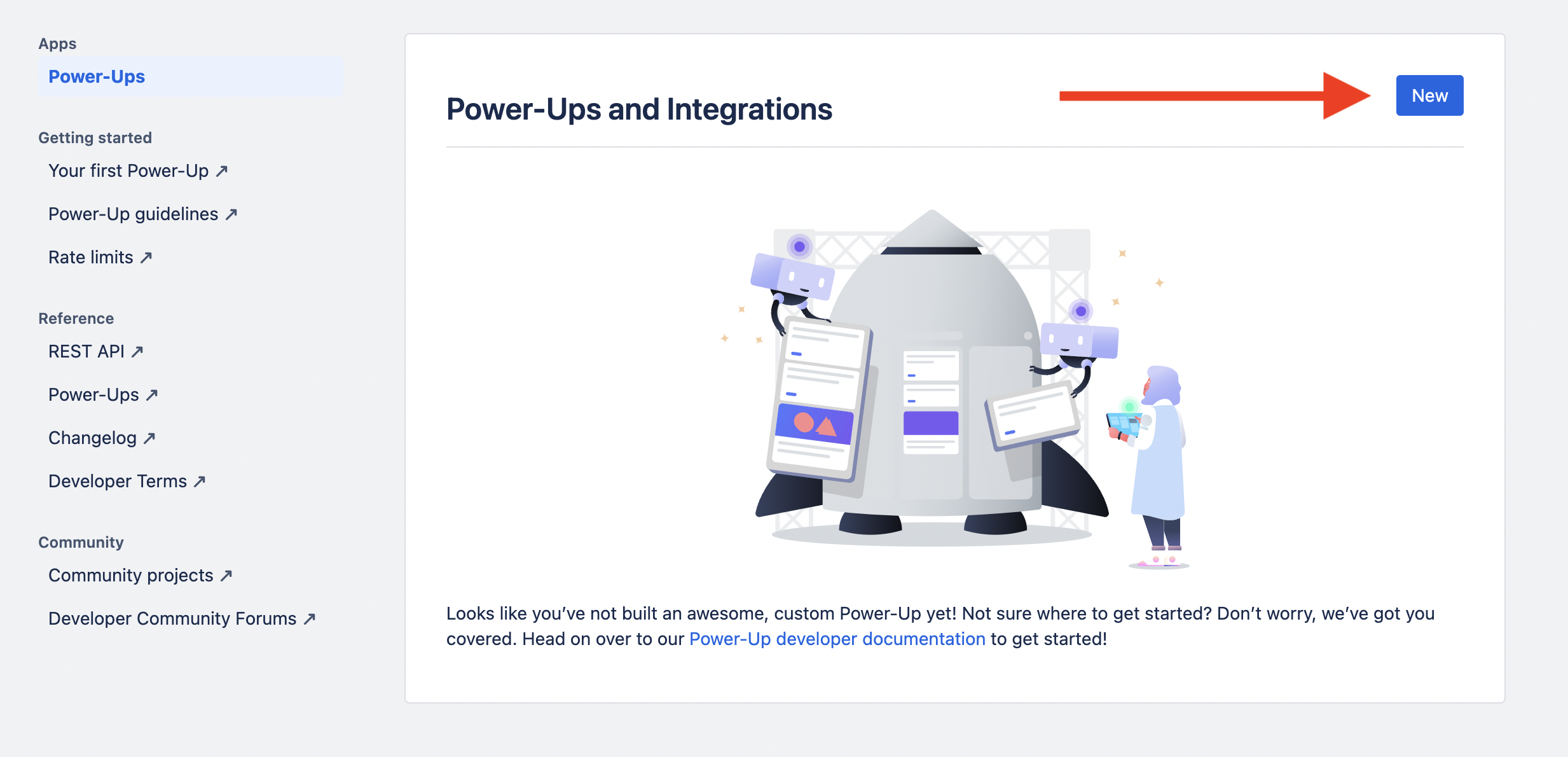
Go to the Admin page and click New to creare a new integration.
-
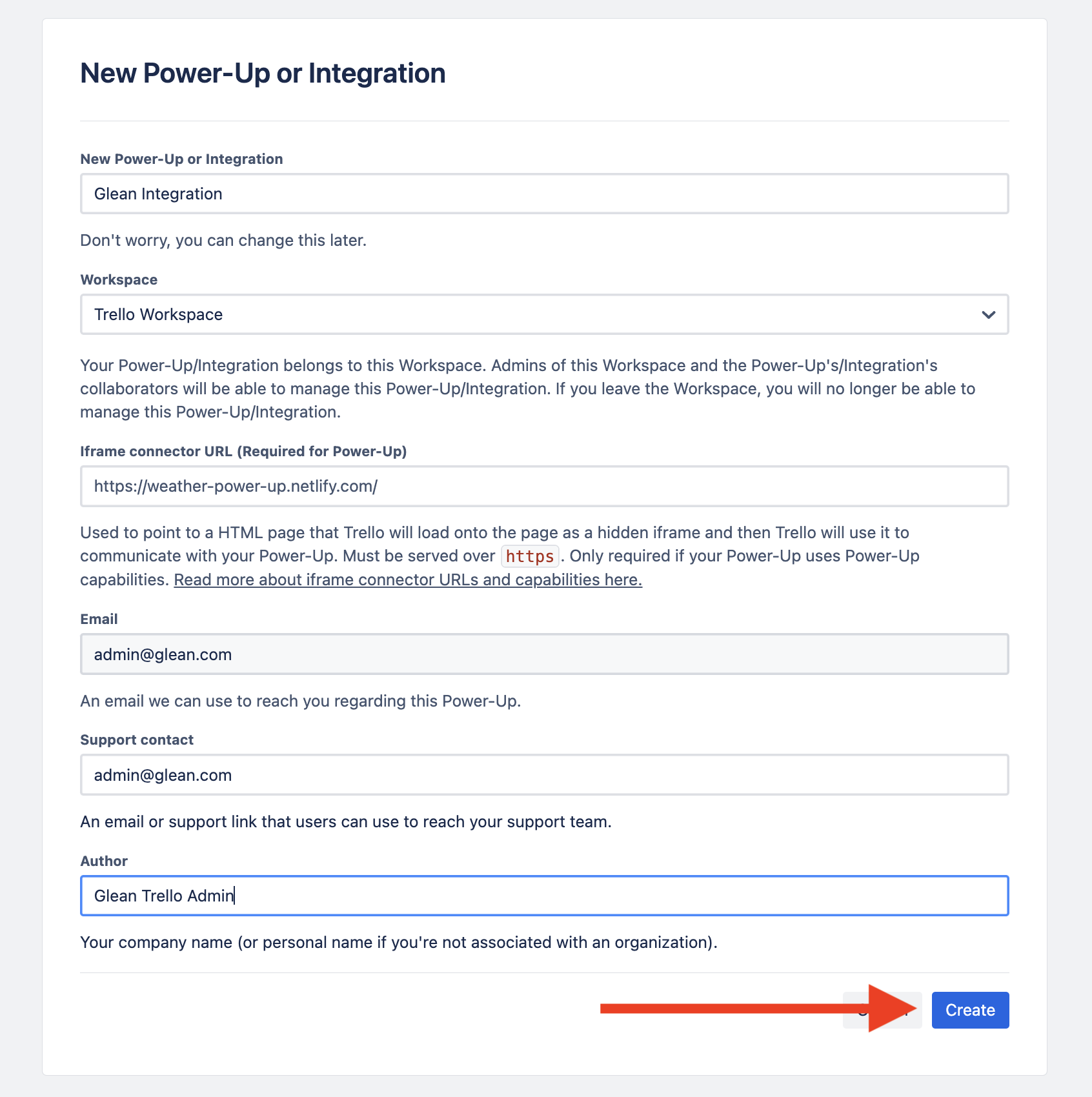
Fill in the New Powerup or integration form:
- Add "Glean integration" as the New Powerup or integration name.
- Add the Workspace as per your configuration.
- Add the Email, Support contact and Author details in the respective fields.
- Leave the Iframe connector URL field blank.
-
Click Create.
-
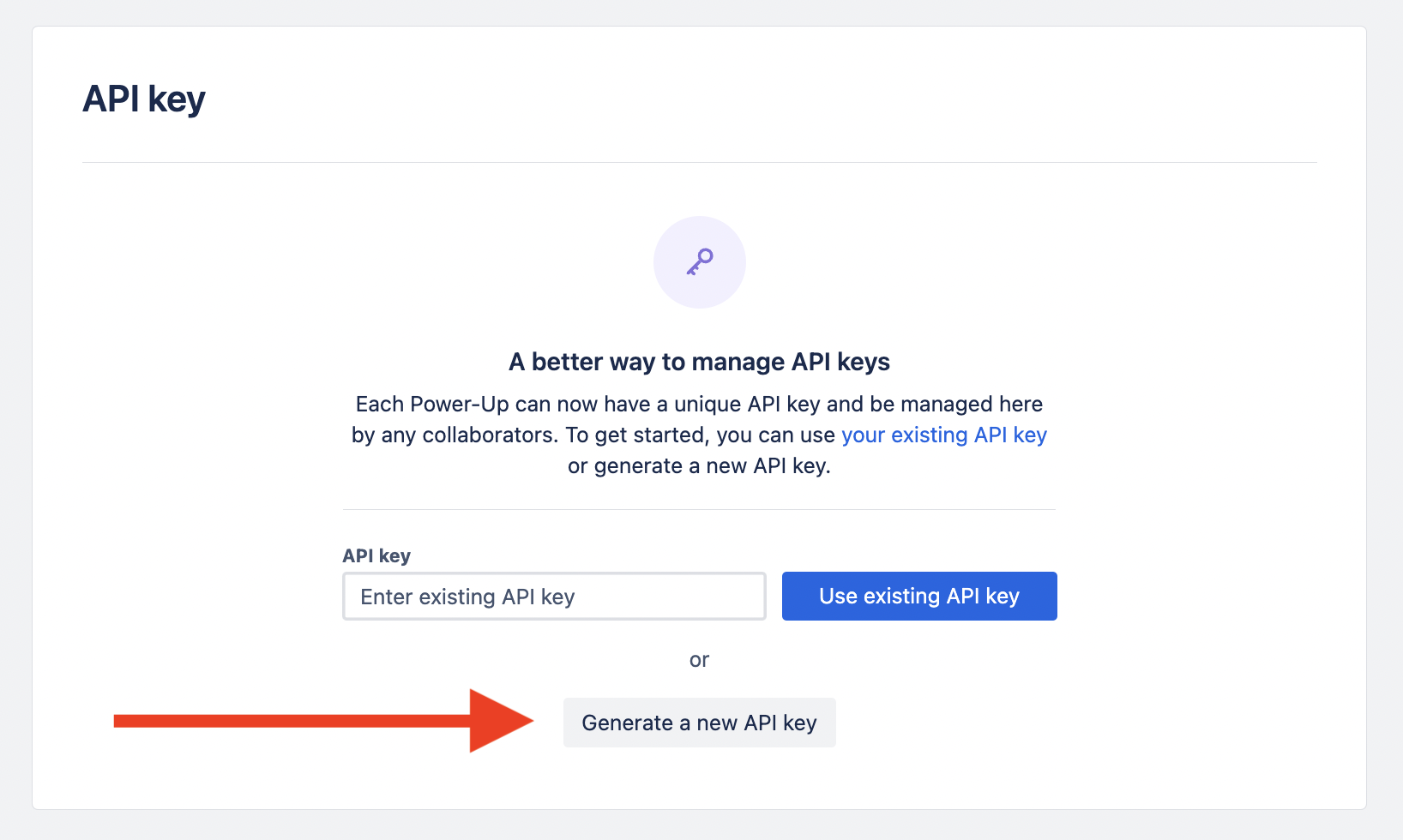
Click Generate a new API key.
-
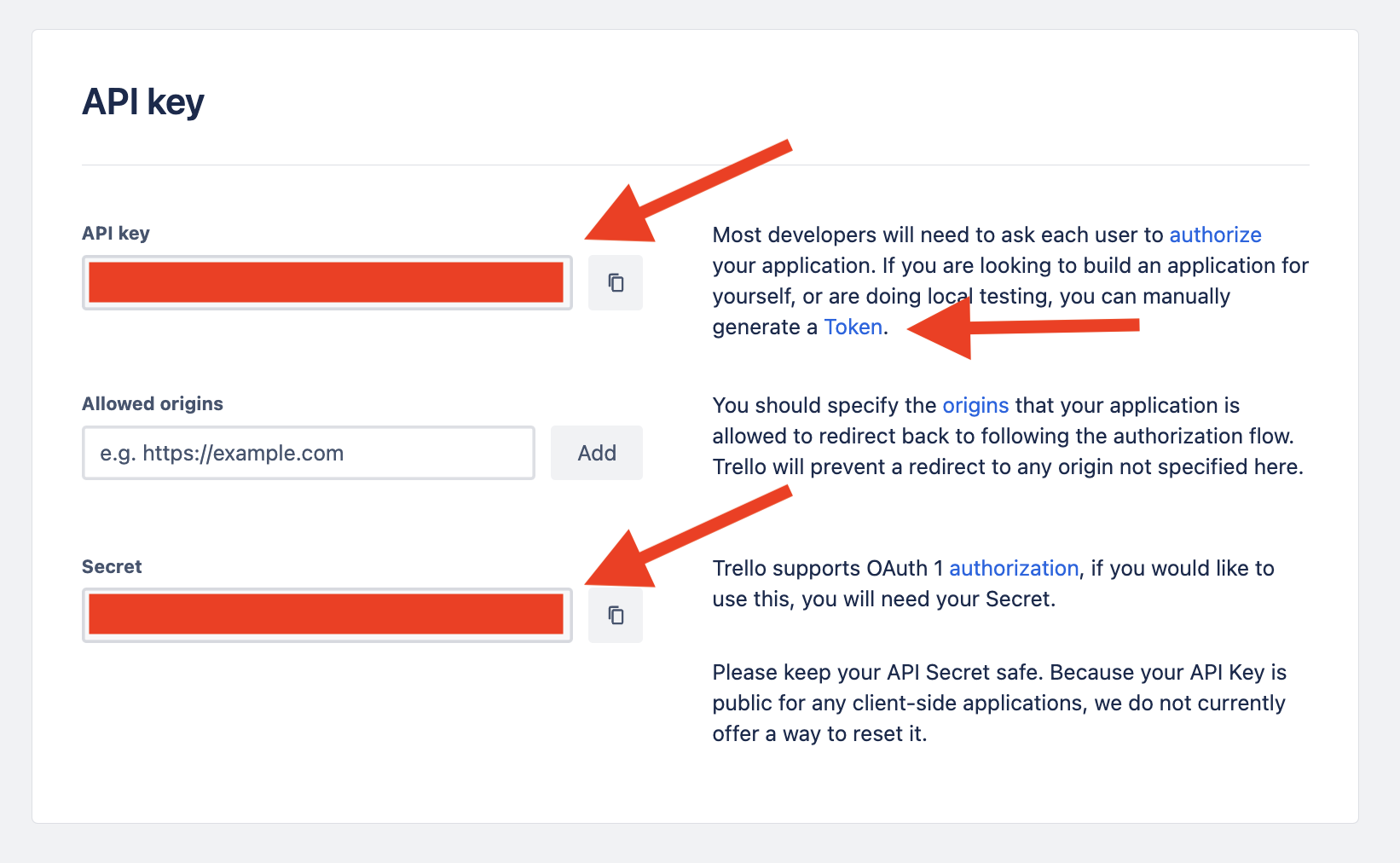
To generate the access token manually, click the Token link and click Allow.
Connecting Trello and Glean
- Go to the Glean Admin console.
- Navigate to Data sources and click ** Add data source**.
- Select Trello from the list of data sources.
- In the Setup tab,
- Add a name for the data source.
- Add the API Key, Access Token and Webhook secret generated in the above section. For more information see, Getting Trello configuration details.
- Click Save.
Crawl Configuration Options
- You can modify full crawl scheduling from the default daily interval.
- You can configure people data recrawl intervals. The default interval is 30 minutes.
- Advanced red or greenlist and custom object settings are not relevant for Trello.
- Lookback period is managed through webhook event processing and regular crawl configuration.
Permissions & Security
Data and Metadata Ingested
- Workspaces for which the admin user has access.
- Boards.
- Cards.
- User identities and membership data for permission enforcement.
Permission Propagation Logic
- Workspace and board visibility settings are inherited and mapped into Glean.
- Card-level permissions are resolved according to Trello’s current model.
- Search results only show what the querying user is permitted to view in Trello.
Security & Compliance Notes
- API keys and tokens are never shared outside the customer's secure GCP instance.
- All indexed data is stored in the customer’s cloud owner project.
- Content visibility and deletion follow Trello’s event model through webhooks and periodic full crawls.
Known Security Restrictions
- There is no support for on-prem or multi-instance Trello deployments.
- Visibility caveats exist for free workspace users.
- Private boards are not indexed.
Data Privacy Implications
- Since identity and content crawls rely on Trello’s API, indexed content visibility mirrors your existing Trello privacy model.
- No additional identity data is ingested beyond membership, workspace and board assignments.