Model choice
You can choose which AI model powers a Glean Assistant conversation or Builder Assistant chat. Model choice is available for Glean Universal Model Key and Customer Key (BYOK) deployments, subject to the models and features enabled by your admin.
If your organization uses Glean Universal Model Key, you can set a default model that Glean manages for you based on evaluations and real‑world usage data.
Model choice lets you:
- Select a specific model for a given Glean Assistant conversation.
- Use Auto (the default). On Glean Universal Model Key, Glean selects a model for each chat on your behalf. On Customer Key (BYOK), Auto uses the default model your admin configured.
- Experiment with multiple leading models on your own company data, within Glean's governed enterprise environment.
(Recommended) Use Auto
Auto is the default option in Glean Chat. Its subtitle in the UI is "Selects the best model". What Auto does depends on your key type.
Auto on Glean Universal Model Key
Glean-managed best-fit model selection is available only on the Glean Universal Model Key. When you use Auto:
- Glean automatically selects the model for each chat based on internal evaluations and live usage data.
- Glean continuously monitors quality, latency, cost, and reliability in production and adjusts the recommendations over time.
- You get a strong default experience without tracking the rapidly changing model landscape yourself.
Glean recommends using Auto for most conversations, especially when you are not sure which specific model to select.
Auto on Customer Key (BYOK)
The Customer Key (BYOK) type does not support Glean-managed best-fit model selection. Auto in this kind of deployment entails the following:
- Auto uses the default model your admin configured in the Model Hub. It does not switch models based on task complexity, cost, or live evaluation data.
- To change which model Auto uses, an admin must change the configured default model. For more information, see Change your default model on Customer Key. Users can still select a specific model for an individual chat.
- Model upgrades and provider failover remain your team's responsibility. For more information, see Feature availability by LLM key.
On Customer Key, adaptive reasoning and retrieval planning still apply. Glean can vary how it plans retrieval and reasoning steps for a request. That behavior is independent of model selection, and it does not mean Auto is choosing a different model.
Select a model in Glean Chat
Here's how to select a model in Glean Chat:
- Navigate to New Chat, or start a new chat from the Glean URL for your organization.
- In the chat interface, select the adjustment icon. Glean uses Auto by default.
- Pick a specific model (for example, GPT-5.5, Claude Sonnet 4.6, or Gemini Pro 3.1) from the list your admin enabled.
- Enter your question or task as usual. Glean uses the selected model to respond to that conversation.
If you don't see the model choice feature or a specific model you expect, contact your Glean admin. They may have limited which models are available for your organization.
- The selection applies to a particular chat session. You can pick a model for a conversation, but you cannot change the global default models used by Assistant for your organization.
- If you do nothing, Glean keeps using Auto as the default for a seamless experience.
Select a model in Builder Assistant
Builder Assistant includes a model picker in its chat bar. Use it to choose the model that powers Builder Assistant interactions while you build an agent. This selection affects Builder Assistant chat only. It does not change the models configured for the agent or its individual steps.
To select a model:
- In Glean, go to Agents.
- Click Create. Builder Assistant opens.
- In the Builder Assistant chat bar, click the current model name.
- Select a model from the list.
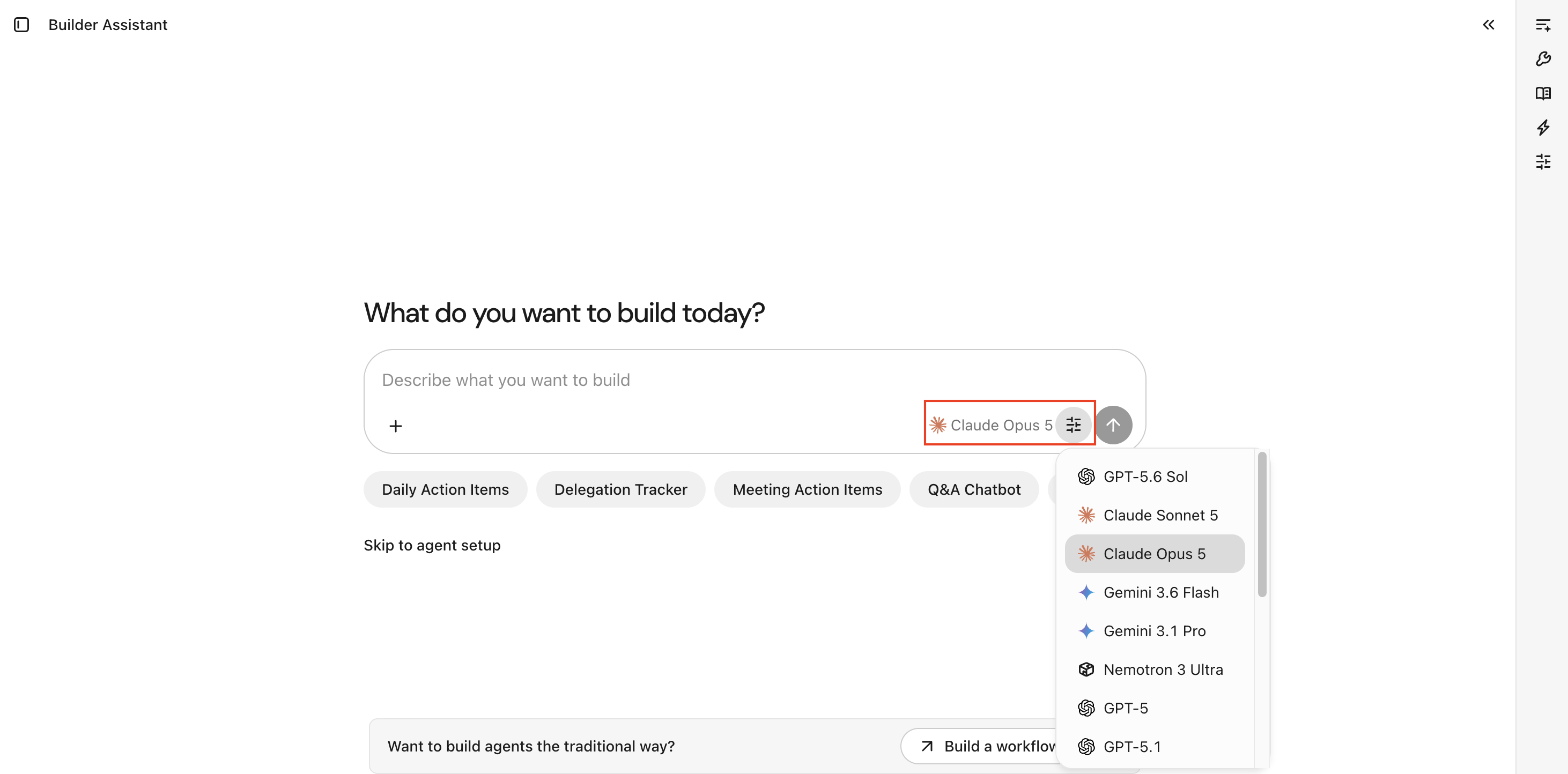
Builder Assistant initially uses the same default model configured for Agents. It does not provide the Auto option available in Glean Assistant. After you select a model, your selection persists across Builder Assistant sessions and agents. Each response identifies the model that generated it.
Available models
The exact list of models shown in Glean Chat and Builder Assistant depends on what Glean has enabled globally and what your admin has allowed for your deployment. Builder Assistant shows named models enabled for Agents. Examples of models that may be available include:
- GPT family, for example, GPT 5.2
- Claude family, for example, Claude Sonnet 4.6
- Gemini family, for example, Gemini Pro 3.1
The Model Hub of Glean and Universal Model Key allows admins to quickly onboard new frontier models from providers such as OpenAI, Anthropic, Google, and Amazon as soon as they launch, which is often under a beta flag.
For more information about the models available in Glean, see Supported models.
Model names and availability can change over time as providers release new versions or retire older ones.
Default models and premium models
A model's default status and its pricing tier are separate things:
- Default describes which model Glean uses when you don't select a specific one. On the Glean Universal Model Key, Auto selects a default model for you. On Customer Key (BYOK), the default is the model your admin configures.
- Premium describes a pricing tier. Premium models consume FlexCredits when they run, whether Glean selects one automatically in Auto or you choose it yourself.
Because these are independent, your default model can also be a premium model. When it is, everyday use of that model through Auto consumes FlexCredits. To see which models are premium, or to restrict them, see Glean Enterprise Flex pricing and Exclude or restrict models.
Admin controls
Glean Admins can:
- Decide which models are available for users in Glean Chat and Builder Assistant.
- If using Glean Universal Model Key, keep some models in beta or limited rollout, and set Auto for everyone else.
This lets admins control cost, compliance, and change management, and allows users to experiment with different models when appropriate.
Model availability in Builder Assistant follows your organization's existing model controls. To make a model available to builders, an admin must enable it for the deployment and for Agents where applicable. Premium models can also be hidden from model pickers or restricted by department. For more information, see Exclude or restrict models.
The model management experience differs between Glean Universal Model Key and Customer Key deployments. Glean Universal Model Key customers see models grouped by creator (OpenAI, Anthropic, Google) with per-model, per-surface controls. Customer Key deployments configure models through hosting provider setup.
Security, privacy, and pricing
Model choice follows the existing enterprise model for Glean integrations:
- Glean manages contracts, capacity, and upgrades with providers such as OpenAI, Azure OpenAI, Vertex AI, and Amazon Bedrock, helping customer avoid vendor lock‑in.
- Providers are configured with zero‑retention commitments, so customer data is not stored or used for training by the model vendors.
- Model choice does not introduce additional consumption pricing today. Glean will alert admins if this changes in the future.
Limitations
- Surface-specific selection: Model choice applies to the Glean Assistant conversation or Builder Assistant session where you select it. It does not change your organization's default model.
- Chat-only for Builder Assistant: Builder Assistant model selection controls the model used for chat interactions. It does not change the models configured for the agent or individual agent steps.
- Persists across sessions: Your selected Builder Assistant model persists across sessions and agents.
- Admin-controlled availability: You can select only models that are available for your deployment and enabled by your admin. If a model is missing, ask your admin to check model availability, deployment compatibility, premium-model visibility, and department restrictions.
- Usage-based pricing: Builder Assistant usage may be subject to usage-based pricing. See your plan details for applicable charges.
See also
- To learn how to configure models and providers in your deployment, see Configure LLMs in the Model Hub.
- To see which models are supported, see Supported LLMs.
- To understand how availability varies by deployment and key mode, see Availability by hosting environment and provider.
- To learn how to use Builder Assistant while creating an agent, see Agent Builder.