Connecting Glean to on-premises connectors
Connect Glean's GCP deployment to connectors in your private network. Private networking connects Glean's deployment network to the customer network. Glean uses a proxy VM in its Google Cloud Virtual Private Cloud (VPC) to route crawler traffic to those connectors through a private network path. Glean supports Shared VPC, VPC peering, a standalone proxy, and site-to-site Virtual Private Network (VPN) connections.
This page covers Glean-hosted and customer-hosted deployments that connect to on-premises or private connectors.
Prerequisites
Prepare the following information before you choose a connectivity method:
- The GCP project and VPC network that host your connectors.
- The connector hostnames or IP addresses.
- The ports that each connector uses.
- The Classless Inter-Domain Routing (CIDR) ranges in the Glean and customer networks. Keep these ranges non-overlapping.
- A network administrator who can create or approve the required connections and firewall rules.
Ask your Glean Customer Success or Solutions Engineering contact to confirm the supported method and final configuration values for your deployment.
How Glean reaches private connectors
Glean deploys a proxy VM in the GCP deployment. The proxy bridges the Glean network and the customer network. Crawlers send requests for private connectors through this proxy.
For a site-to-site virtual private network, the customer provides a virtual private network gateway. Glean creates the virtual private network connection and routes traffic through the proxy. For Shared VPC and VPC peering, Glean attaches the proxy to the private network path that the customer provides.
Glean validates the proxy, resolves each connector hostname, and tests connectivity to each connector before it enables crawling. The public proxy handles separate outbound traffic and does not replace the on-premises proxy.
Choose a connectivity method
| Method | Choose this method when | What the customer provides |
|---|---|---|
| Shared VPC | Your connectors run in a customer GCP project and you want Glean to attach the proxy to a shared subnet. | A shared subnet and the network details that Glean needs to attach the proxy. |
| VPC peering | Your network design requires a direct peering connection between your network and the Glean transit network. | A network for peering with the Glean transit subnet. Treat this as a specialized option and confirm it with Glean before you choose it. |
| Standalone proxy | You maintain a legacy deployment that already uses this model. | The existing proxy configuration. Do not choose this method for a new deployment without approval from Glean. |
| Site-to-site virtual private network | Your connectors run in another cloud or in a private data center. | A virtual private network gateway, routing details, and the network ranges that Glean must reach. |
Configure shared VPC
Use Shared VPC when your connectors run in a customer GCP project.
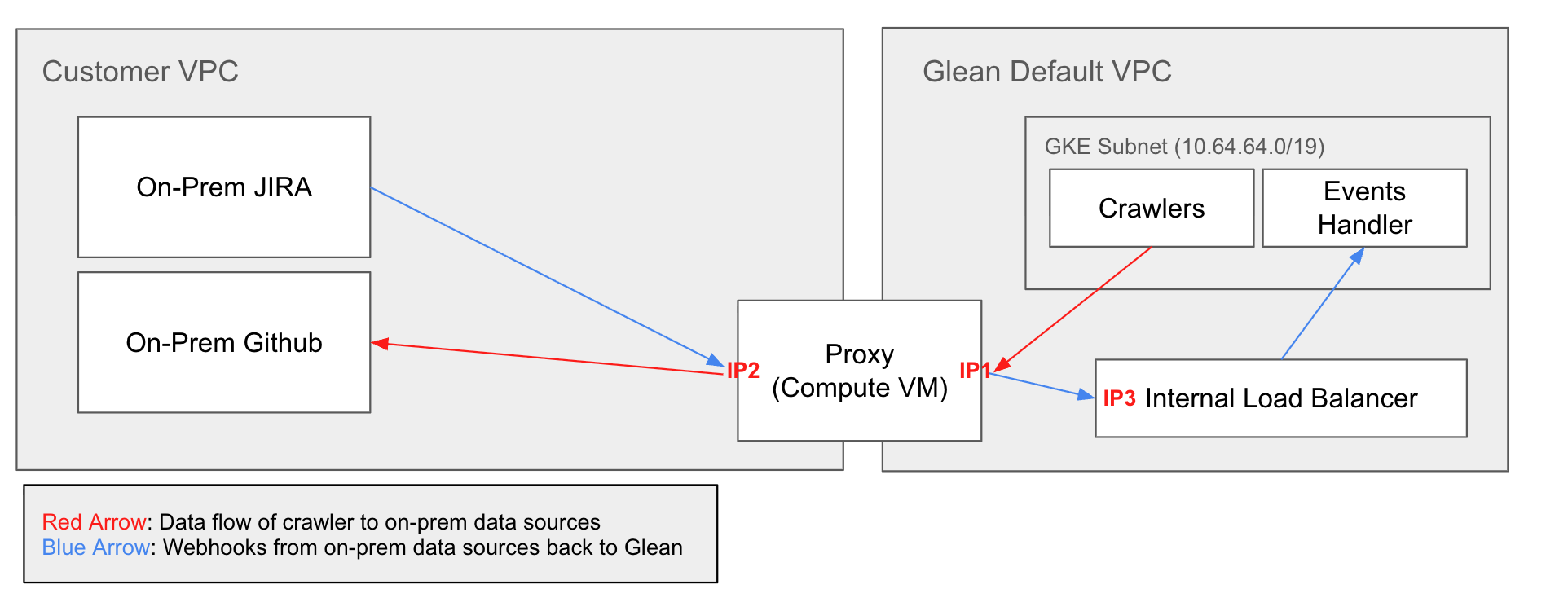
- Share the customer subnet with the Glean project.
- Give Glean the permissions that it needs to attach a network interface to the shared subnet.
- Send Glean the shared subnet, network range, gateway, and connector details.
- Work with Glean to configure the proxy.
- Test name resolution and connectivity from the proxy to each connector.
Glean configures the proxy on the shared subnet and validates the connection before it enables crawling.
Configure VPC peering
Use VPC peering only when your network design requires it.
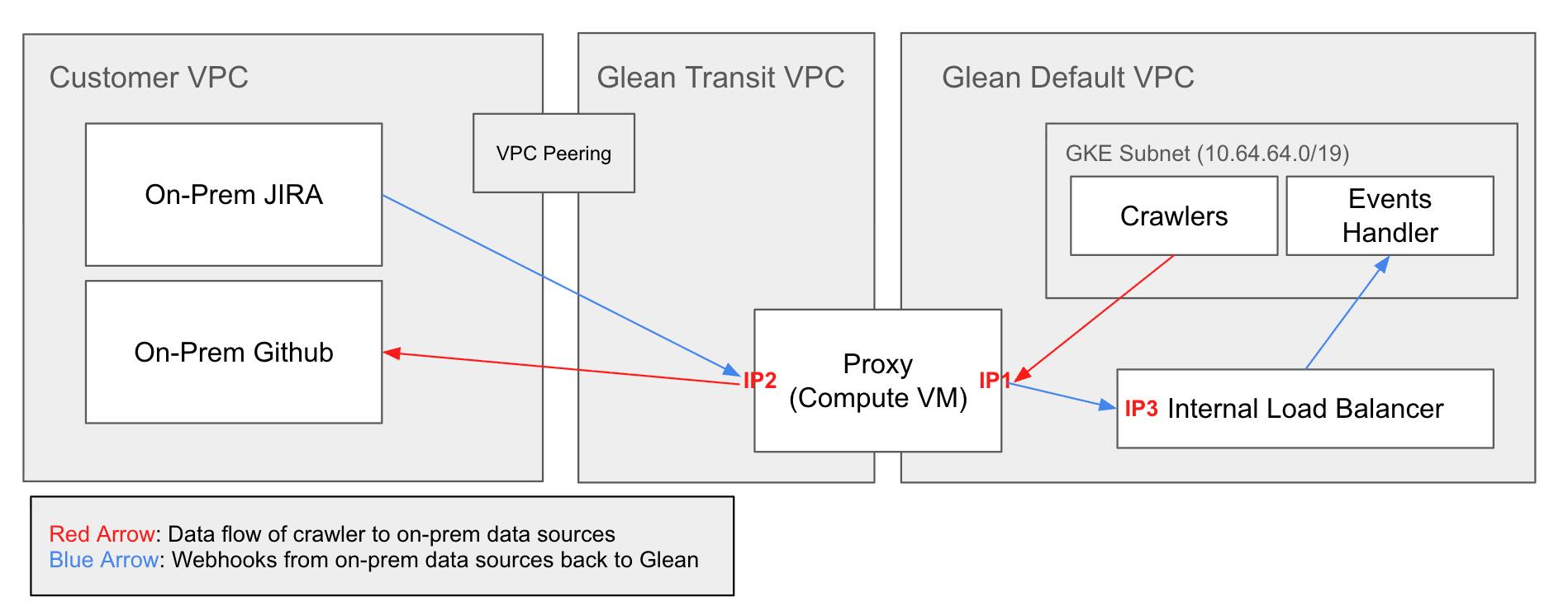
- Create a customer network for peering with the Glean transit subnet.
- Confirm that the customer and Glean network ranges do not overlap.
- Send Glean the customer project and network details.
- Work with Glean to complete the peering connection.
- Test name resolution and connectivity from the proxy to each connector.
Glean completes the proxy configuration after the peering connection becomes available.
Use a standalone proxy
Use a standalone proxy only for a legacy deployment. This method does not create a transit subnet.
Contact Glean before you use this method. Glean must confirm that the deployment supports the existing proxy configuration and must provide the required values.
Virtual private network connection
Use a site-to-site virtual private network when your connectors run in another cloud or in a private data center.
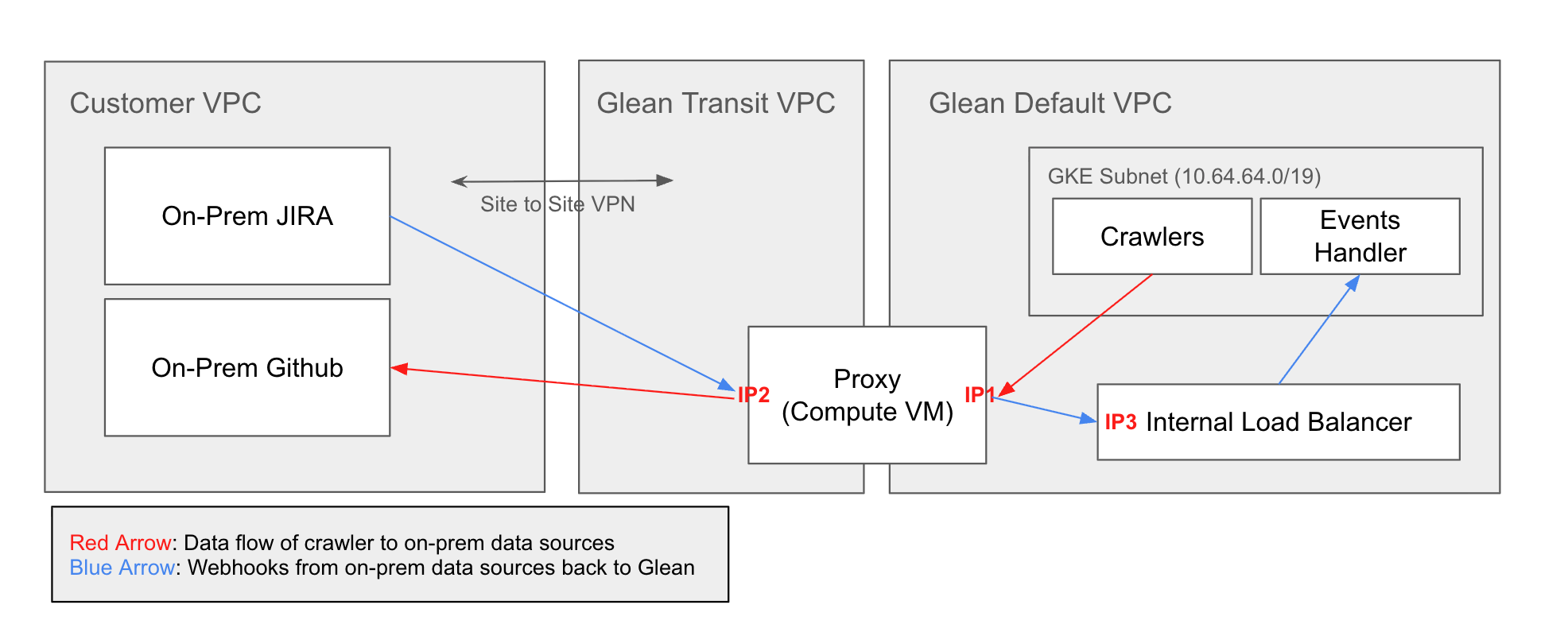
- Provide Glean with the public IP address of your virtual private network gateway.
- Agree on the Internet Key Exchange (IKE) version, routing mode, remote traffic selectors, destination ranges, and the IP name for the virtual private network.
- Allocate a non-overlapping transit range for the Glean proxy.
- Exchange a strong pre-shared key with Glean through an approved secure channel.
- Work with Glean to create the IPsec connection and route traffic through the proxy.
- Test name resolution and connectivity from the proxy to each connector.
The proxy routes requests to the customer network through the virtual private network. Glean validates the proxy, hostname resolution, and connector connectivity before it enables crawling.
Network and security requirements
- Keep connector endpoints on private network paths. Do not expose them to the public internet to support this setup.
- Use firewall rules that permit only the traffic that the connectors require from the Glean proxy.
- Keep the Glean and customer CIDR ranges non-overlapping. GCP does not support overlapping ranges for VPC peering.
- List every connector port in the setup plan. Glean validates each port during connectivity testing.
- Keep the on-premises proxy separate from the public proxy. The on-premises proxy reaches private connectors. The public proxy handles separate outbound traffic.
Implementation process
- Choose a method. Select Shared VPC, VPC peering, a standalone proxy, or a site-to-site virtual private network based on the connector location and network design.
- Prepare the network. Create or approve the required subnet, peer network, virtual private network gateway, routes, firewall rules, and connector access.
- Send the configuration to Glean. Provide the project, network, connector, routing, and security details for the selected method.
- Configure the connection. Glean configures the proxy and completes the selected private connection.
- Validate the connection. Glean checks that the proxy runs, resolves each connector hostname, and reaches each connector.
- Enable crawling. Glean enables the connector crawlers after the validation succeeds.
Support
- See the GCP FAQ for deployment questions.
- See Monitoring probe for proxy and connector checks.
- Contact your Glean Solutions Engineer for network issues.
- Contact Glean Support for general support.