AZUREDEVOPS_2
Possible error
- Glean is unable to list Azure DevOps projects during connector validation.
Possible reasons
- The Azure DevOps app user (service principal) is not added as a user in the Azure DevOps organization.
- The app user does not have Basic access level and Project Reader (or equivalent) role in one or more projects that should be indexed.
- The Azure DevOps organization name configured in Glean does not match the actual organization name in Azure DevOps.
Possible resolutions
To resolve this error, try one or more of the following resolutions:
Confirm the app user is added to the Azure DevOps organization
- In Azure DevOps, go to Organization settings → Users.
- Verify that the service principal / app registration used for the Azure DevOps connector is listed as a user in the organization.
Verify project-level access
For every project you want to index:
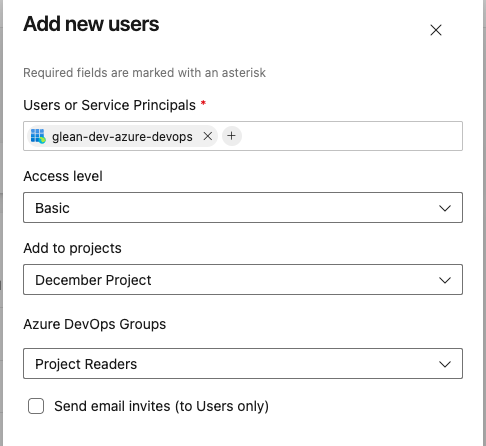
- Ensure the app user is assigned:
- Access level: Basic
- Project role: Project Reader (or equivalent read-only role)
- If the app user is not added to a project, Glean will not be able to list that project.
Double-check the configured organization name
- In the Glean Admin console, confirm that the Azure DevOps organization name matches the value in your Azure DevOps instance.
- A mismatch can cause project listing to fail even if the credentials themselves are valid.
For more information, see Azure DevOps connector setup.
If you continue to see this error, contact Glean Support.