AZUREDEVOPS_3
Possible error
Glean cannot list Azure DevOps repositories for authorized projects.
Possible reasons
- The authorized Azure DevOps project does not contain any repositories.
- The Azure DevOps app user (service principal) doesn't have Read access to repositories.
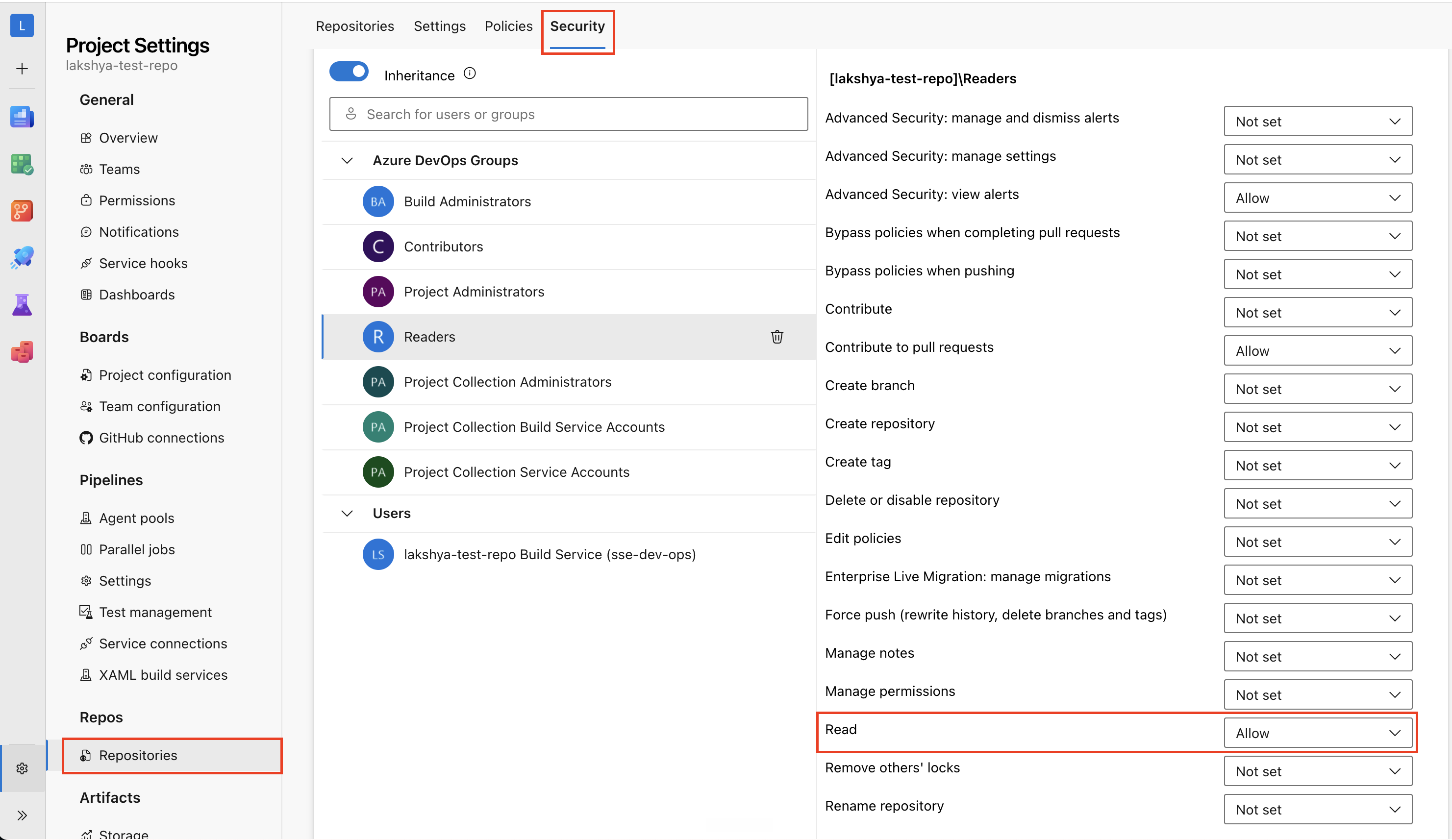
- Reader group hasn't been granted Read access to repositories.
Possible resolutions
To resolve this error, try one or more of the following resolutions:
Verify project contents
- Ensure the service principal has access to projects containing at least one repository.
- If the project does not contain any repositories, uncheck the Crawl Repositories option in the configuration settings.
Verify permissions in Azure DevOps
Ensure the Azure DevOps app user (service principal) has permission to read the repositories:
- In Azure DevOps, navigate to Organization Settings > Project Settings > Repositories.
- Confirm that either the Reader group or Azure DevOps app user (service principal) has been granted Read access.
For more information, see Azure DevOps connector setup.
If you continue to see this error, contact Glean Support.