Interactive artifacts
Interactive artifacts are rich, dynamic pages you can create by simply chatting with Glean, no code required. They help you turn enterprise context into visual proposals, refreshable dashboards, and lightweight apps, all tailored to your needs.
Each artifact lives natively in Glean with a stable URL and shows up in Glean search. When Chat Sharing is enabled for your organization, interactive artifacts can be shared with private, team, or org-wide visibility. Under the hood, these artifacts are powered by HTML rendered in a secure sandbox.
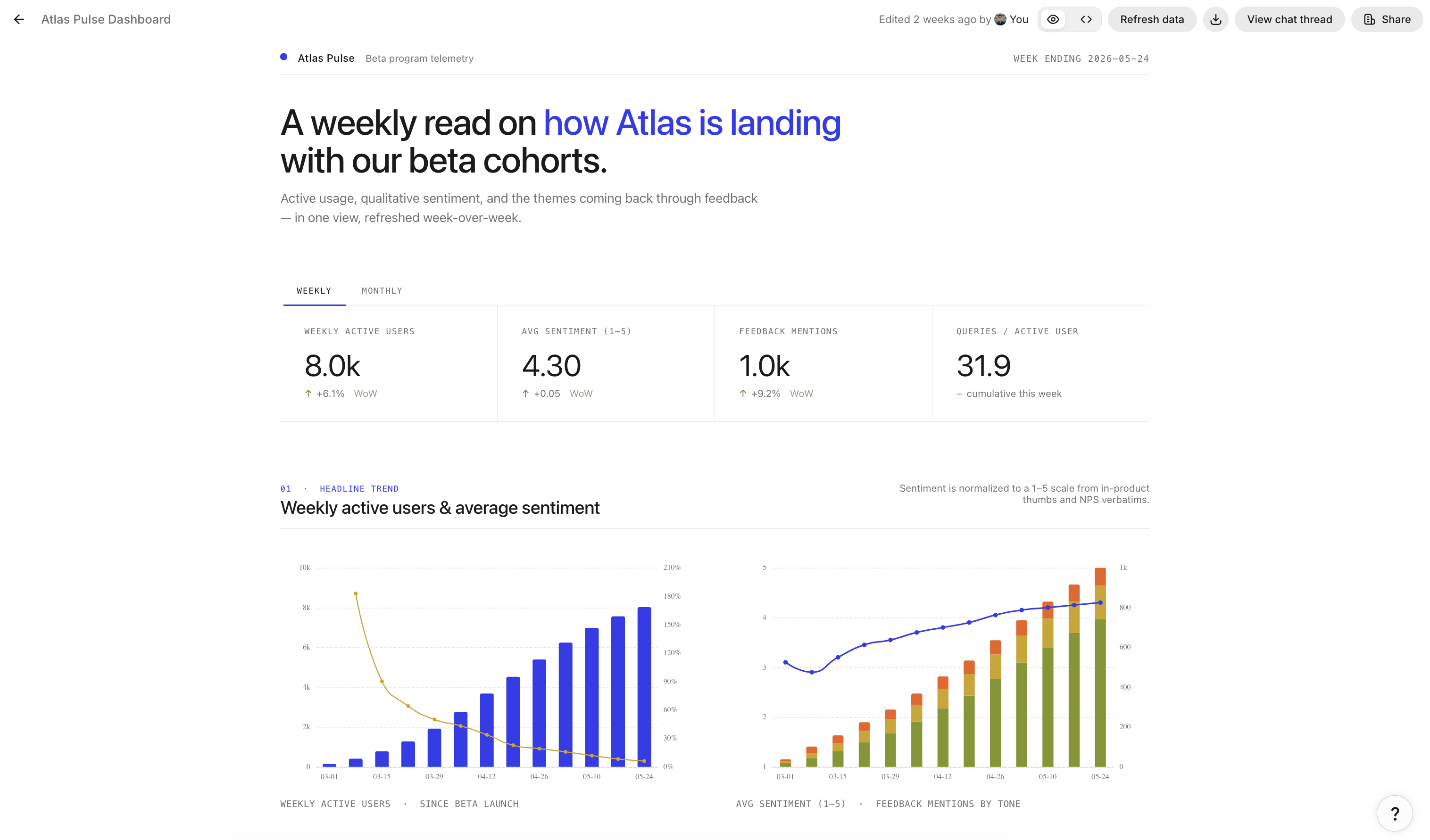
An interactive artifact showing a dashboard with weekly active users and average sentiment charts
Common use cases
Interactive artifacts are a great fit for:
-
Visual content
- Customer proposals, slide decks, QBRs, and other polished visuals where design and interaction help tell the story.
-
Dashboards
- Interactive views that summarize recent activity, metrics, or findings for a customer or initiative, shared via a stable link and refreshed on a schedule so viewers always see current numbers.
-
Lightweight internal apps and tools
- Simple calculators, forms, or interactive visualizations generated by Glean and shared as a self-contained experience for your team.
-
Research and analysis hubs
- Interactive visualizations for Deep Research outputs or internal analyses where a static document doesn't capture the full experience.
Choose full or inline artifacts
With Auto model selection, Glean can choose a full interactive artifact even when your request doesn't mention HTML. Glean selects the format that best fits the output:
| Full interactive artifact | Inline artifact |
|---|---|
| A self-contained page or app with rich layout, visual structure, or interactivity | A compact chart, diagram, or visualization inside the chat response |
| Best for dashboards, calculators, micro-apps, and large analyses that are easier to explore visually | Best for a focused visual that supports the answer without needing a separate page |
Requests for documents, spreadsheets, slides, or images use those formats when they fit the task better. To control the output, name the format in your request. Ask for a full interactive artifact when you want a standalone page in Canvas, or an inline chart when you want a compact visual in the chat response.
Key capabilities
Interactive artifacts support:
-
Visual and interactive content
- Create rich, interactive pages, such as dashboards, walkthroughs, and lightweight apps, without leaving Glean.
-
Glean-native publishing
- Sharing an interactive artifact publishes the current view into a standalone page.
- You can continue iterating alongside Glean, and viewers see the latest version.
- Choose between private, team, or org-wide visibility.
-
Discovery across Glean
- Glean assigns a stable URL for every interactive artifact, with an option to attach a human-friendly go/link (for example, go/your_app).
- Interactive artifacts are visible in Glean search and library.
-
Refreshable content
- Any artifact built on data can refresh on a schedule, including dashboards, presentations, and daily briefs.
- Glean pulls the latest data at the time you choose, so the artifact stays current without manual updates.
How to use interactive artifacts
Step 1: Create in Canvas
Start in Glean Canvas as you would for any content type: ask Glean to generate an HTML walkthrough, mini-app, or visualization, or paste in existing HTML and refine it with Glean.
Step 2: Preview
Canvas renders the HTML inside a secure, sandboxed frame so you can see the final interactive experience before publishing.
Step 3: Publish and share
To publish and share an interactive artifact, Chat Sharing must be enabled by your admin. If Chat Sharing is turned off, the Share option is unavailable. Admins can manage this setting in Admin console > Assistant > Settings > Sharing.
When you're satisfied, select Share > General access > Anyone at <Organization> with the link can view to publish it.
- Glean assigns a stable URL and (optionally) a go/link.
- You can share this link in email, Slack/Teams, or docs without exposing the underlying chat.
Refresh your artifact data
You can refresh the data in an artifact to keep dashboards, briefs, and reports current without rebuilding them. To refresh an artifact right away, open it and click Refresh → Refresh now. To keep it current automatically, set a refresh schedule.
How a refresh works
When Glean builds an artifact that depends on data, such as structured data from your connected apps or AI-generated insights, it also writes code that defines what data to fetch and how to update the artifact. This code runs in Glean's secure sandbox.
Each refresh, whether scheduled or started with Refresh now, runs this code to update the artifact. It updates only the data and leaves the artifact's design unchanged.
If the artifact has nothing to refresh, such as a static presentation with no live data, Glean may tell you that it didn't find any data to update.
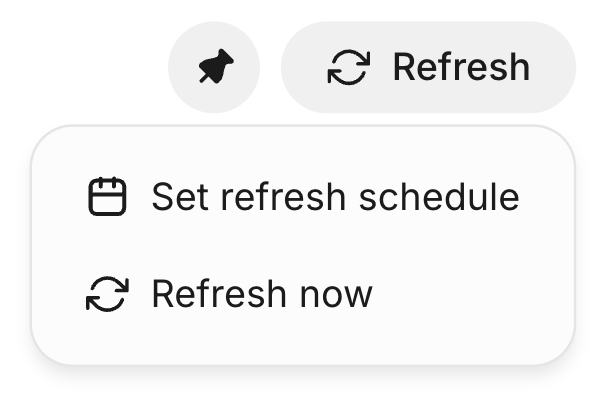
The Refresh menu with Set refresh schedule and Refresh now options
Understand whose access a refresh uses
Refreshes run with the creator's permissions, whether they're scheduled or started with Refresh now. On each run, Glean fetches data with the creator's access and saves the results with the artifact. Everyone who can view the artifact sees that same snapshot. Before you share an artifact that refreshes, confirm that its audience should see the data the artifact fetches and displays.
Refresh on a schedule
Set a refresh schedule to keep a dashboard, daily brief, or recurring report current without refreshing it by hand. Glean refreshes the artifact at the time you choose, and anyone who opens its link sees the latest version.
Each artifact can have one schedule. Only the artifact's creator can set or change it.
Set a refresh schedule
- Open the artifact and click Refresh in the artifact header.
- Select Set refresh schedule.
- Choose how often to refresh: daily, every weekday, weekly on the days you pick, or monthly.
- Set the time and time zone, then click Save.
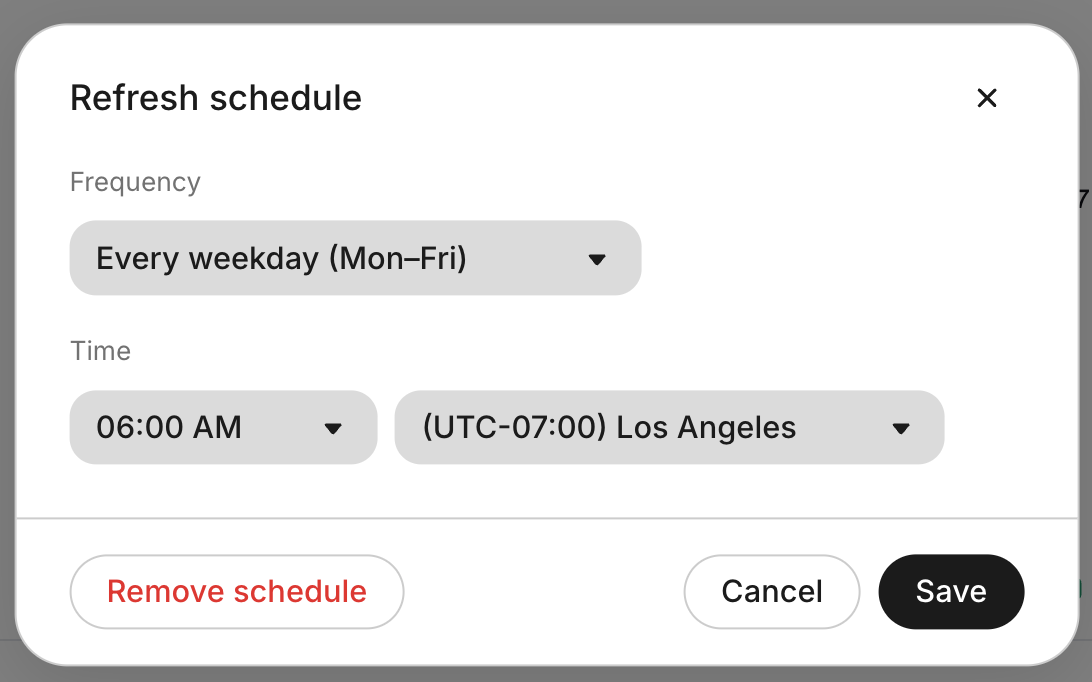
The Refresh schedule dialog with frequency, time, and time zone settings
A calendar icon next to the refresh status shows that the artifact has a schedule. Hover over the icon to see the schedule.
Manage a schedule
Open the Refresh menu to see the current schedule. From there, you can:
- Click Pause schedule or Resume schedule
- Click Edit configuration to change the frequency, time, or time zone, or to remove the schedule
- Click Refresh now to update the artifact between scheduled runs
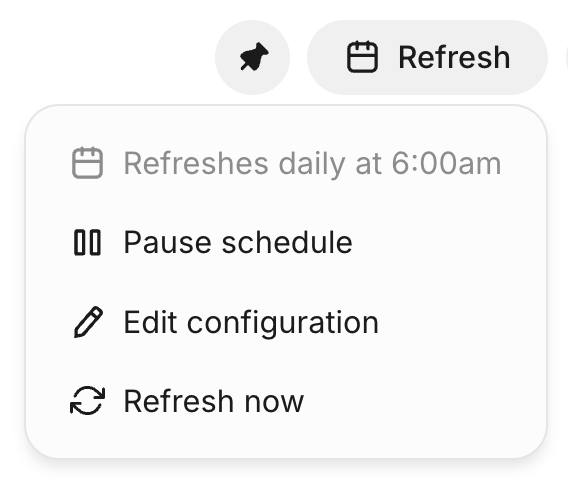
The Refresh menu for a scheduled artifact, showing the schedule and options to pause, edit, or refresh now
Deleting an artifact also deletes its schedule. If you delete the chat that created a scheduled artifact, Glean warns you, then deletes the schedule and keeps the artifact.
Choose between scheduled refresh and a scheduled agent
Auto mode agents can also create interactive artifacts. If you run one on a schedule, the agent creates a new artifact, with a new link, on every run. This works well when you want a separate copy for each run.
If you want one artifact at a stable link that stays current, build the artifact with Glean Assistant and set a refresh schedule on the artifact itself. Scheduled refresh updates the same artifact in place, so anyone with the link always sees the latest version.
Control scheduled refresh as an admin
Admins decide who can create refresh schedules and whether Glean pauses schedules that nobody uses. Both controls are in Admin console → Assistant → Settings → Scheduled refresh for interactive artifacts.
Choose who can schedule refreshes
Select one of the following options, then click Save:
- On for everyone: Any user can create and edit refresh schedules.
- On for some teammates: Only the users you add can create, edit, or resume schedules.
- Off: No one can create, edit, or resume schedules.
Users without access can still pause or delete their existing schedules and click Refresh now. When you remove a user's access, Glean pauses that user's active schedules. Changes to existing schedules can take up to a day to apply.
Pause inactive schedules automatically
Turn on Auto-cancel inactive schedules to stop refreshing artifacts that no one opens. This keeps abandoned dashboards from refreshing indefinitely. Glean pauses a schedule when no one has viewed the artifact within the inactivity window for its frequency.
The following table lists the default inactivity window for each frequency. You can change each window in the setting.
| Schedule frequency | Default inactivity window |
|---|---|
| Daily or every weekday | 7 days |
| Weekly | 4 weeks |
| Monthly | 3 months |
When Glean pauses a schedule, the artifact's Refresh menu shows "Scheduled refresh is paused." Opening the artifact doesn't restart the schedule. The creator can click Resume schedule to start it again with a new inactivity window. Refresh now still works on a paused schedule.
Turning off Auto-cancel inactive schedules stops future automatic pauses. It doesn't resume schedules that Glean already paused.
Permissions and sharing
Interactive artifacts follow Glean's existing permissions model. Sharing is coupled with Chat Sharing — when Chat Sharing is turned off, the Share option for interactive artifacts is unavailable.
-
Share within Glean only
- Sharing an interactive artifact changes who can see it in Glean (Search, direct link). It doesn't change permissions in any external systems.
- Links can only be accessed by members of your organization who have been granted permission. People outside your organization cannot open these links.
-
Audience presets
- Private to you
- Visible to a specific team
- Org-wide, for broad-reach artifacts like internal microsites or dashboards
Restricted visibility means the artifact is shared only with specific people or groups, rather than being broadly visible to everyone in your organization.
-
Access controls
- Only the Canvas owner (the person who originally created the Canvas) can edit the underlying content and republish updated versions.
- All other recipients receive view-only access. They can open and interact with the experience within the sandbox, but cannot modify or republish the artifact.
-
Download options
- Creators can download an artifact as a PDF or download its underlying HTML code.
Where applicable, Glean may add light attribution (for example, a "Generated with Glean" footer or URL path) so new viewers understand that the artifact was produced in Glean and can discover Glean for their own workflows.
Security and sandboxing
Because interactive artifacts can contain dynamic HTML, CSS, and JavaScript, Glean executes them inside a locked-down sandbox designed to protect your data and session:
-
Sandboxed iframe execution
- HTML runs inside an iframe with
sandbox="allow-scripts", which isolates it from the parent app and gives it a null origin. - The code cannot access Glean cookies, localStorage, sessionStorage, or the parent DOM.
- HTML runs inside an iframe with
-
Strict content security policy (CSP)
- A dedicated CSP for the sandbox blocks outbound network requests (
connect-src 'none'), disallows nested frames, and restricts form submissions. - Images and fonts are limited to safe sources to prevent data exfiltration via URLs.
- A dedicated CSP for the sandbox blocks outbound network requests (
-
No access to user data or credentials
- Executed HTML cannot read Glean authentication tokens, user credentials, or private document content beyond what the artifact is explicitly rendering.
These controls are part of Glean's broader security posture for Canvas and HTML artifact execution; security teams can review the detailed architecture in the Artifact HTML Code Execution design and related security documentation.
Pricing and credit usage
Generating interactive artifacts consumes FlexCredits based on the model tier used. With Auto selected, Glean uses a model optimized for creating polished visualizations, which may be a premium model enabled in your deployment.
Auto mode is available if your organization uses the Glean Universal Key. See Auto model selection.
Known limitations
Interactive artifacts are powerful but intentionally constrained to keep them safe and maintainable:
-
No server-side code
- Interactive artifacts run only client-side HTML/CSS/JS. They don't support Python, SQL, or server-side execution.
-
No outbound network calls
- The sandbox CSP blocks network requests (
connect-src 'none'), so interactive artifacts cannot call external APIs or arbitrary endpoints.
- The sandbox CSP blocks network requests (
-
No nested iframes or top-level navigation
- Interactive artifacts cannot embed additional frames or navigate the parent page (for example, redirecting the Glean app).
-
Not available in workflow / Plan & Execute agents:
- Interactive HTML artifacts are not generated by workflow-style agent runs via Plan & Execute steps.
FAQs
See also
- Glean Canvas - Overview of drafting, iterating, and exporting written artifacts in Canvas.
- Image generation in Glean - How to generate visuals that you can embed into interactive artifacts and other outputs.
- Create podcast artifacts - Turn a topic into a playable audio artifact with a transcript.
- Chat Sharing - Learn how chat sharing works and how admins control availability.