Understand Public Mode responses
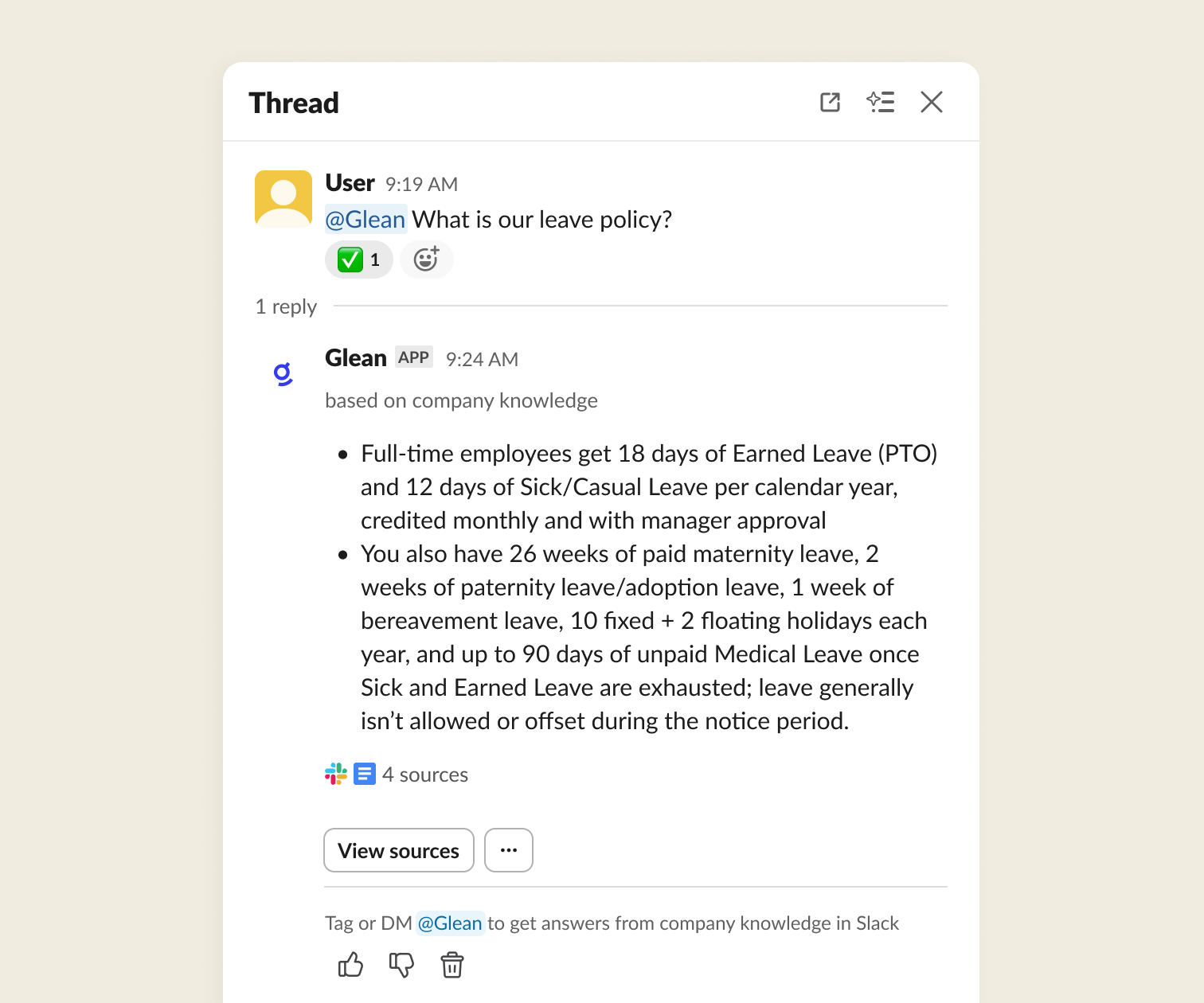
Public Mode allows Glean to share answers directly in Slack channel threads. When enabled, Glean's responses are visible to all members of the channel, making high-value information accessible to the entire team.
Public Mode is configured per channel by your Glean admin. To request that Public Mode be turned on (or off) in a channel, share the Public Mode admin guide with your admin.
How Public Mode works for you
When Public Mode is enabled in a channel:
- Replies are visible to everyone — Glean's responses appear in the Slack channel thread where all members can see them.
- Replies are triggered by a direct
@Gleanmention or automatically when Glean detects a question. - Answers use broadly shared content — Glean generates public replies using only content that is broadly shared across your organization, such as public documents, org-wide wiki pages, and public Slack channel messages.
Public Mode and Option C
Public Mode is how Glean Assistant shares answers in a channel. When someone publishes a Glean agent to a Slack channel, the same behavior is called Option C. Both restrict replies to content that is broadly shared across your organization, so an answer that draws on restricted content in the web app can look different or incomplete in a channel.
For the per-connector rules that decide what counts as broadly shared, such as SharePoint content shared with Everyone except external users, see Publishing to Slack.
What content is used
Public Mode replies draw only from broadly shared content in your organization. This includes documents, wiki pages, and messages that anyone in the organization can access. Content from restricted folders, private channels, 1:1 emails, or other sources with limited permissions is not included in public replies.
This ensures that public answers do not inadvertently surface information that should remain private.
Glean uses its index of broadly shared content to generate public replies. To protect privacy, it doesn't fetch live content from connected apps or use Live Mode for public replies, because those paths rely on an individual user's access. Consequently, public replies may not reflect recent changes or live-only results. To include live updates or restricted sources that only you can access, select Find more information to generate a private response.
Find more information in private sources
If you think an answer could be improved by data only you have access to (such as private documents or restricted Jira tickets), you can select Find more information.
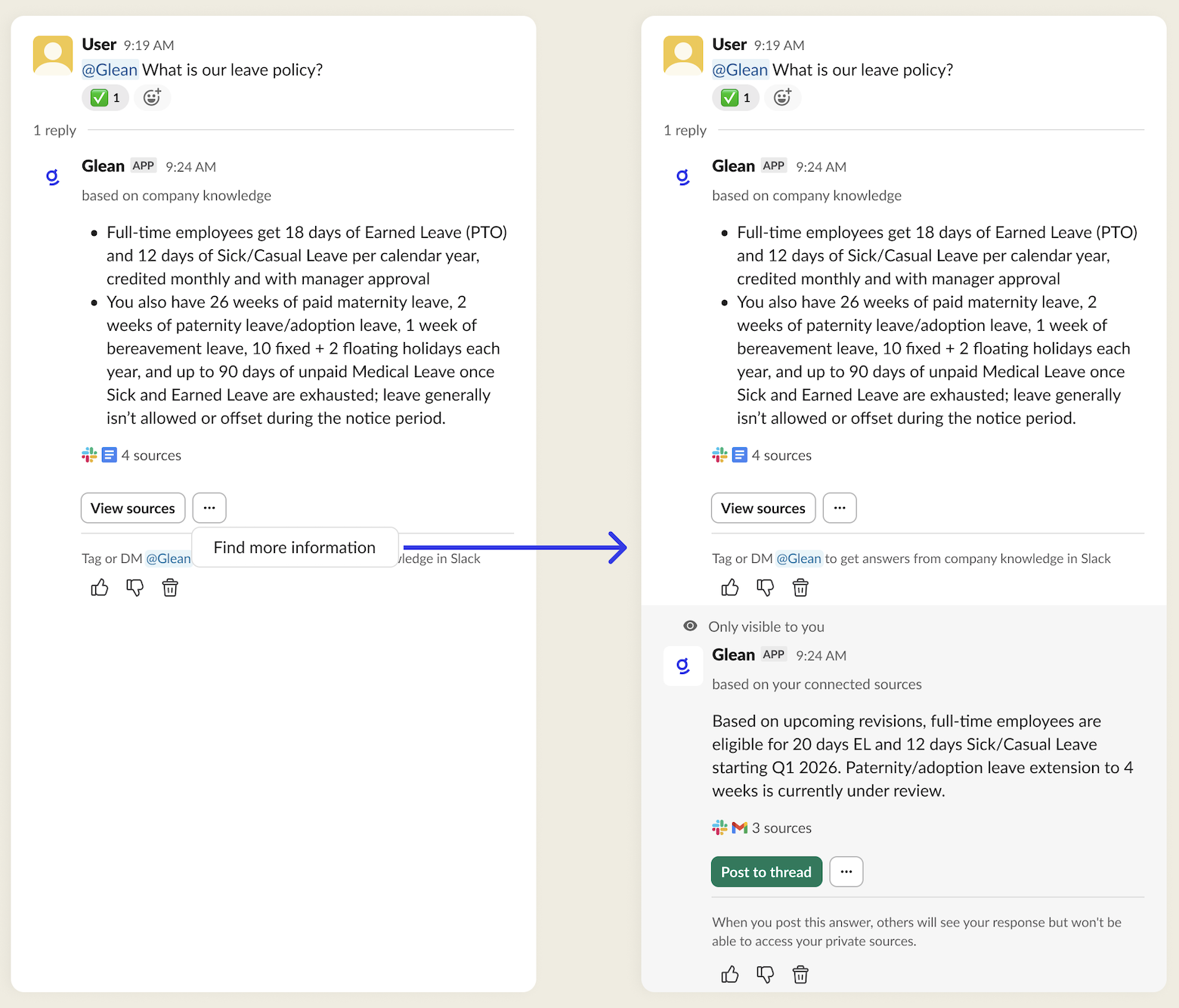
- Glean generates a private response visible only to you.
- This private response focuses only on new updates found in restricted sources to avoid duplicating the public answer.
- You can manually post the private answer into the thread if you believe it would benefit the rest of the channel.
Example scenarios
The following examples illustrate what content Glean includes or excludes in public replies.
| Question | Included in public replies | Not included in public replies |
|---|---|---|
| What is the status of the migration project? | Docs about the migration, Jira issues tracking the work, and relevant public Slack channel discussions. | Salesforce comments or notes on at-risk deals, private Slack channels discussing the migration impact on specific customers. |
| Where can I find our updated leave policy? | HR policy docs in Google Drive or Confluence shared org-wide, intranet pages visible to everyone, and HR announcements. | Draft policy docs in restricted folders, 1:1 emails or DMs between HR and employees. |
| What are the Q3 OKRs for the engineering team? | Public OKR docs in Confluence/Notion, org-wide goal tracking tools, and announcements shared with all employees. | Private manager notes about performance, individual review packets, or restricted leadership docs. |
| How is the ACME renewal deal progressing? | Publicly shared renewal playbooks or process docs, general pipeline dashboards that are visible org-wide. | Deal-specific Salesforce opportunity comments, emails with the customer, and private Slack channels discussing negotiation details. |
These examples are illustrative. Actual sources included or excluded depend on the connectors your organization has connected and how content is shared and permissioned.