Code Search
Engineering teams don't work in isolation. They work across code, documentation, conversations, and tickets. Yet when debugging a production issue or understanding a complex system, engineers are forced to search these silos separately, losing critical context that connects them.
Glean's code search is the layer we built to remove that guesswork. Built on Glean's Enterprise Graph, code search combines semantic understanding with precise lexical matching across your entire codebase. More importantly, it works alongside our document search to deliver complete context. Your AI assistant can trace an issue from a Slack alert, through the relevant code, to the documentation that explains the business logic, all while respecting the exact permissions from your source systems.
This post comes from the Glean engineering team behind code search and focuses on how we designed it to be secure, scalable, efficient, and deeply integrated with our work AI platform.
Prerequisites
Your organization must have connected source repositories to use Code Search. See Connectors hub for admin guides to set up connectors for your organization's source repositories (GitHub, GitLab, Bitbucket).
In this post, we'll walk through:
- Code search as a shared layer for Glean for Engineering
- How Glean code search works under the hood
- Agentic looping with Glean Assistant and Glean Document Reader
- Security, performance, and eval results
- How Glean code search works with IDE tools through MCP
- How to get started
Code search is a shared layer for Glean for Engineering experiences
In Glean, code search isn't a stand-alone product. It is a layer in the work AI stack that every product calls when it needs to understand your codebase.
It builds on the Enterprise Graph to search across your repositories within seconds, returning relevant files, diffs, code snippets, and references to help answer code related questions. It works alongside document search so the assistant can connect code to design docs, runbooks, tickets, and conversations.
Glean code search shows up in several ways:
- Glean: When you ask a code question, our agentic system will invoke code search to pull in relevant code files and explain them, instead of relying on generic web training or isolated snippets.
- Glean Search: You can ask broad natural-language questions or issue precise keyword queries with filters for repository, file path, and extension.
- Tools in Agents: You can explicitly use code search as a tool inside agents to debug, explore implementations, or automate workflows that depend on understanding code.
- Tool in Glean MCP Server: You can use code search through Glean MCP Server to third-party hosts like Claude Code or Cursor. That lets those tools converge on correct answers faster by combining their local view of your repo with Glean's semantic and lexical search over your entire codebase.
The key idea is simple: if the assistant is going to help you work in your codebase, it needs a first-class, enterprise-grade way to understand code files. Code search is that layer.
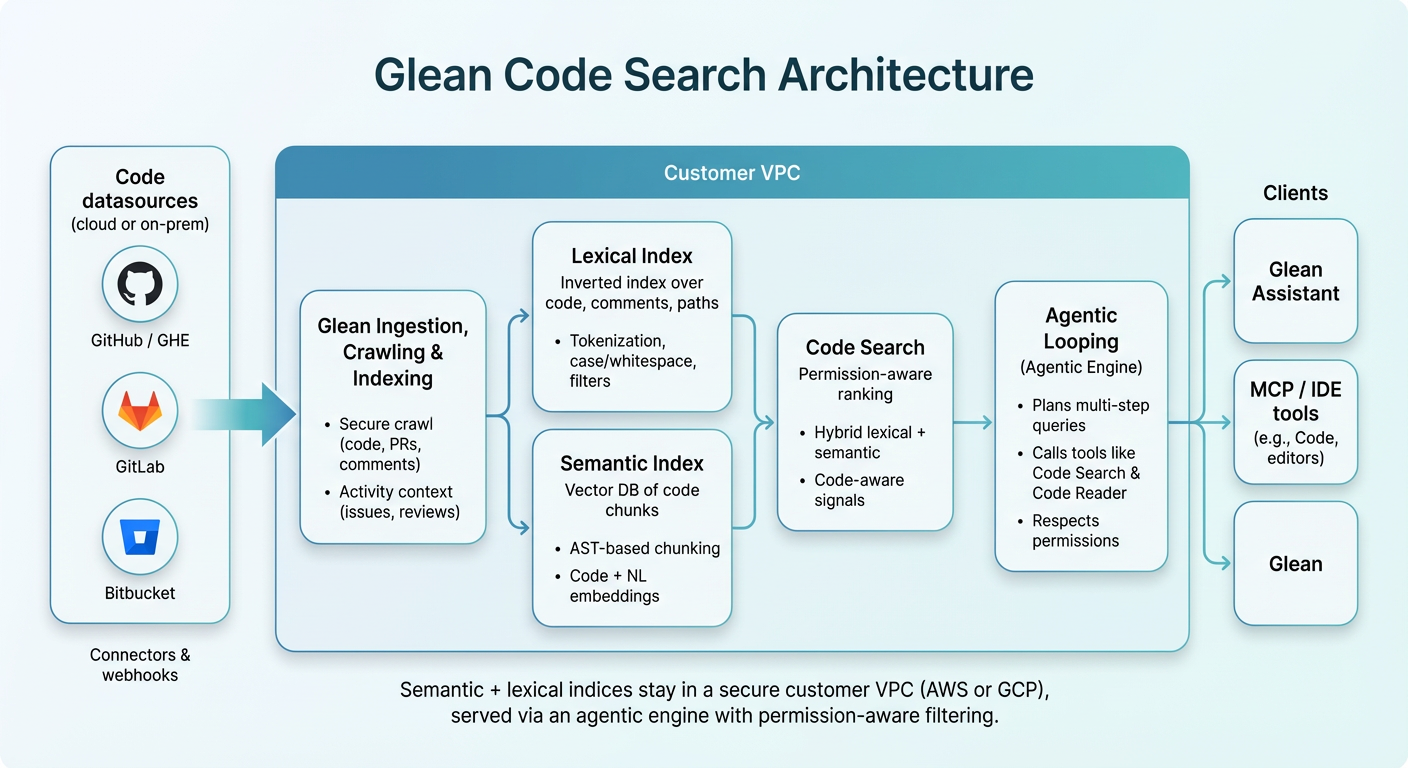
How code search works under the hood
We built a dedicated code search tool that our agentic engine can call whenever it needs to understand or navigate code. When Glean or an agent receives a code-related query, it uses this tool to retrieve the right files and chunks. The system has three components:
- Crawling: docs, permissions, activity, and code
- Indices: semantic and lexical
- Agentic looping: how the assistant drives these tools
1. Crawling: docs, permissions, activity, and code
Glean's architecture starts with a crawling layer that continuously builds an enterprise graph. For code, we maintain three complementary crawls: docs/code, permissions, and activity.
Docs crawl (code and code-adjacent content)
Docs crawl brings in the code and code-adjacent content that engineers and agents will read and reason over:
- It connects to a wide array of code connectors, including GitHub, GitHub Enterprise, GitLab, Bitbucket, and on-prem mirrors.
- It crawls every file across all your connected repositories, not just a single monolith or the repo you have checked out.
- Each connector runs an initial full crawl to index the existing corpus, then stays fresh via incremental updates, using webhooks or periodic diffs to pick up only changed files instead of recrawling entire repos on every commit.
- For GitHub and other major code connectors, we track a lifecycle freshness metric that captures how up-to-date the connector is (for example, how quickly new commits and branches show up in search). This makes staleness visible and lets us monitor and tune connector performance over time.
Permissions crawl
Permissions crawl ensures that ingested code carries the right access controls:
- It mirrors source-of-truth ACLs from all your code connectors (GitHub, GitLab, and other code hosts). It includes users, groups, teams, and repository and project level permissions.
- For each document or code file, we attach the same ACLs your source system enforces: which org/project/repo it belongs to, which teams, groups, or users can access it, and any additional policies such as confidential directories or archived repos.
- These ACLs are synchronized continuously and pushed all the way through to query time. When an engineer searches, the index can only ever return files they could already see in the source system.
Activity crawl
Activity crawl captures how people actually work with content and code:
- It records views and visits, so we can tell which docs and code files are commonly read in practice.
- It tracks edits and authorship, including which files are frequently modified together in PRs or changesets, giving us co-edit signals for related code and docs.
- It ingests references and links across systems, for example code files referenced in design docs, tickets, or runbooks, to build linkage between code, docs, and incidents.
These activity signals feed into ranking and agent behavior. They help code search results by:
- Preferring examples that real teams actually use.
- Surfacing docs that engineers visit when working in a given code area.
- Following references between code and documentation when answering multi-hop questions.
Together, these three crawls ensure the agentic engine sees the same world your engineers see: a unified, permission-aware, activity-aware graph spanning docs, code, and how they're used in practice.
2. Indices: semantic and lexical
On top of this crawl, we build two complementary indices for code:
- A lexical index over tokens in code, comments, and paths.
- A semantic index that understands the meaning of code.
Lexical index (Opensearch)
Our lexical code index is similar to a traditional inverted index:
- We treat each code file as a document.
- We break each document into terms (tokens), normalize and de-noise them, and build an inverted index mapping tokens to the most relevant documents.
- For code, we tune tokenization for camelCase, snake_case, and other common coding conventions, so RuntimeConfigError and runtime_config_error are both searchable in natural ways.
- The index supports faceting, so agents can filter by file extension, repo, or path pattern.
This lexical index is the fine-comb tool once we know roughly where to look. It's ideal for:
- Filenames, symbols, and test names.
- Error messages and stack traces.
- Tight filters like "just this repo" or "only .go files"
Semantic index
The semantic index is a vector database that stores high-dimensional embeddings representing the meaning of code. Modern codebases are full of near-duplicates in intent that look different at the text level:
- Different teams wrap the same logic with different helpers
- The same idea is implemented in different languages.
- Engineers rename variables or refactor functions while keeping behavior roughly the same.
A pure keyword engine can't see through that. The semantic index can.
It's built in three steps:
- Chunking
- Each code file is split into smaller, meaningful chunks (for example, imports in one chunk, and related functions or classes in others).
- Use AST-based chunking, to split along semantic boundaries instead of arbitrary line counts. That avoids splitting functions in half and yields chunks that are easier to match to questions.
- Embedding
- Embed each chunk into a numeric vector using a model trained on both code and natural language, so queries and code live in the same space.
- Alongside the raw code text, we store metadata like file path, repo name, and language so the agent can reason with that context later.
- ANN indexing
- We build an approximate nearest-neighbor (ANN) index over these vectors.
- At query time, we embed the user's question and look up the closest code chunks in this vector space.
- A single ANN lookup returns the top-N most relevant code chunks to feed into downstream ranking and LLM reasoning.
This allows queries like "How is Glean managing security?" to surface code around OAuthTokenManager or CredentialFetcher, even if those names never appear in the question.
Combining semantic and lexical at query time
Early experiments with semantic-only retrieval showed strong intent-level performance, but struggled when exact strings or filenames mattered. Developers want both:
- "Find the right concept"
- "Let me jump to the exact file or symbol I care about"
At query time, we combine both indices:
- Semantic scores say "this file is about what you're asking."
- Lexical scores say "these files match the exact names, paths, or error strings you typed."
- Ranking adds popularity, recency, and affinity signals to prefer the code people actually use.
The result: we can quickly find the right neighborhood in your codebase, then land precisely on the right files and symbols.
3. Agentic looping in Glean with code search and Doc Reader
Indices alone aren't enough. Real engineering questions often require multiple hops:
- "Where is this implemented, and what do I need to change to support multi-tenant configs?"
- "What changed recently that could explain this new runtime error?"
Glean's agentic engine is the layer that plans, loops, and adapts over code search and Glean Document Reader (GDR) to answer those questions end-to-end.
At a high level, the agentic engine is built around three core capabilities:
Looping and context management: the engine can issue multiple tool calls in sequence, track intermediate hypotheses, and decide when to zoom in or out. For example, it might:
- Run several code search queries to go broad across services
- Narrow to a promising repo and path
- Use GDR to load a specific file once it has found the right entry point
- Iterate as it learns more from the retrieved code
Operator usage: The engine can construct highly specific queries to code search and GDR using structured operators like extension:java or extension:yaml to zone in on specific languages within the codebase. The engine can also request exhaustive results when comprehensive coverage is needed, ensuring it doesn't miss relevant files.
Hints and checks: As it loops, the engine surfaces structured errors and hints from tools (empty results, noisy matches, missing repos) and uses them to adjust course, rather than quietly failing or hallucinating.
GDR is the agent's tool for reading entire code documents with full context. Where code search retrieves and ranks the most relevant chunks of code, GDR can:
- Load the full file once a promising result has been found.
- Preserve structure like imports, class and function boundaries, and comments that might be split across chunks.
- Let the model reason about how different parts of the file relate, for example, helper functions, shared constants, or multiple code paths in the same module.
Most real tasks need both: code search to quickly find where to look, and GDR to read the whole file and understand how the implementation actually works. Agentic looping is what turns code search and GDR from standalone features into parts of a work AI system that can actually complete engineering tasks end-to-end.
Security-First Design
For enterprises, source code is among their most valuable intellectual property, and it comes with significant security risk.
Internally, incorrect access controls can allow employees to view code they should not be able to see. Externally, sending code to LLMs can expose it to unwanted storage or even model training on proprietary assets. Together, these issues create a wide surface area of security vulnerabilities whenever organizations work with their code.
Glean is designed with security as a first principle:
- Your code stays within your Glean VPC and reflects the permissions of the source system.
- We mirror ACLs from your code hosts and enforce them at query time, so code search can only return files that a user is allowed to see.
- We have contractual agreements with LLM providers to ensure zero day data retention and prevent models from training on enterprise data.
Performance and scale
In a typical large enterprise deployment, Glean code search sits in front of millions of code files and still stays fast enough to sit in the developer loop.
In a typical large customer deployment, we:
- Index 1k+ repositories
- Make 100M+ code files searchable
- Maintain a semantic index over 10M+ code chunks
- Keep latency low - 50 ms at P95
From our internal usage, we observed:
- A 3x reduction in tool calls
- ~27% fewer output tokens
- 1.43 win-loss ratio
when using Glean with Code Search, compared to another top coding tool.
This is why when an incident hits, our engineers prefer to use Glean with Code Search to resolve issues. Queries stay sub-second even at organization scale, so the bottleneck is understanding and fixing the problem, not waiting for search.
How to Get Started
Glean Code Search currently supports:
- GitHub Cloud, Enterprise, and On-Prem
- GitLab
- Bitbucket
To enable Code Search, ask your Glean Admin or Account team to connect the code repos your engineering teams use most.