Connecting Glean to on-premises connectors
This feature is available for both Glean-hosted and customer-hosted deployments that need to connect to on-premises or private connectors.
Overview
Glean on GCP can connect to your on-premises or cloud-based connectors using private networking. This allows Glean to securely crawl private services within your network without exposing them to the public internet.
Glean uses a transit VPC to minimize IP address conflicts with your network and reduce infrastructure exposure.
Connectivity methods
| Method | Use when | Deployment speed | Tooling maturity |
|---|---|---|---|
| Shared VPC | Your connectors are on GCP and you want centralized network management | Fast | Mature |
| VPC peering | Your connectors are on GCP and you need direct VPC-to-VPC connection | Fast | Mature |
| Site-to-site VPN | Your connectors are on AWS, Azure, or on-premises | Fast | Mature |
| Private Service Connect | You need service-level isolation and fine-grained access control | Slow | Newer |
Glean's recommendation: Use Shared VPC for GCP environments (preferred by most customers) or VPN for multi-cloud/on-premises. These have mature automation and operational support. VPC peering is also available for GCP. Private Service Connect is available for advanced use cases.
Shared VPC
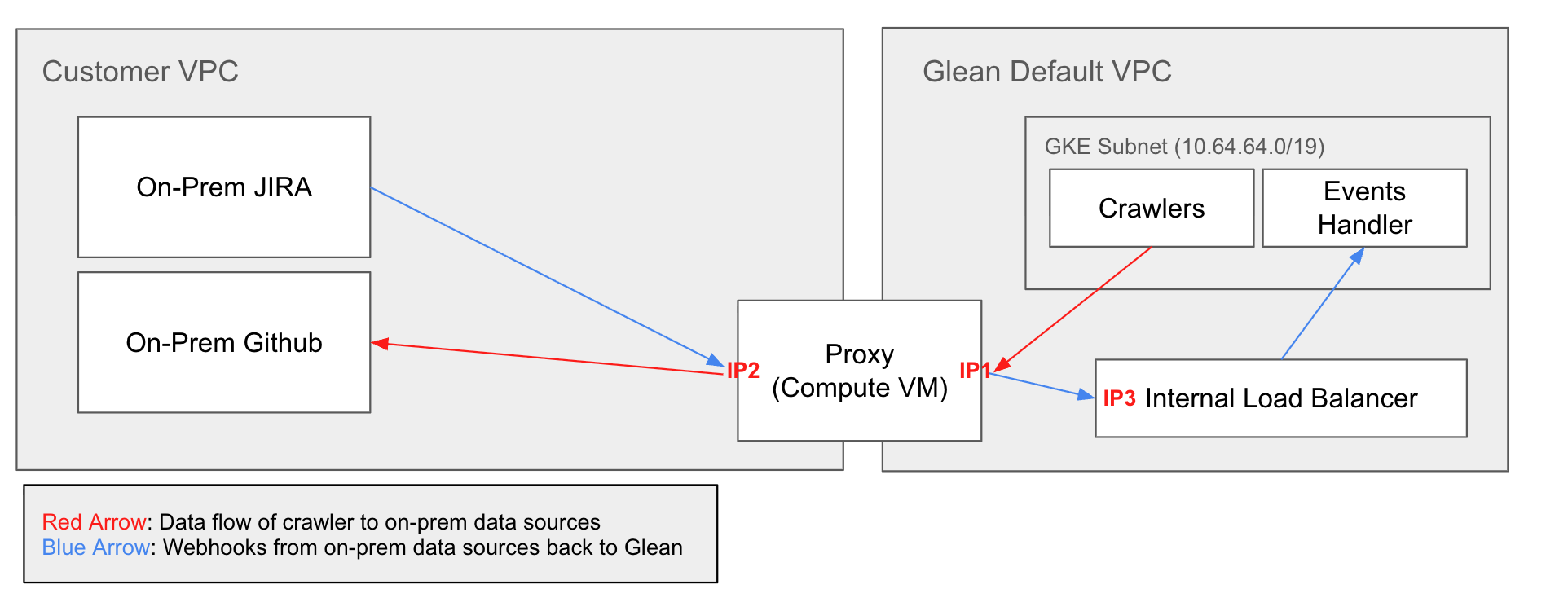
Connect Glean to your connectors using GCP's Shared VPC architecture, where a host project shares VPC network resources with service projects.
How it works
Your Shared VPC host project shares network resources with Glean's service project. Glean's resources are deployed in a service project attached to your Shared VPC, allowing direct access to connectors within the shared network.
What you need to provide
- Subnet ID for Glean to use in the shared VPC
- Format:
projects/{project}/regions/{region}/subnetworks/{subnet-name} - Example:
projects/connectivity-vpn-57503/regions/asia-east1/subnetworks/glean-subnet
- Format:
- Subnet CIDR range (if you cannot provide subnet viewing permissions)
- Must not overlap with 10.1.0.0/16
- IAM permissions: Grant
roles/compute.networkUserrole to Glean's deployer service account- Service account format:
cloud-build@<glean-project>.iam.gserviceaccount.com - This allows Glean to attach network interfaces to the shared subnet
- Service account format:
- Connector hostnames/IPs that Glean needs to access
Configuration notes
- Requires Shared VPC Admin role to attach service projects
- Firewall rules configured at the host project level
- Best performance and lowest latency
- Cost-effective (no gateway fees)
- Most popular choice
- Provides centralized network management and security policies
- Limited to GCP-to-GCP connectivity
VPC peering
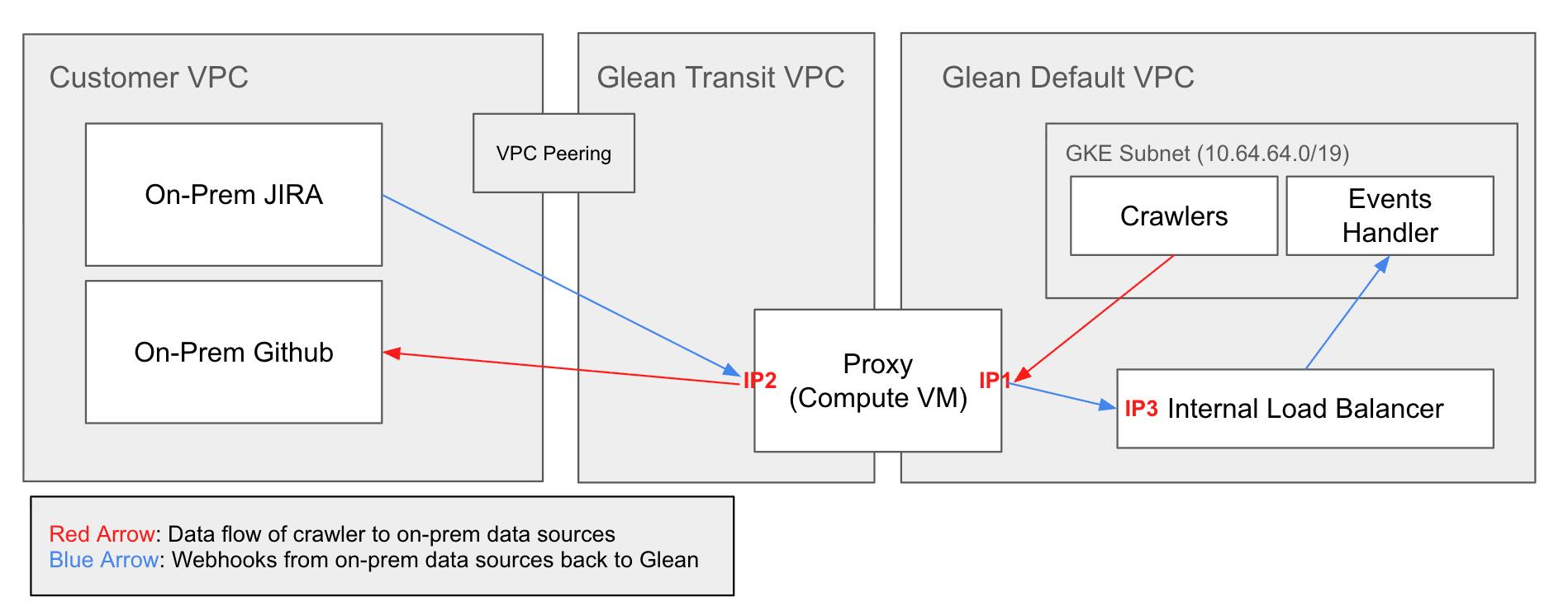
Direct network connection between your GCP VPC and Glean's transit VPC.
How it works
Your VPC peers with Glean's transit VPC, which peers with Glean's default VPC. Traffic flows privately through these peering connections for both crawler access and webhook delivery.
What you need to provide
- GCP project ID
- VPC network name (format:
projects/{project}/global/networks/{network}) - VPC CIDR ranges (must not overlap with 10.1.0.0/16)
- Connector hostnames/IPs that Glean needs to access
Configuration notes
- Requires firewall rules to allow traffic from Glean's transit VPC CIDR (provided by Glean)
- Best performance and lowest latency
- Cost-effective (no gateway fees)
- Limited to GCP-to-GCP connectivity
Site-to-site VPN
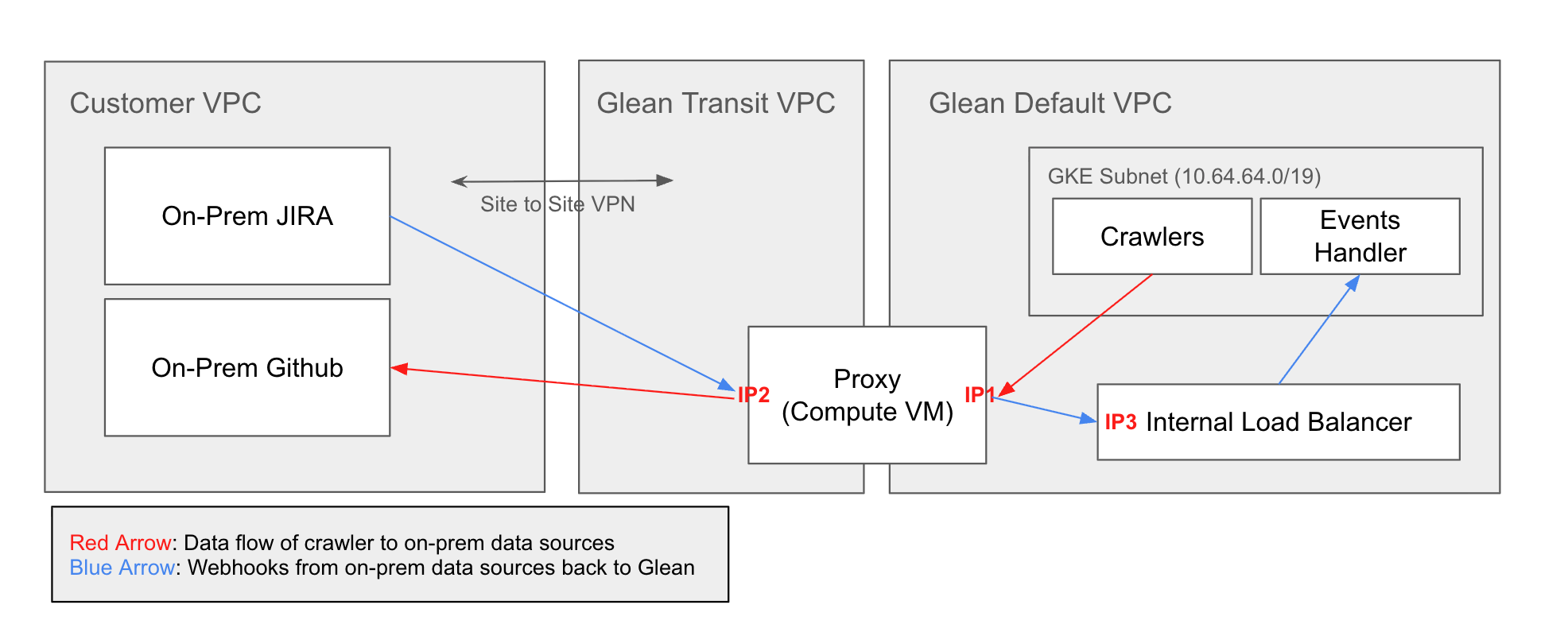
Encrypted IPsec tunnel between your network and Glean's GCP environment.
How it works
IPsec VPN tunnel connects your VPN gateway to Glean's Cloud VPN gateway. Glean uses a /29 CIDR range (provided by you) for the transit VPC. All traffic is encrypted in transit.
What you need to provide
- VPN gateway public IP address
- IKE version (v1 or v2) - IKE v2 recommended
- Pre-shared key (generate a strong 32+ character key)
- Dedicated /29 CIDR range for Glean's transit VPC (e.g., 10.99.0.0/29)
- Must not overlap with your networks or 10.1.0.0/16
- Routes to advertise (networks where connectors reside)
- Connector hostnames/IPs that Glean needs to access
Configuration notes
- Works with any cloud provider (AWS, Azure, GCP) or on-premises datacenter
- Higher latency than VPC peering due to VPN gateway hop
- VPN gateway and data transfer costs apply
- Supports static routing or BGP (GCP-to-GCP only)
Private Service Connect
Service-level isolation using GCP's Private Service Connect producer/consumer model.
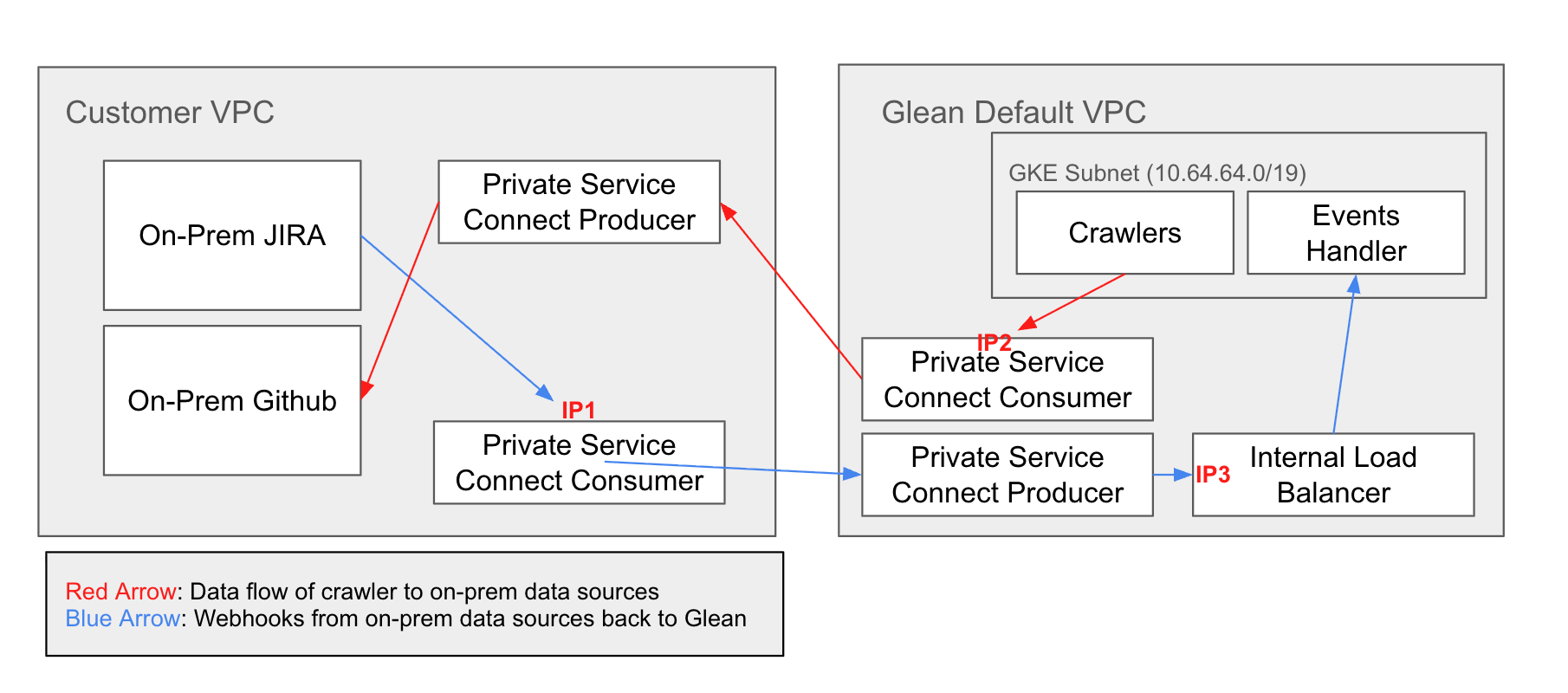
Private Service Connect has newer tooling with less automation than VPC peering/VPN. Use only when VPC peering or VPN cannot meet your requirements.
How it works
PSC requires two separate configurations:
For webhooks (Customer → Glean):
- Glean creates a PSC producer (publishes Internal LB)
- You create a PSC consumer endpoint in your VPC
- Your connectors send webhooks to
<deployment>-internal-psc.glean.com
For crawlers (Glean → Customer):
- You create a PSC producer (publish connectors via Internal LB)
- Glean creates PSC consumer endpoint(s)
- Glean crawlers access your connectors through consumer endpoints
What you need to provide
For webhook setup:
- GCP project ID
- Preferred region for PSC endpoint
For crawler setup:
- Service attachment ID after creating your PSC producer
- Format:
projects/{project}/regions/{region}/serviceAttachments/{name}
- Format:
- Glean project ID added to trusted consumers (Glean provides this)
Configuration steps
Configuration notes
- Requires GCP-to-GCP connectivity
- Fine-grained access control via project allowlisting
- More manual configuration than peering/VPN
- Service-level isolation without exposing entire VPC
Security & network details
Encryption & isolation
- VPC peering: Traffic uses GCP's internal network encryption
- VPN: IPsec tunnel encryption with IKE v1/v2
- PSC: Traffic stays within Google's private network
All methods prevent traffic from traversing the public internet.
Access control
- VPC peering/VPN: Firewall rules control connectivity
- PSC: Project allowlists provide explicit trust model
Glean network ranges
Reserved CIDR:
- 10.1.0.0/16 - Glean default VPC (do not use this range)
Your CIDR requirements:
- VPC peering: Avoid overlap with 10.1.0.0/16
- VPN: Allocate /29 for transit VPC (must not overlap with 10.1.0.0/16 or your networks)
- PSC: Allocate /24 for PSC NAT
Firewall ports
Ensure firewall rules allow Glean to access:
- Port 443 (HTTPS) - Most connectors
- Port 80, 8080 (HTTP) - Some internal applications
- Custom ports - Work with Glean to identify specific requirements
Implementation process
1. Choose your method
Use the comparison table above based on where your connectors are hosted.
2. Prepare information
Gather the required information listed in your chosen method section above.
3. Contact Glean
Reach out to your Glean Customer Success or Solutions Engineering team with:
- Chosen connectivity method
- Required information from step 2
- Timeline and compliance requirements
- Technical point of contact (name, email, role)
4. Deploy & validate
Glean will:
- Configure Glean infrastructure (VPN gateway, peering request, or PSC producer)
- Provide connection details (IP addresses, service attachment IDs, etc.)
- Coordinate connectivity testing
- Enable connector crawlers after validation
- Monitor initial crawl
Support
- Technical Documentation: GCP C FAQ
- Network Issues: Contact your Glean Solutions Engineer
- Security Questions: security@glean.com
- General Support: https://support.glean.com/hc/en-us