Setting up Glean to use Anthropic Claude models on Amazon Bedrock
This article provides instructions for configuring Glean to use Anthropic Claude models on Amazon Bedrock, allowing direct billing of LLM usage through your Amazon Bedrock account.
This document should not be used if you are utilizing the Glean Key option. With the Glean Key option, Glean transparently manages the configuration and provisioning of LLM resources.
Enable access to foundation models in Bedrock
- Log into the AWS Console with a user account that has permissions to subscribe to Bedrock models.
- Navigate to Amazon Bedrock → Model access.
- Choose the same region as your Glean AWS instance (or the nearest supported one).
- Request access to Claude Sonnet 4.6. Claude Sonnet 4.6 is the agentic model for complex tasks, and is also the fast agentic model for simpler tasks.
If prompted for a use case for the models, you can state: "Generate answers to questions about internal company documents."
Ensure you have enough quota from Bedrock
For default quotas on these models for pay-as-you-go, please refer to the Amazon Bedrock quotas. If you need more quota, you must contact your AWS account manager, as Bedrock does not currently offer a self-service method for increasing quota.
Capacity requirements
Glean token consumption varies based on query complexity and document size. To estimate your weekly LLM costs, calculate your expected weekly query volume and multiply by the per-query cost based on current Claude API pricing. Actual token usage will vary by customer depending on query complexity and document size.
To estimate throughput requirements in tokens per minute (TPM), you should identify your deployment's query per minute (QPM) rate at a desired percentile (e.g., p90) and multiply it by the average tokens per query. The table below shows example TPM conversions assuming a rate of 0.004 QPM per Daily Active User (DAU).
TPM per Glean DAU
| Users | TPM |
|---|---|
| 500 | 125,000 |
| 1000 | 245,000 |
| 2500 | 615,000 |
| 5000 | 1,225,000 |
| 10000 | 2,450,000 |
| 20000 | 4,895,000 |
It is highly recommended to use your deployment's actual QPM for estimating capacity, as QPM per DAU can vary significantly across customers.
Select the models in Glean
- Navigate to Admin Console → Platform → LLMs.
- Click on Add LLM.
- Choose Bedrock.
- Select the models:
- Claude Sonnet 4.6 for the large model.
- Claude Haiku 4.5 for the small model.
- Claude Sonnet 4.6 for the agentic reasoning models.
- Click Validate to confirm that Glean can use the models.
- After validation, click Save.
- To use Claude 4.6 Sonnet with Glean, the agentic engine features must be enabled. Until then, the assistant will use the agentic and fast agentic models you have configured.
- Glean will automatically apply an IAM policy to grant its servers access to Bedrock, so no extra authentication is needed.
Verify model used in Glean
- Go to Glean and choose the Public Knowledge Assistant.
- Ask the question: "Who created you?"
- You should receive a response like: "I was created by the artificial intelligence company Anthropic."
FAQ
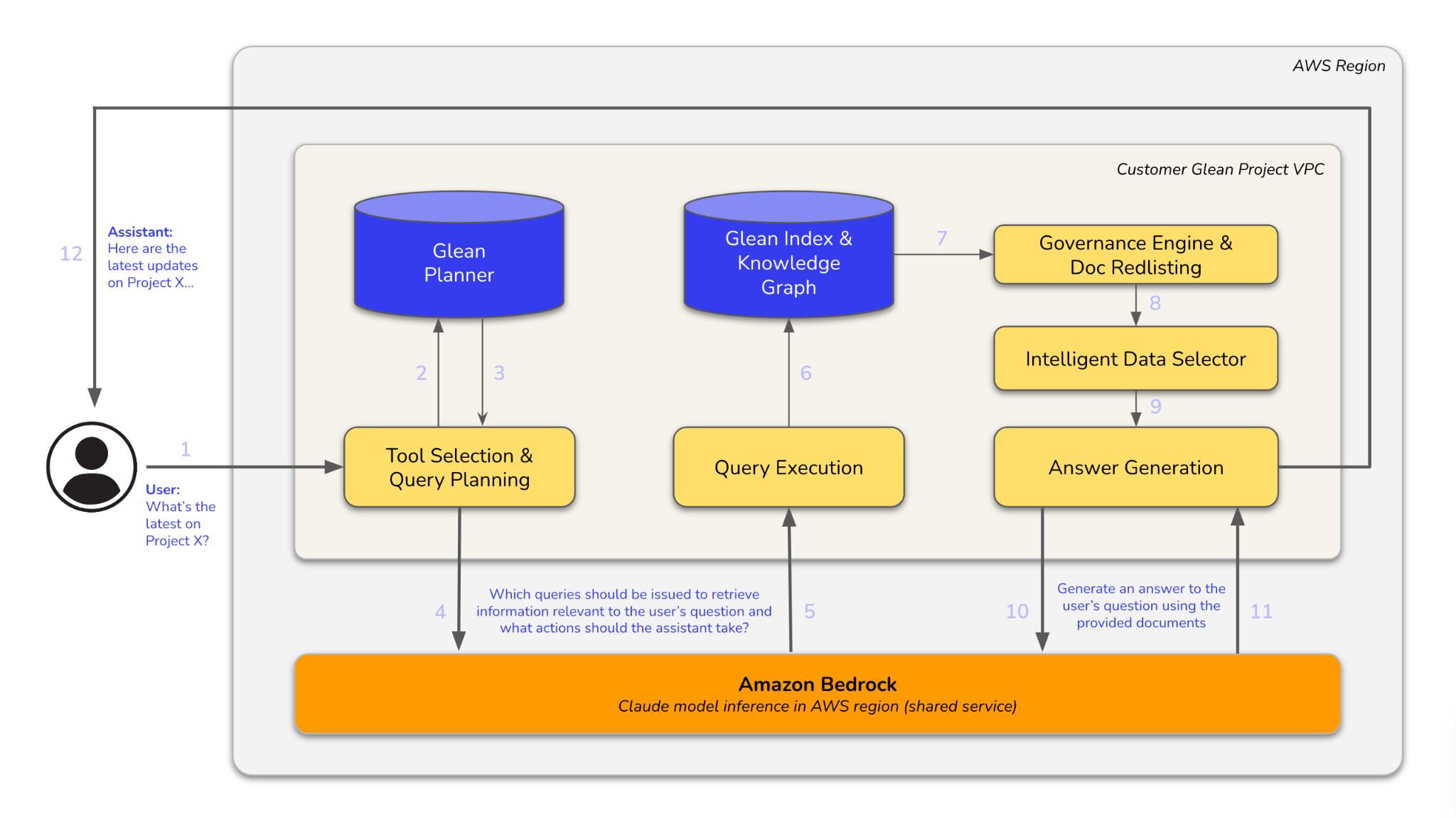
Architecture diagram
The diagram below illustrates how a user query is processed. It flows through modules for tool selection, query planning, and execution, interacts with Glean Index and Knowledge Graph, and uses Amazon Bedrock for Claude model inference to generate an answer.