Setting up Glean to use GPT models on Azure OpenAI
This article provides instructions for configuring Glean to use GPT models on Azure OpenAI, allowing direct billing of LLM usage through your Azure account. This document applies to customers hosted on GCP or AWS who want to directly bill their LLM usage via Azure.
Do not use this document if you are leveraging the Glean Key option. For the Glean Key option, Glean manages the configuration and provisioning of LLM resources transparently.
Enable access to models
Glean requires the Azure OpenAI Responses API. This API is not available in all Azure regions. When provisioning your Azure OpenAI resource, choose a region that supports the Responses API. See Microsoft's documentation for the full list of supported regions.
Fill out the Azure OpenAI Service form and request access to the following models:
| Model name | How Glean uses the model |
|---|---|
| GPT-5.1 (Preferred) | Agentic Reasoning model used in fast and thinking modes in chat. This is the primary model for Glean chat. |
| GPT-5 | Agentic Reasoning model used in fast and thinking modes in chat. This is the primary model for Glean chat. |
| GPT-5.1 | Agentic model used for other, more complex tasks in Glean |
| GPT-5.1 | Fast agentic model used for simpler tasks such as follow-up question generation |
Request additional capacity from Azure
Please see Azure OpenAI Service quotas and limits for the default quotas and instructions for requesting additional quota.
Capacity Requirements for the latest assistant architecture on Agentic Engine 2 using GPT-5
| Users | High capacity model | Low capacity model | ||
|---|---|---|---|---|
| TPM | RPM | TPM | RPM | |
| 500 | 125000 | 10 | 5000 | 5 |
| 1000 | 250000 | 15 | 5000 | 5 |
| 2500 | 625000 | 35 | 10000 | 10 |
| 5000 | 1245000 | 65 | 15000 | 15 |
| 10000 | 2490000 | 130 | 30000 | 30 |
Select the model in Glean Workspace
- Go to Admin Console → Platform → LLMs.
- Click Add LLM.
- Select Azure OpenAI.
- Select:
- GPT-5.1 (Preferred) or GPT-5 for the agentic engine model
- GPT-5.1 for the agentic model
- GPT-5.1 for the fast agentic model
- Click Validate to ensure Glean can use the model
- Once validated, click Save.
Verify the model used by Glean
- Go to Glean and select the public knowledge assistant.
- Ask the question: "Who created you?"
You should get a response similar to: I was created by OpenAI.
FAQ
Troubleshoot setup errors
If validation fails or Glean can't connect to your Azure OpenAI resource, check the following:
- Deployment name mismatch (404 error): The deployment name you enter in Glean must match the deployment name in your Azure Portal exactly. Go to your Azure OpenAI resource, select Model deployments > Manage Deployments, and copy the deployment name. The deployment name is not the same as the model name — for example, you might deploy
gpt-5.1with a deployment name likegpt-51-prod. - Invalid API key (401 error): Confirm your Azure OpenAI key is still active in the Azure Portal under Keys and Endpoints. If the key was rotated, update it in Glean.
- Rate limit exceeded (429 error): Compare your Azure OpenAI quota against the capacity requirements above for your number of users. Request a quota increase in the Azure Portal if needed.
- Region doesn't support the Responses API: The Azure OpenAI Responses API isn't available in all regions. If you see validation errors, confirm your Azure OpenAI resource is in a supported region.
For a full list of error codes and resolution steps, see Troubleshoot LLM provider errors.
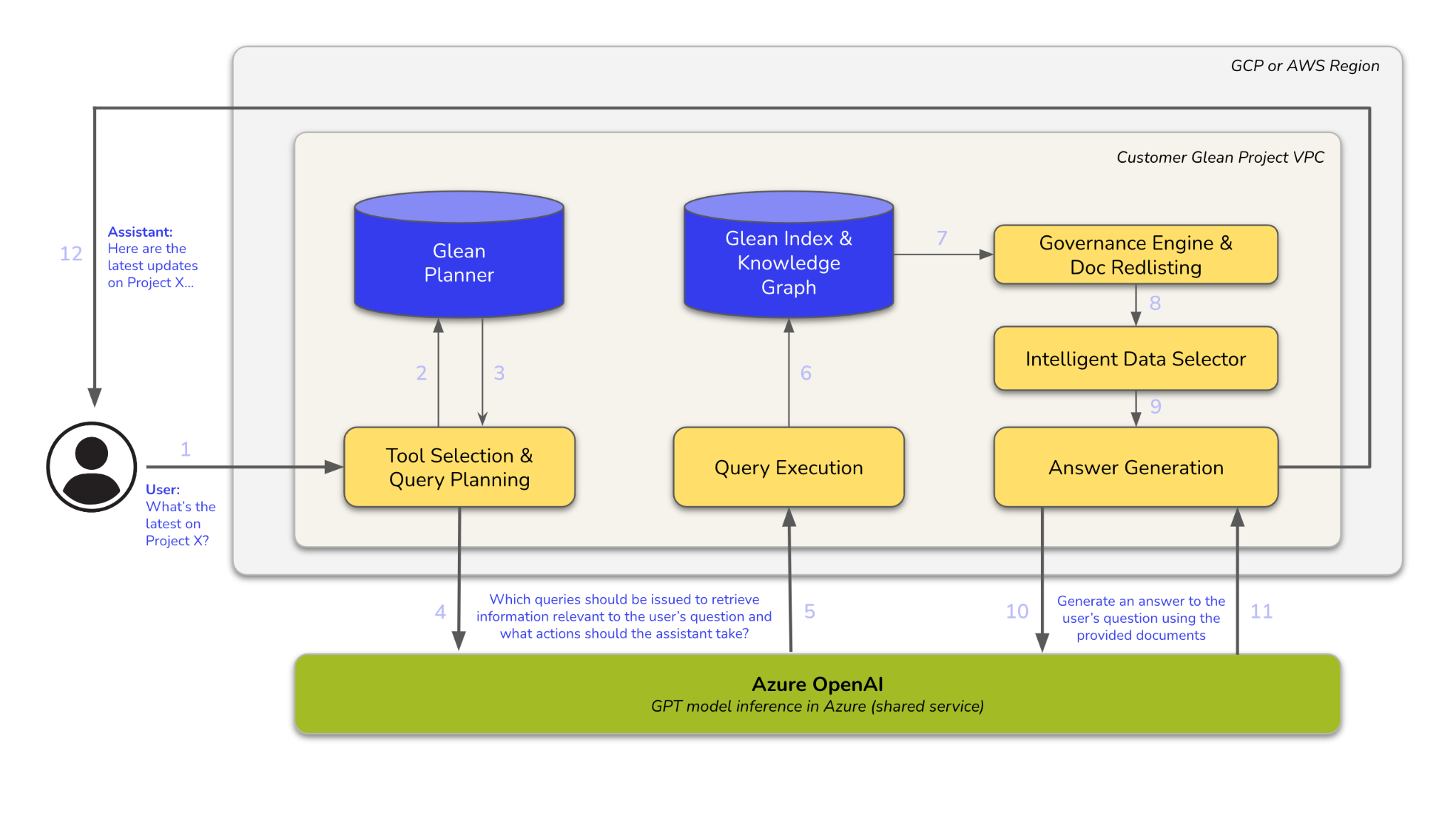
Architecture Diagram