Setting up Glean to use Gemini models on Google Vertex AI
Perform the steps in this article to configure your LLM usage for billing directly through Google Vertex AI using the customer key option.
If you are using the Glean Key option, this document does not apply. With the Glean Key option, Glean transparently manages the configuration and provisioning of LLM resources.
Enable access to models in Vertex AI
Navigate to the Vertex AI Model Garden and ensure you have enabled access to the following foundation models from the GCP project where Glean is running.
| Model name | How Glean uses the model |
|---|---|
| Gemini Pro Custom Tools 3.1 | Thinking mode - Agentic reasoning model used for Glean Assistant and autonomous agents |
| Gemini Flash 3.0 | Fast mode - Agentic reasoning model used for Glean Assistant and autonomous agents |
| Gemini Pro Custom Tools 3.1 | Agentic model used for other, more complex tasks in Glean |
| Gemini Flash 3.0 | Fast agentic model used for simpler tasks such as followup question generation |
Request additional quota from Vertex AI
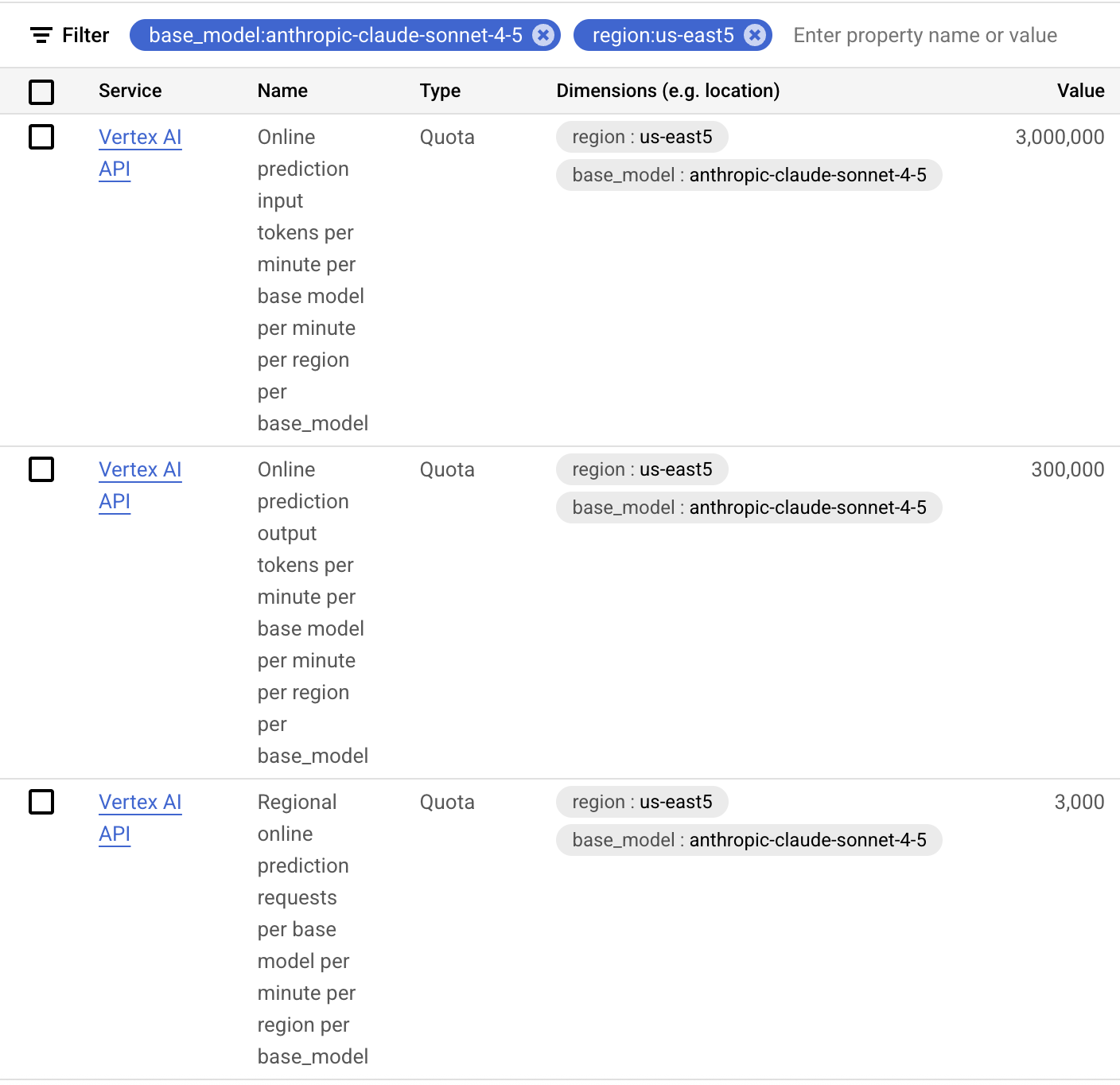
You will need to submit a standard GCP quota request, which is measured in Requests Per Minute (RPM) and Tokens Per Minute (TPM). Use the filter "base_model:" for the model names in the table below and "region:" for the region your GCP project is running in.
Please be aware that quota is not a guarantee of capacity; it is Google's way of ensuring fair use of shared resources. Your requests might not be served during peak times. For guaranteed capacity, you should contact your Google account team about purchasing Provisioned Throughput. An example with Claude Sonnet 4.6 and US-East5 is shown below.
Capacity requirements
- Gemini Pro Custom Tools 3.1 (Thinking mode): Glean uses an average of 35.6k full input, 11.2k cached input, and 2k output tokens per query. This is equivalent to about $0.09 per query based on current Gemini Pro 3.1 Pricing.
- Gemini Flash 3.0 (Fast mode): Glean uses an average of 12.5k full input, 5.2k cached inputs, and 418 output tokens per query. This is equivalent to about $0.005 per query based on current Gemini Flash 3.0 Pricing.
These averages were determined by running a large, representative sample of queries. To estimate your weekly Glean LLM costs, you can multiply your weekly query volume by $0.09 for Thinking mode and $0.005 for Fast mode. Note that actual token usage can vary based on query complexity and document size.
To estimate throughput requirements (TPM), find your deployment's query-per-minute (QPM) rate at a desired percentile (like p90), and then multiply that by the average tokens per query.
The following table provides example TPM conversions assuming 0.004 QPM per Daily Active User (DAU), based on historical customer data.
TPM per Glean DAU
| Users | TPM |
|---|---|
| 500 | 125,000 |
| 1000 | 245,000 |
| 2500 | 615,000 |
| 5000 | 1,225,000 |
| 10000 | 2,450,000 |
| 20000 | 4,895,000 |
It is highly recommended to estimate capacity using your deployment's actual QPM, as QPM per DAU can vary significantly across customers.
Select the model in Glean Workspace
- Navigate to Admin Console → Platform → LLMs.
- Click on Add LLM.
- Choose Vertex AI.
- For the agentic reasoning model, select Gemini Pro Custom Tools 3.1 for Thinking mode and Gemini Flash 3.0 for Fast mode.
- Select Gemini Flash 3.0 for the fast agentic model.
- Select Gemini Pro Custom Tools 3.1 for the agentic model.
- Click Validate to confirm that Glean can use the models.
- After validation, click Save.
To use these models with Glean, Agentic Engine features must be enabled. Until these features are activated, Glean will continue to use your previously configured agentic and fast agentic models. You do not need to change your agentic and fast agentic models at this time. Glean will use Application Default Credentials to call the models, so no extra authentication is needed.
FAQ
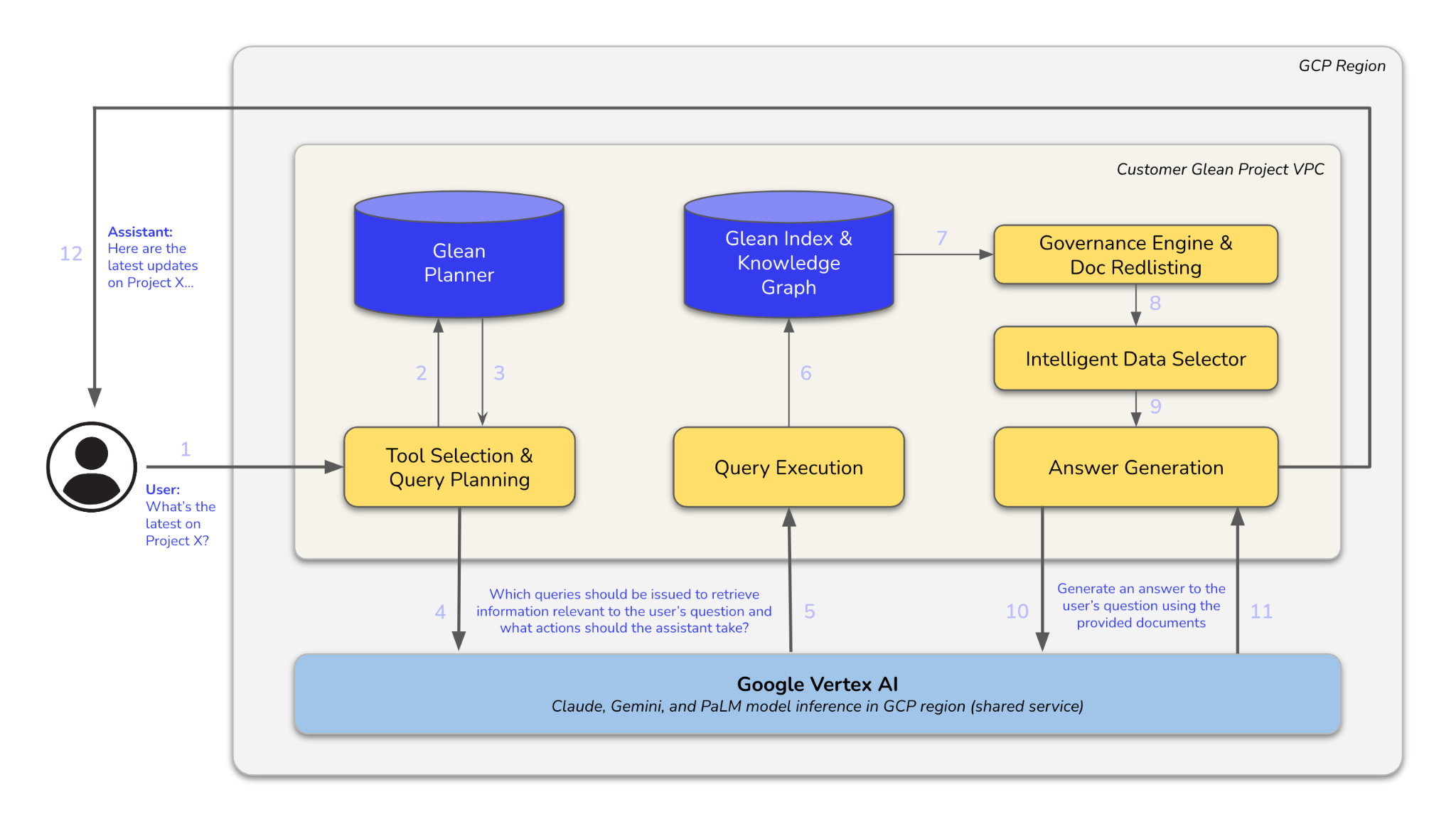
Architecture diagram
The diagram below illustrates the process flow: A user's query is processed through query planning, tool selection, query execution, and finally answer generation, utilizing the Glean Planner, Glean Index & Knowledge Graph, and Google Vertex AI.